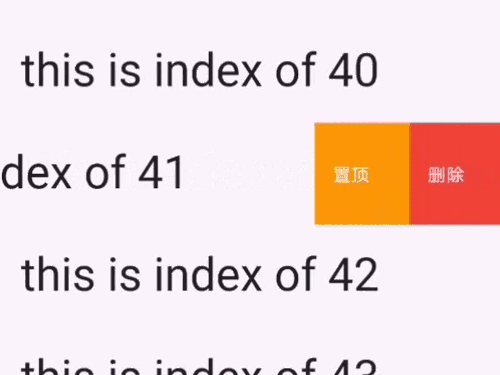
Ein fantastisches UI-Paket mit iOS-Stil-Zellen-Swipe-Aktionseffekt. Sie können dieses Paket verwenden, um iOS-stilhafte TableView-Zellen-Swipe-Aktionen zu implementieren
Aus öffentlichen Paketdaten erstellte Orientierung.
flutter_swipe_action_cell ist ein Flutter-Paket, das iOS-ähnliche Swipe-Aktionen für Listeneinträge ermöglicht und das interaktive Verhalten nativer iOS-Tabelle View nachahmt. Es erlaubt Benutzern, durch horizontales Wischen über eine Listenzelle Aktionsschaltflächen zu enthüllen und dadurch die Benutzerinteraktion mit intuitiven Gesten zu verbessern. Das Paket unterstützt mehrere Plattformen wie Android, iOS, Web, macOS, Windows und Linux und ist daher ideal für plattformübergreifende Anwendungen, die eine konsistente und ansprechende Benutzeroberfläche bieten möchten. Entwickler können das Aussehen und das Verhalten der Swipe-Aktionen an die Designsprache ihrer App anpassen.
Anwendungsfälle
iOS-artiges Swipe-zum-Löschen oder Swipe-zu-Aktion in Listen implementieren
Interaktive Listenelemente mit kontextbezogenen Aktionen erstellen
Verbesserung der Benutzererfahrung in Aufgabenverwaltungs- oder Messaging-Apps
Reaktive und gestenbasierte Benutzeroberflächen erstellen
Swipe-Effekte zu Chat- oder Benachrichtigungslisten hinzufügen
Modernes, natives Mobile-UI gestalten
Hauptmerkmale
iOS-ähnliche horizontale Swipe-Aktionen
Anpassbare Aktionsschaltflächen und Farben
Unterstützung für mehrere Wischrichtungen
Plattformübergreifende Kompatibilität
Einfache Integration mit ListView und anderen Listen-Widgets
Konfigurierbare Animation und Zeit
Geeignet für
Entwickler, die iOS-inspirierte Flutter-Apps erstellen
Teams, die native UX-Muster priorisieren
Apps, die interaktive Listenpositionen erfordern
UI-orientierte Projekte mit gestenbasierten Interaktionen
Cross-Platform-Entwickler, die mehrere Betriebssysteme ansprechen
Hinweise
Kann zusätzliche Stilisierung für nicht-iOS-Plattformen erfordern
And you can find full example code in example page
Examples
Example 1: Simple delete the item in ListView
Tip: put the code in the itemBuilder of your ListView
SwipeActionCell(
key: ObjectKey(list[index]), /// this key is necessary
trailingActions: <SwipeAction>[
SwipeAction(
title: "delete",
onTap: (CompletionHandler handler) async {
list.removeAt(index);
setState(() {});
},
color: Colors.red),
],
child: Padding(
padding: constEdgeInsets.all(8.0),
child: Text("this is index of ${list[index]}",
style: TextStyle(fontSize: 40)),
),
);
Example 2: Perform first action when full swipe
SwipeActionCell(
/// this key is necessary
key: ObjectKey(list[index]),
trailingActions: <SwipeAction>[
SwipeAction(
/// this is the same as iOS native
performsFirstActionWithFullSwipe: true,
title: "delete",
onTap: (CompletionHandler handler) async {
list.removeAt(index);
setState(() {});
},
color: Colors.red),
],
child: Padding(
padding: constEdgeInsets.all(8.0),
child: Text("this is index of ${list[index]}",
style: TextStyle(fontSize: 40)),
),
);
Example 3: Delete with animation
SwipeActionCell(
key: ObjectKey(list[index]),
trailingActions: <SwipeAction>[
SwipeAction(
title: "delete",
onTap: (CompletionHandler handler) async {
/// await handler(true) : will delete this row/// And after delete animation,setState will called to /// sync your data source with your UIawaithandler(true);
list.removeAt(index);
setState(() {});
},
color: Colors.red),
],
child: Padding(
padding: constEdgeInsets.all(8.0),
child: Text("this is index of ${list[index]}",
style: TextStyle(fontSize: 40)),
),
);
Example 4: More than one action:
SwipeActionCell(
key: ObjectKey(list[index]),
trailingActions: <SwipeAction>[
SwipeAction(
title: "delete",
onTap: (CompletionHandler handler) async {
awaithandler(true);
list.removeAt(index);
setState(() {});
},
color: Colors.red),
SwipeAction(
widthSpace: 120,
title: "popAlert",
onTap: (CompletionHandler handler) async {
/// false means that you just do nothing,it will close/// action buttons by defaulthandler(false);
showCupertinoDialog(
context: context,
builder: (c) {
returnCupertinoAlertDialog(
title: Text('ok'),
actions: <Widget>[
CupertinoDialogAction(
child: Text('confirm'),
isDestructiveAction: true,
onPressed: () {
Navigator.pop(context);
},
),
],
);
});
},
color: Colors.orange),
],
child: Padding(
padding: constEdgeInsets.all(8.0),
child: Text(
"this is index of ${list[index]}",
style: TextStyle(fontSize: 40)),
),
);
Example 5:Delete like WeChat message page(need to confirm it:
returnSwipeActionCell(
key: ValueKey(list[index]),
trailingActions: <SwipeAction>[
SwipeAction(
////// This attr should be passed to first action///
nestedAction: SwipeNestedAction(title: "确认删除"),
title: "删除",
onTap: (CompletionHandler handler) async {
awaithandler(true);
list.removeAt(index);
setState(() {});
},
color: Colors.red,
),
SwipeAction(
title: "置顶",
onTap: (CompletionHandler handler) async {
/// false means that you just do nothing,it will close/// action buttons by defaulthandler(false);
},
color: Colors.grey),
],
child: Padding(
padding: constEdgeInsets.all(8.0),
child: Text("this is index of ${list[index]}",
style: TextStyle(fontSize: 40)),
),
);
Example 6:Edit mode(just like iOS native effect)
/// To controller edit modeSwipeActionEditController controller;
/// 在initState@overridevoidinitState() {
super.initState();
controller = SwipeActionController();
}
/// To get the selected rows indexList<int> selectedIndexes = controller.getSelectedIndexes();
/// open cell
controller.openCellAt(index: 2, trailing: true, animated: true);
/// close cell
controller.closeAllOpenCell();
/// whether any cell is currently open (e.g. to let a back gesture close it first)bool hasOpen = controller.hasAnyOpenCell;
/// toggleEditingMode
controller.toggleEditingMode()
/// startEditMode
controller.startEditingMode()
/// stopEditMode
controller.stopEditingMode()
/// select cell
controller.selectCellAt(indexPaths:[1,2,3])
controller.deselectCellAt(indexPaths:[1,2,3])
/// pass your data length to selectedAll
controller.selectAll(30
)
/// deselect all cell
controller deselectAll()
ListView.builder(
itemBuilder: (c, index) {
return_item(index);
},
itemCount: list.length,
);
Widget_item(int index) {
returnSwipeActionCell(
/// controller
controller: controller,
/// index is required if you want to enter edit mode
index: index,
key: ValueKey(list[index]),
trailingActions: [
SwipeAction(
/// this is the same as iOS native
performsFirstActionWithFullSwipe: true,
onTap: (handler) async {
awaithandler(true);
list.removeAt(index);
setState(() {});
},
title: "delete"),
],
child: Padding(
padding: constEdgeInsets.all(15.0),
child: Text("This is index of ${list[index]}",
style: TextStyle(fontSize: 35)),
),
);
}
Example 7:customize shape
Widget_item(int index) {
returnSwipeActionCell(
key: ValueKey(list[index]),
trailingActions: [
SwipeAction(
nestedAction: SwipeNestedAction(
/// customize your nested action content
content: Container(
decoration: BoxDecoration(
borderRadius: BorderRadius.circular(30),
color: Colors.red,
),
width: 130,
height: 60,
child: OverflowBox(
maxWidth: double.infinity,
child: Row(
mainAxisAlignment: MainAxisAlignment.center,
children: [
Icon(
Icons.delete,
color: Colors.white,
),
Text('确认删除',
style: TextStyle(color: Colors.white, fontSize: 20)),
],
),
),
),
),
/// you should set the default bg color to transparent
color: Colors.transparent,
/// set content instead of title of icon
content: _getIconButton(Colors.red, Icons.delete),
onTap: (handler) async {
list.removeAt(index);
setState(() {});
}),
SwipeAction(
content: _getIconButton(Colors.grey, Icons.vertical_align_top),
color: Colors.transparent,
onTap: (handler) {}),
],
child: Padding(
padding: constEdgeInsets.all(15.0),
child: Text(
"This is index of ${list[index]},Awesome Swipe Action Cell!! I like it very much!",
style: TextStyle(fontSize: 25)),
),
);
}
Widget_getIconButton(color, icon) {
returnContainer(
width: 50,
height: 50,
decoration: BoxDecoration(
borderRadius: BorderRadius.circular(25),
/// set you real bg color in your content
color: color,
),
child: Icon(
icon,
color: Colors.white,
),
);
}
Example 8:Close opening cell when navigator change its routes.
Add a SwipeActionNavigatorObserver in MaterialApp's navigatorObservers
About CompletionHandler in onTap function of SwipeAction
it means how you want control this cell after you tap it. If you don't want any animation, just don't call it and update
your data and UI with setState()
If you want some animation:
handler(true) : Means this row will be deleted(You should call setState after it)
await handler(true) : Means that you will await the animation to complete(you should call setState after it so that
you will get an animation)
handler(false) : means it will not delete this row.By default, it just close this cell's action buttons.
await handler(false) : means it will wait the close animation to complete.
About all parameter:
I wrote them in my code with dart doc comments. You can read them in source code.