Pakete, Repositories und App-Kategorien suchen

Cover von flutter_wall_layout
Paketdetailsv2.1.2

flutter_wall_layout

Ein Layout-Widget, das eine Reihe von Steinen (Widgets mit unterschiedlichen Formen) als vertikale oder horizontale Liste anzeigt, wie eine Wand...

AndroidiOSWebmacOSWindowsLinux
30-Tage-Downloads
2570
Likes
133
Pub-Punkte
150

Paket installieren

flutter pub add flutter_wall_layout

Paketübersicht

Aus öffentlichen Paketdaten erstellte Orientierung.

Ein Flutter-Paket, das ein flexibles Layout-Widget bietet, um Steine (Widgets mit unterschiedlichen Formen) in einer vertikalen oder horizontalen Liste anzuordnen, die einer Wand ähnelt. Es unterstützt dynamische Größenanpassung und Positionierung und ist ideal für die Erstellung visuell ansprechender Raster mit unregelmäßigen Elementen. Das Layout passt sich verschiedenen Bildschirmgrößen und Ausrichtungen an und sorgt für eine responsive Gestaltung über alle Plattformen hinweg. Besonders nützlich für Fotogalerien, Dashboards und kreative Benutzeroberflächen, bei denen nicht einheitliche Layouts gewünscht sind.

Anwendungsfälle

  • Foto-Galerien mit gemischten Seitenverhältnissen
  • Dashboard-Widgets mit verschiedenen Größen
  • Kreative UI-Layouts mit unregelmäßigen Formen
  • Reagierende Raster zeigen auf mehreren Plattformen an
  • Interaktive wandaufbauähnliche Schnittstellen

Hauptmerkmale

  • Unterstützt Ziegel unterschiedlicher Formen und Größen
  • Vertikale und horizontale Ausrichtungsoptionen
  • Reaktive und adaptive Layouts
  • Plattformübergreifende Kompatibilität
  • Einfache Integration mit bestehenden Flutter-Widgets

Geeignet für

  • Designer, die visuelle Vielfalt suchen
  • Entwickler, die dynamische Raster erstellen
  • Apps mit nicht einheitlichen Layouts
  • Projekte für mehrere Plattformen
  • UI-intensive Anwendungen mit komplexen Anordnungen

Hinweise

  • Die Leistung kann bei großen Mengen an Steinen variieren
  • Erfordert sorgfältige Behandlung von Ziegelgrößenbeschränkungen
  • eingebaute Animationen begrenzt
  • Am besten geeignet für statischen oder gering dynamischen Inhalt
  • Möglicherweise ist benutzerdefinierte Logik für komplexe Interaktionen erforderlich
Original-README

Originaler README-Schnappschuss aus dem verknüpften Quell-Repository. Aktuelle Inhalte finden Sie im Repository.

flutter_wall_layout - Layout child having different shape into a vertical or horizontal list

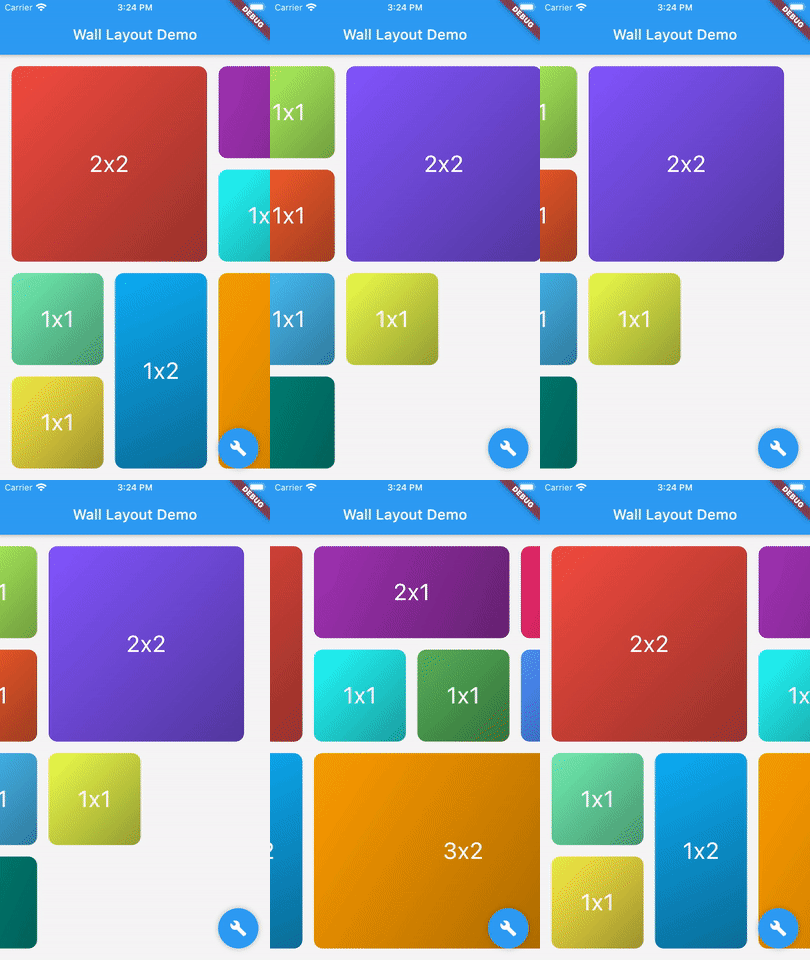
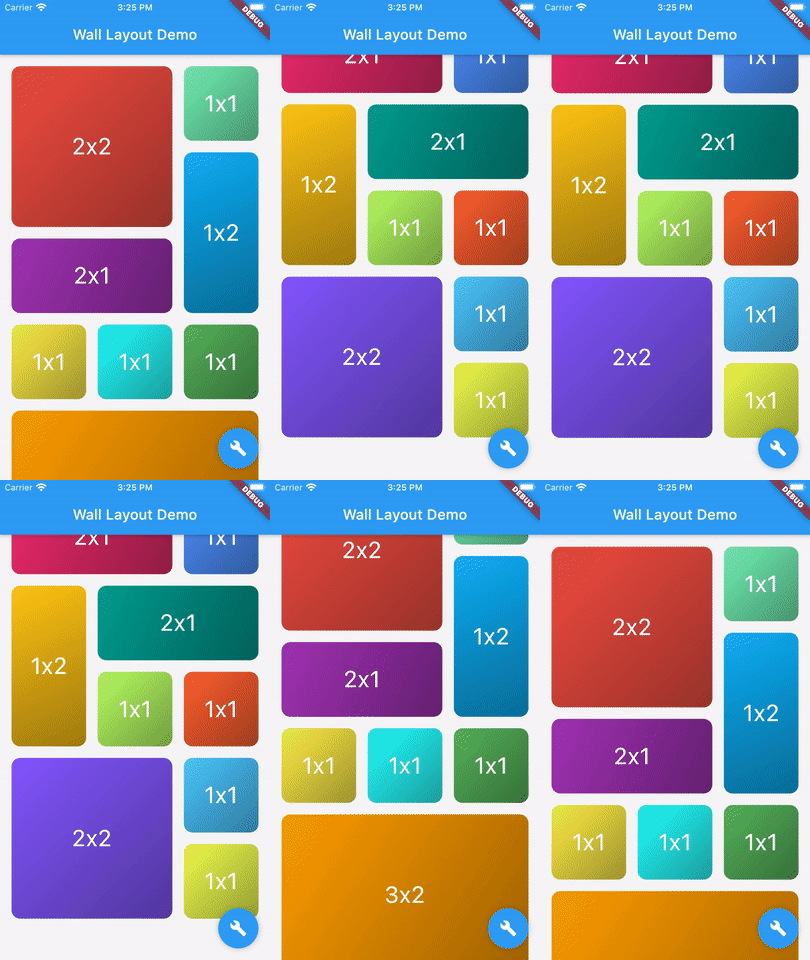
This library provides a unique widget, WallLayout, rendering into a list children having different shapes.

There is two main classes: WallLayout and Stone.

  • A wall is composed by a set of stones, arranged in a certain way.
  • A stone is a component defining its shape by a width and a height.
Wall Layout Widget

This component has been inspired by the ListView widget, in which you can choose scroll direction and the way. Added to that, you can also define how many rows or column have the wall, if you want to create a responsive design.

WallLayout(
  stones: _buildStonesList(),
  layersCount: 3,
  scrollDirection: Axis.vertical,
  reverse: false,
);
Wall Layout Widget Properties
Parameter Description Default value
stones List of Stone widgets, representing wall layout's children. -
layersCount Define the number of layers the wall have. Must be higher or equal to 2. When direction is Axis.vertical, it defines the number of columns the wall has. When direction is Axis.horizontal, it defines the number of rows. -
wallBuilder Define how the wall is built: where each stone is positioned within the wall.The wall builder is allowed to use less stones than provided, and can create new stones (see ./example for more details). WallBuilder.standard()
stonePadding Padding between stones. 16.0
primaryAxisStoneSize Optional. If specified, indicates the exact size of each stone in the direction of the primary scroll axis. If not specified, each stone will be exactly square. -
scrollController Same as [ListView.scrollController]: "control the position to which this scroll view is scrolled". -
physics Same as [ListView.physics]: "How the scroll view should respond to user input". -
restorationId Same as [ListView.restorationId]: used "to save and restore the scroll offset of the scrollable". -
dragStartBehavior Same as [ListView.dragStartBehavior]: "Determines the way that drag start behavior is handled". DragStartBehavior.start
clipBehavior Same as [ListView.clipBehavior]: "ways to clip a widget's content". Clip.hardEdge
primary Same as [ListView.primary]: "Whether this is the primary scroll view associated with the parent [PrimaryScrollController]" false
scrollDirection Same as [ListView.scrollDirection]: "axis along which the scroll view scrolls". Axis.vertical
reverse Same as [ListView.reverse property]: "whether the scroll view scrolls in the reading direction". false
Stone Widget

A Stone Widget is a widget proxy defining stone's size (width and height). It's rendered object is optimized thanks to it's id property.

Stone(
    id: 7,
    width: 2,
    height: 2,
    child: Container(
      color: Colors.red,
      child: Center(child: Text("2x2")),
    ),
);
Stone Widget Properties
Parameter Description Default value
width Stone width (relative to the number of wall divisions). Must be higher or equal to 1. -
height Stone height (relative to the number of wall divisions). Must be higher or equal to 1. -
id Proxy layout identifier: must be unique. -
child Widget to render, where its size will be constrained by the stone width and height. -

Kategorien

Quell-Repository

Projekte, die dieses Paket verwenden

Noch keine Daten verfügbar.