Pakete, Repositories und App-Kategorien suchen

Paketdetailsv0.2.1

flutter_wordpress

Diese Bibliothek verwendet die WordPress REST-API-V2, um eine Möglichkeit für Ihre Anwendung bereitzustellen, mit Ihrer WordPress-Website zu interagieren.

30-Tage-Downloads
65
Likes
120
Pub-Punkte
40

Paket installieren

flutter pub add flutter_wordpress

Paketübersicht

Aus öffentlichen Paketdaten erstellte Orientierung.

Das flutter_wordpress-Paket ermöglicht Flutter-Anwendungen die Interaktion mit WordPress-Websites über die WordPress REST API v2. Es bietet eine strukturierte Möglichkeit, Beiträge, Seiten, Kommentare und andere Inhalte abzurufen, wodurch die Erstellung dynamischer Apps erleichtert wird, die Daten aus einem WordPress-Backend beziehen. Die Bibliothek ist für Entwickler konzipiert, die ihre bestehenden WordPress-Sites in mobile Anwendungen integrieren möchten, ohne komplexe benutzerdefinierte APIs zu benötigen.

Anwendungsfälle

  • Holen von Blogbeiträgen aus WordPress
  • Seiten und benutzerdefinierten Inhalt anzeigen
  • Benutzerkommentare integrieren
  • Mobile Apps für WordPress-Websites erstellen
  • Inhaltssynchronisierung zwischen Web und Mobil

Hauptmerkmale

  • REST-API v2-Integration
  • Einfache Methoden zum Abrufen von Daten
  • Unterstützt Beiträge, Seiten und Kommentare
  • Leichtgewichtig und einfach zu implementieren
  • Kompatibel mit Standard-WordPress-Einrichtungen

Geeignet für

  • Mobile App-Entwickler, die WordPress verwenden
  • inhaltsbasierte Apps
  • Blogging-Plattformen
  • Websites mit öffentlichen Inhalten
  • Entwickler, die eine schnelle WordPress-Integration suchen

Hinweise

  • Erfordert WordPress-Site mit aktivierter REST-API
  • Beschränkt auf öffentliche Endpunkte, es sei denn, authentifiziert
  • Keine integrierte Caching- oder Offlineunterstützung
  • Abhängig von der Stabilität des externen Servers
  • Die Authentifizierung erfordert zusätzliche Einstellungen für privaten Inhalt

Original-README

Originaler README-Schnappschuss aus dem verknüpften Quell-Repository. Aktuelle Inhalte finden Sie im Repository.

Flutter Wordpress

pub.dev

This library uses WordPress REST API V2 to provide a way for your application to interact with your WordPress website.

Tutorial - by Ritesh Sharma

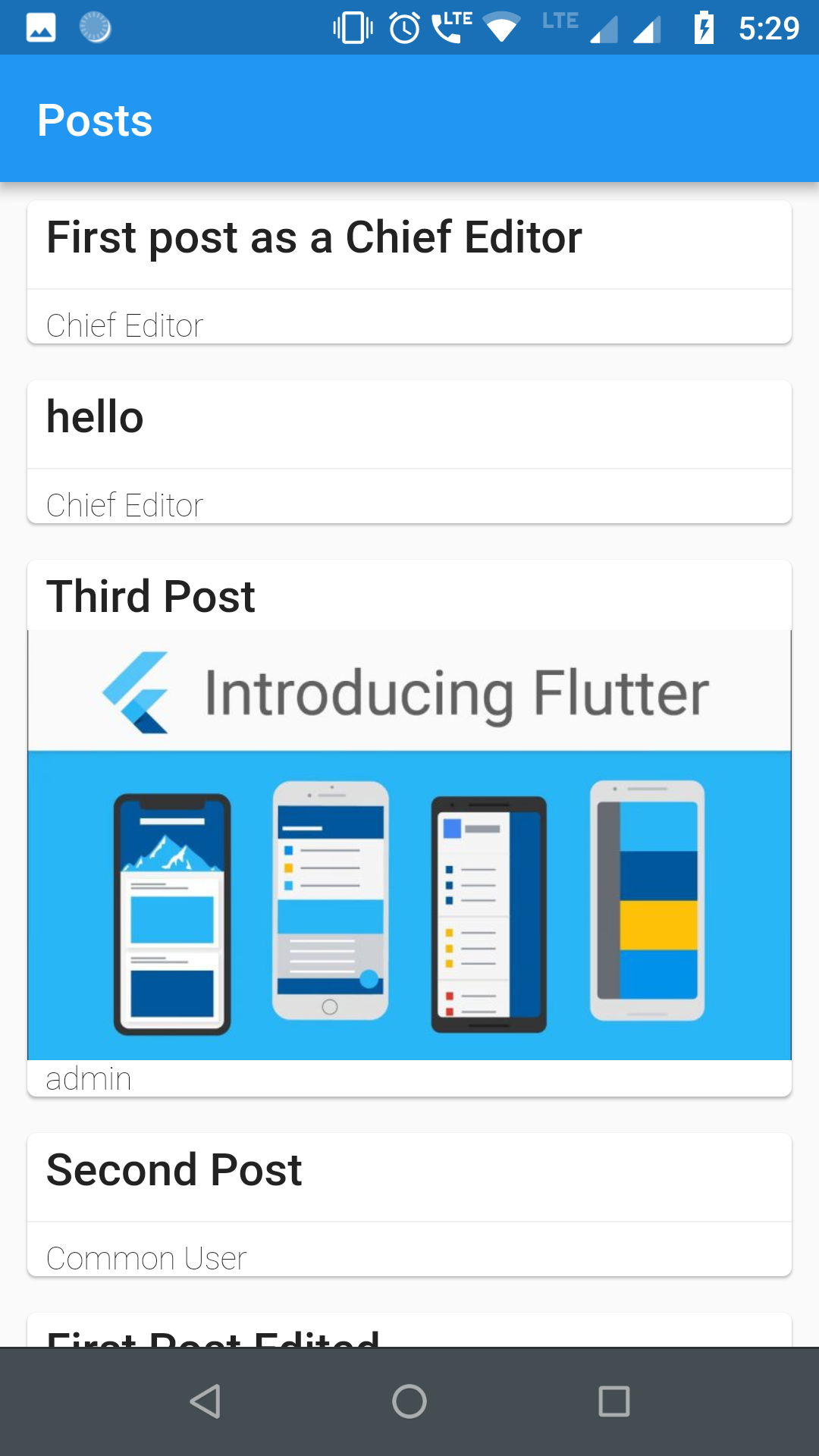
Screenshots

Requirements

For authentication and usage of administrator level REST APIs, you need to use either of the two popular authentication plugins in your WordPress site:

  1. Application Passwords
  2. JWT Authentication for WP REST API (recommended)

Getting Started

1. Import library
First:

Find your pubspec.yaml in the root of your project and add flutter_wordpress: ^0.2.0 under dependencies:

Second:
import 'package:flutter_wordpress/flutter_wordpress.dart' as wp;
2. Instantiate WordPress class
wp.WordPress wordPress;

// adminName and adminKey is needed only for admin level APIs
wordPress = wp.WordPress(
  baseUrl: 'http://localhost',
  authenticator: wp.WordPressAuthenticator.JWT,
  adminName: '',
  adminKey: '',
);
3. Authenticate User
Future<wp.User> response = wordPress.authenticateUser(
  username: 'ChiefEditor',
  password: 'chiefeditor@123',
);

response.then((user) {
  createPost(user);
}).catchError((err) {
  print('Failed to fetch user: $err');
});
4. Fetch Posts
Future<List<wp.Post>> posts = wordPress.fetchPosts(
  postParams: wp.ParamsPostList(
    context: wp.WordPressContext.view,
    pageNum: 1,
    perPage: 20,
    order: wp.Order.desc,
    orderBy: wp.PostOrderBy.date,
  ),
  fetchAuthor: true,
  fetchFeaturedMedia: true,
  fetchComments: true,
  postType: 'post'
);
5. Fetch Users
Future<List<wp.User>> users = wordPress.fetchUsers(
  params: wp.ParamsUserList(
    context: wp.WordPressContext.view,
    pageNum: 1,
    perPage: 30,
    order: wp.Order.asc,
    orderBy: wp.UsersOrderBy.name,
    roles: ['subscriber'],
  ),
);
6. Fetch Comments
Future<List<wp.Comment>> comments = wordPress.fetchComments(
  params: wp.ParamsCommentList(
    context: wp.WordPressContext.view,
    pageNum: 1,
    perPage: 30,
    includePostIDs: [1],
  ),
);
7. Create User
Future<void> createUser({@required String email, @required String username, @required String password, @required List<String> roles}) async {
    await widget.wordPress.createUser(
      user: wp.User(
        email: email,
        password: password,
        username: username,
        roles: roles
      )
    ).then((p) {
      print('User created successfully ${p}');
    }).catchError((err) {
      print('Failed to create user: $err');
    });
  }
8. Create Post
  void createPost({@required wp.User user}) {
    final post = widget.wordPress.createPost(
      post: new wp.Post(
        title: 'First post as a Chief Editor',
        content: 'Blah! blah! blah!',
        excerpt: 'Discussion about blah!',
        authorID: user.id,
        commentStatus: wp.PostCommentStatus.open,
        pingStatus: wp.PostPingStatus.closed,
        status: wp.PostPageStatus.publish,
        format: wp.PostFormat.standard,
        sticky: true,
      ),
    );

    post.then((p) {
      print('Post created successfully with ID: ${p.id}');
    }).catchError((err) {
      print('Failed to create post: $err');
    });
  }
9. create Comment
  void createComment({@required int userId, @required int postId}) {
    final comment = widget.wordPress.createComment(
      comment: new wp.Comment(
        author: userId,
        post: postId,
        content: "First!",
        parent: 0,
      ),
    );

    comment.then((c) {
      print('Comment successfully posted with ID: ${c.id}');
    }).catchError((err) {
      print('Failed to comment: $err');
    });
  }
10. Update Comment
Future<void> updateComment({@required int id, @required int postId, @required wp.User user}) async {
    await widget.wordPress.updateComment(
      comment: new wp.Comment(
        content: "Comment Updated2!",
        author: user.id,
        post: postId,
      ),
      id: id,
    ).then((c) {
      print('Comment updated successfully "$c"');
    }).catchError((err) {
      print('Failed to update Comment: $err');
    });
  }
11. Update Post
Future<void> updatePost({@required int id, @required int userId}) async {
    await widget.wordPress.updatePost(
      post: new wp.Post(
        title: 'First post as a Chief Editor',
        content: 'Blah! blah! blah!',
        excerpt: 'Discussion about blah!',
        authorID: userId,
        commentStatus: wp.PostCommentStatus.open,
        pingStatus: wp.PostPingStatus.closed,
        status: wp.PostPageStatus.publish,
        format: wp.PostFormat.standard,
        sticky: true,
      ),
      id: id, //
    ).then((p) {
      print('Post updated successfully with ID ${p}');
    }).catchError((err) {
      print('Failed to update post: $err');
    });
  }
12. Update User
Future<void> updateUser({@required int id, @required String username, @required String email}) async {
    await widget.wordPress.updateUser(
      user: new wp.User(
        description: "This is description for this user",
        username: username,
        id: id,
        email: email
      ),
      id: id,
    ).then((u) {
      print('User updated successfully $u');
    }).catchError((err) {
      print('Failed to update User: $err');
    });
  }
13. Delete Comment
Future<void> deleteComment({@required int id}) async {
    await widget.wordPress.deleteComment(id: id).then((c) {
      print('Comment Deleted successfully: $c');
    }).catchError((err) {
      print('Failed to Delete comment: $err');
    });
  }
14. Delete Post
  Future<void> deletePost({@required int id}) async {
    await widget.wordPress.deletePost(id: id).then((p) {
      print('Post Deleted successfully: $p');
    }).catchError((err) {
      print('Failed to Delete post: $err');
    });
  }
15. Delete User
  Future<void> deleteUser({@required int id, @required int reassign}) async {
    await widget.wordPress.deleteUser(id: id, reassign: reassign).then((u) {
      print('User Deleted successfully: $u');
    }).catchError((err) {
      print('Failed to Delete user: $err');
    });
  }
16. Upload Media
  uploadMedia(File image) async {
  var media = await wordPress.uploadMedia(image).then((m) {
    print('Media uploaded successfully: $m');
  }).catchError((err) {
    print('Failed to upload Media: $err');
  });
  int mediaID = media['id'];  
}

Future Work

  1. Implementing OAuth 2.0 authentication.

Contributors

Kategorien

Abhängigkeiten

Abhängigkeiten 2 Einträge

Quell-Repository

Projekte, die dieses Paket verwenden

Noch keine Daten verfügbar.