Aus öffentlichen Paketdaten erstellte Orientierung.
flutter_xupdate ist ein Flutter-Plugin, das XUpdate integriert, eine für Android spezifische Bibliothek zur Verwaltung von App-Updates. Es ermöglicht nahtlose In-App-Update-Funktionen auf Android-Geräten und unterstützt sowohl stille Hintergrundupdates als auch vom Benutzer ausgelöste Update-Aufforderungen. Das Plugin vereinfacht den Prozess der Überprüfung neuer Versionen, des Downloads von Updates und deren Installation, ohne dass eine vollständige Neustart der App erforderlich ist. Es wurde entwickelt, um die Benutzererfahrung durch Minimierung von Störungen während Updates zu verbessern.
Anwendungsfälle
In-App-Aktualisierungsbenachrichtigungen
Stille Hintergrundaktualisierungen
Manuelle Aktualisierung auslösen
Versionskompatibilitätsprüfungen
Fortschrittsverfolgung aktualisieren
Hauptmerkmale
Nur Android-Unterstützung
Hintergrund-Update-Downloads
Anpassbare Update-Dialoge
Fortschrittsüberwachung
Integration mit der XUpdate-Bibliothek
Geeignet für
Android-fokussierte Flutter-Apps
Apps, die häufig aktualisiert werden müssen
Entwickler, die XUpdate verwenden
Projekte, die eine leichte Aktualisierungslogik benötigen
Hinweise
Beschränkt auf die Android-Plattform
Benötigt manuelle Konfiguration für Server zur Aktualisierung
Kein iOS-Unterstützung
Abhängig von der XUpdate-Backend-Einrichtung
Möglicherweise sind benutzerdefinierte UI-Anpassungen erforderlich
Original-README
Originaler README-Schnappschuss aus dem verknüpften Quell-Repository. Aktuelle Inhalte finden Sie im Repository.
flutter_xupdate
A Flutter plugin for XUpdate -- Android Update Library。See the use Chinese Document for details。
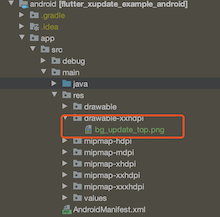
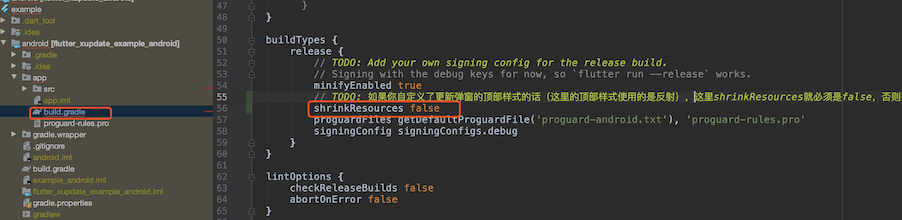
【Note】: When you use the command flutter build apk to make a release package, If you use the topImageRes property, you must configure shrinkResources to false, otherwise the pop-up window will display an exception!
Property value
Initialization
Name
Type
Default
Description
debug
bool
false
Whether Output log
isPost
bool
false
Whether use post request
isPostJson
bool
false
Whether post request upload json format
timeout
int
20000(ms)
Request response timeout
isWifiOnly
bool
true
Whether update only under WiFi
isAutoMode
bool
false
Whether to turn on automatic mode
supportSilentInstall
bool
false
Whether to support silent installation requires that the device has root permission
enableRetry
bool
false
In the process of downloading, if you click Cancel, whether the pop-up window for retrying to switch the download mode will pop up
retryContent
String
''
Try the prompt content of the prompt pop-up window again
retryUrl
String
''
Retrying prompt pop-up URL to jump after clicking
params
Map
/
Public parameters to be set
CheckUpdate
Name
Type
Default
Description
url
String
/
URL of version check
params
Map
/
Parameters
supportBackgroundUpdate
bool
false
Whether to support background updates
isAutoMode
bool
false
Whether to turn on automatic mode
isCustomParse
bool
false
Is it a custom resolution protocol
themeColor
String
''
Apply pop-up theme color
topImageRes
String
''
The name of the top picture resource in the pop-up window
buttonTextColor
String
''
The color of the button text
widthRatio
double
/
Proportion of version update Prompter width to screen
heightRatio
double
/
Proportion of version update Prompter height to screen
overrideGlobalRetryStrategy
bool
false
Whether to override the global retry policy
enableRetry
bool
false
In the process of downloading, if you click Cancel, whether the pop-up window for retrying to switch the download mode will pop up
retryContent
String
''
Try the prompt content of the prompt pop-up window again