Aus öffentlichen Paketdaten erstellte Orientierung.
GetStorage ist eine leichte, synchrone Schlüssel-Wert-Speicherlösung, die vollständig in Dart entwickelt wurde und für schnelle und effiziente Datenpersistenz über mehrere Plattformen hinweg konzipiert ist. Sie bietet eine einfache API zum Speichern und Abrufen grundlegender Datentypen wie Strings, Zahlen, Boolesche Werte und Listen, ohne asynchrone Operationen zu erfordern. Ideal für kleine Anwendungs-Zustandsverwaltung oder Caching, läuft nahtlos auf Android, iOS, Web, macOS, Windows und Linux. Ihr geringer Ressourcenverbrauch und Benutzerfreundlichkeit machen sie zu einer geeigneten Alternative für Entwickler, die eine einfachere Lösung als komplexere Datenbanken suchen.
Anwendungsfälle
Speichern von Benutzereinstellungen
Kleine Datensätze zwischenspeichern
App-Einstellungen beibehalten
Sitzungsdaten verwalten
Einfache lokale Zustandsverwaltung
Hauptmerkmale
Synchronisierte Operationen
Leicht und schnell
Unterstützt mehrere Plattformen
Einfach zu verwendende API
Keine externen Abhängigkeiten
Geeignet für
Kleine bis mittlere Apps
Schnellprototypen
Einfache Anforderungen an die Datenpersistenz
Plattformübergreifende Entwicklung
Apps, die komplexe Datenbank-Einrichtungen vermeiden
Hinweise
Nicht geeignet für große Datensätze
Eingeschränkte Abfragefunktionen
Keine integrierte Verschlüsselung
Daten im Klartext gespeichert
Am besten für einfache Schlüssel-Wert-Paare nur
Original-README
Originaler README-Schnappschuss aus dem verknüpften Quell-Repository. Aktuelle Inhalte finden Sie im Repository.
get_storage
A fast, extra light and synchronous key-value in memory, which backs up data to disk at each operation.
It is written entirely in Dart and easily integrates with Get framework of Flutter.
Supports Android, iOS, Web, Mac, Linux, and fuchsia and Windows**.
Can store String, int, double, Map and List
If you subscribe to events, be sure to dispose them when using:
disposeListen?.call();
To listen changes on key you can use listenKey:
box.listenKey('key', (value){
  print('new key is $value');
});
To erase your container:
box.erase();
If you want to create different containers, simply give it a name. You can listen to specific containers, and also delete them.
GetStorage g = GetStorage('MyStorage');
To initialize specific container:
awaitGetStorage.init('MyStorage');
SharedPreferences Implementation
classMyPref{
staticfinal _otherBox = () => GetStorage('MyPref');
final username = ''.val('username');
final age = 0.val('age');
final price = 1000.val('price', getBox: _otherBox);
// orfinal username2 = ReadWriteValue('username', '');
final age2 = ReadWriteValue('age', 0);
final price2 = ReadWriteValue('price', '', _otherBox);
}
...
voidupdateAge() {
final age = 0.val('age');
// or final age = ReadWriteValue('age', 0, () => box);
// or final age = Get.find<MyPref>().age;
age.val = 1; // will save to boxfinal realAge = age.val; // will read from box
}
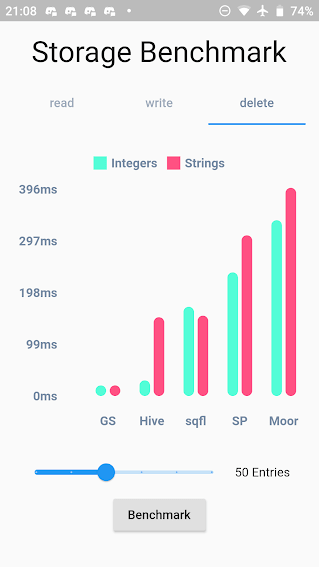
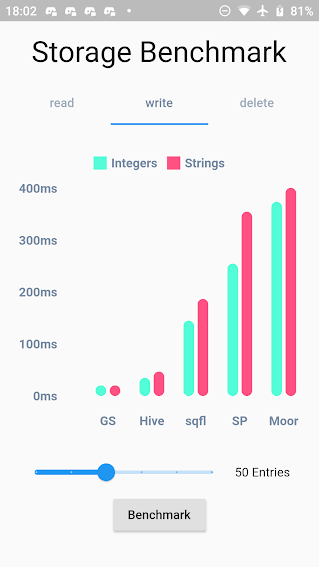
Benchmark Result:
GetStorage is not fast, it is absurdly fast for being memory-based. All of his operations are instantaneous. A backup of each operation is placed in a Container on the disk. Each container has its own file.
What GetStorage is:
Persistent key/value storage for Android, iOS, Web, Linux, Mac and Fuchsia and Windows, that combines fast memory access with persistent storage.
What GetStorage is NOT:
A database. Get is super compact to offer you a solution ultra-light, high-speed read/write storage to work synchronously. If you want to store data persistently on disk with immediate memory access, use it, if you want a database, with indexing and specific disk storage tools, there are incredible solutions that are already available, like Hive and Sqflite/Moor.
As soon as you declare "write" the file is immediately written in memory and can now be accessed immediately with box.read(). You can also wait for the callback that it was written to disk using await box.write().
When to use GetStorage:
simple Maps storage.
cache of http requests
storage of simple user information.
simple and persistent state storage
any situation you currently use sharedPreferences.
When not to use GetStorage:
you need indexes.
when you need to always check if the file was written to the storage disk before starting another operation (storage in memory is done instantly and can be read instantly with box.read(), and the backup to disk is done in the background. To make sure the backup is complete, you can use await, but if you need to call await all the time, it makes no sense you are using memory storage).
You can use this lib even as a modest persistent state manager using Getx SimpleBuilder