Aus öffentlichen Paketdaten erstellte Orientierung.
Das hmssdk_flutter-Paket ermöglicht Echtzeit-Audio- und Videoanrufe, interaktives Live-Streaming und Aufnahmen in Flutter-Anwendungen. Es unterstützt Funktionen wie Chat, HLS- und RTMP-Streaming, Picture-in-Picture (PiP), Integration mit CallKit, VoIP, Videokonferenzen, Stream-Wiedergabe sowie WebRTC-basierte Kommunikation. Für Android und iOS entwickelt, bietet es eine robuste Grundlage für skalierbare, latenzarme Kommunikationserfahrungen. Der SDK ist ideal für Anwendungen, die hochwertige, synchronisierte Medieninteraktionen mit minimalem Setup erfordern. Entwickler können ihn über einen einfachen pub-Befehl integrieren und die Funktionalität mithilfe des Open-Source-GitHub-Repositorys erweitern.
Anwendungsfälle
Live-virtuelle Klassenräume
Remote Team-Kooperation
Interaktive Live-Veranstaltungen
Video-Streaming auf Anfrage
Echtzeit-Kundensupport
Videofähige soziale Apps
Hauptmerkmale
Echtzeit-Audio- und Videoanrufe
Interaktive Live-Übertragung
HLS- und RTMP-Unterstützung
Picture-in-Picture-Modus
CallKit- und VoIP-Integration
Eingebautes Chat- und Aufnahmefunktion
Geeignet für
Lern-Apps
Unternehmenskommunikationstools
Live-Event-Plattformen
Soziale Netzwerk-Apps
Kundenservice-Lösungen
medienreiche Anwendungen
Hinweise
Stabile Internetverbindung erforderlich
Erforderliche Berechtigungen unter Android/iOS
Kann Backend-Infrastruktur für Skalierung erfordern
Eingeschränkte Anpassungsmöglichkeiten ohne erweiterte Konfiguration
Abhängig von Backend-Diensten mit 100 ms
Original-README
Originaler README-Schnappschuss aus dem verknüpften Quell-Repository. Aktuelle Inhalte finden Sie im Repository.
100ms Flutter SDK 🎉
Integrate Real Time Audio and Video conferencing, Interactive Live Streaming, and Chat in your apps with 100ms Flutter SDK.
With support for HLS and RTMP Live Streaming and Recording, Picture-in-Picture (PiP), CallKit, VoIP, one-to-one Video Call Modes, Audio Rooms, Video Player and much more, add immersive real-time communications to your apps.
The Android SDK supports Android API level 24 and above. It is built for 64-bit architectures only (arm64-v8a, x86_64). Devices running Android OS 12 or above is recommended.
iPhone & iPads with iOS version 12 or above are supported. Devices running iOS 16 or above is recommended.
🔧 Android Build Requirements
To ensure compatibility and optimal performance, your app must use:
Android Gradle Plugin (AGP): 8.9.0 or higher
Gradle: 8.10 or higher
NDK: r28 (28.0.12674087) or higher
Kotlin: 2.0.21 or higher
Java: JDK 17 or higher
Architecture Support: 64-bit only (arm64-v8a, x86_64)
Example configuration in android/app/build.gradle:
android {
    compileSdkVersion 35
    ndkVersion "28.0.12674087"

    defaultConfig {
        minSdkVersion 24
        targetSdkVersion 35

        ndk {
            // Only support 64-bit architectures for 16KB page size support
            abiFilters 'arm64-v8a', 'x86_64'
        }
    }
}
<key>NSMicrophoneUsageDescription</key><string>{YourAppName} wants to use your microphone</string><key>NSCameraUsageDescription</key><string>{YourAppName} wants to use your camera</string><key>NSLocalNetworkUsageDescription</key><string>{YourAppName} App wants to use your local network</string>
Room A room is the basic object that 100ms SDKs return on successful connection. This contains references to peers, tracks and everything you need to render a live a/v or live streaming app.
Peer A peer is the object returned by 100ms SDKs that contains all information about a user - name, role, video track etc.
Track A track is a segment of media (audio/video) captured from the peer's camera and microphone. Peers in a session publish local tracks and subscribe to remote tracks from other peers.
Role A role defines who can a peer see/hear, the quality at which they publish their video, whether they have permissions to publish video/screenshare, mute someone, change someone's role.
100ms SDK provides callbacks to the client app about any change or update happening in the room after a user has joined by implementing HMSUpdateListener. These updates can be used to render the video on the screen or to display other info regarding the room. Let's take a look at the flowchart.
/// 100ms SDK provides callbacks to the client app about any change or update happening in the room after a user has joined by implementing HMSUpdateListener./// These updates can be used to render the video on the screen or to display other info regarding the room.abstractclassHMSUpdateListener{
/// This will be called on a successful JOIN of the room by the user////// This is the point where applications can stop showing their loading state/// [room]: the room which was joinedvoidonJoin({requiredHMSRoom room});
/// This will be called whenever there is an update on an existing peer/// or a new peer got added/existing peer is removed.////// This callback can be used to keep a track of all the peers in the room/// [peer]: the peer who joined/left or was updated/// [update]: the triggered update type. Should be used to perform different UI ActionsvoidonPeerUpdate({requiredHMSPeer peer, requiredHMSPeerUpdate update});
/// This is called when there are updates on an existing track/// or a new track got added/existing track is removed////// This callback can be used to render the video on screen whenever a track gets added/// [track]: the track which was added, removed or updated/// [trackUpdate]: the triggered update type/// [peer]: the peer for which track was added, removed or updatedvoidonTrackUpdate({requiredHMSTrack track, requiredHMSTrackUpdate trackUpdate, requiredHMSPeer peer});
/// This will be called when there is an error in the system/// and SDK has already retried to fix the error/// [error]: the error that occurredvoidonHMSError({requiredHMSException error});
/// This is called when there is a new broadcast message from any other peer in the room////// This can be used to implement chat is the room/// [message]: the received broadcast messagevoidonMessage({requiredHMSMessage message});
/// This is called every 1 second with a list of active speakers////// ## A HMSSpeaker object contains -/// - peerId: the peer identifier of HMSPeer who is speaking/// - trackId: the track identifier of HMSTrack which is emitting audio/// - audioLevel: a number within range 1-100 indicating the audio volume////// A peer who is not present in the list indicates that the peer is not speaking////// This can be used to highlight currently speaking peers in the room/// [speakers] the list of speakersvoidonUpdateSpeakers({requiredList<HMSSpeaker> updateSpeakers});
/// This is called when there is a change in any property of the Room////// [room]: the room which was joined/// [update]: the triggered update type. Should be used to perform different UI ActionsvoidonRoomUpdate({requiredHMSRoom room, requiredHMSRoomUpdate update});
/// when network or some other error happens it will be calledvoidonReconnecting();
/// when you are back in the room after reconnectionvoidonReconnected();
/// This is called when someone asks for a change or role////// for eg. admin can ask a peer to become host from guest./// this triggers this call on peer's appvoidonRoleChangeRequest({requiredHMSRoleChangeRequest roleChangeRequest});
/// when someone requests for track change of yours be it video or audio this will be triggered/// [hmsTrackChangeRequest] request instance consisting of all the required info about track changevoidonChangeTrackStateRequest({requiredHMSTrackChangeRequest hmsTrackChangeRequest});
/// when someone kicks you out or when someone ends the room at that time it is triggered/// [hmsPeerRemovedFromPeer] it consists of info about who removed you and why.voidonRemovedFromRoom({requiredHMSPeerRemovedFromPeer hmsPeerRemovedFromPeer});
/// whenever a new audio device is plugged in or audio output is changed we/// get the onAudioDeviceChanged update/// This callback is only fired on Android devices. On iOS, this callback will not be triggered./// - Parameters:/// - currentAudioDevice: Current audio output route/// - availableAudioDevice: List of available audio output devicesvoidonAudioDeviceChanged(
{HMSAudioDevice? currentAudioDevice,
List<HMSAudioDevice>? availableAudioDevice});
/// Whenever a user joins a room [onSessionStoreAvailable] is fired to get an instance of [HMSSessionStore]/// which can be used to perform session metadata operations/// - Parameters:/// - hmsSessionStore: An instance of HMSSessionStore which will be used to call session metadata methodsvoidonSessionStoreAvailable(
{HMSSessionStore? hmsSessionStore});
/// Upon joining a room with existing peers, onPeerListUpdated will be called with the list of peers present/// in the room instead of getting onPeerUpdate for each peer in the room./// Subsequent peer joins/leaves would be notified via both onPeerUpdate and onPeerListUpdatedvoidonPeerListUpdate(
{requiredList<HMSPeer> addedPeers, requiredList<HMSPeer> removedPeers});
}
The 100ms SDK sends updates to the application about any change in HMSPeer, HMSTrack, HMSRoom, etc via the callbacks in HMSUpdateListener.
The methods of HMSUpdateListener are invoked to notify updates happening in the room like a peer join/leave, track mute/unmute etc.
More information about Update Listeners is available here.
The following are the different types of updates that are emitted by the SDK -
HMSPeerUpdate
  .peerJoined: A new peer joins the Room
  .peerLeft: An existing peer leaves the Room
  .roleUpdated: When a peer's Role has changed
  .metadataChanged: When a peer's metadata has changed
  .nameChanged: When a peer's name has changed


HMSTrackUpdate
  .trackAdded: A new track (audio or video) is added to the Room
  .trackRemoved: An existing track is removed from the Room
  .trackMuted: A track of a peer is muted
  .trackUnMuted: A muted track of a peer was unmuted
  .trackDegraded: When track is degraded due to bad network conditions
  .trackRestored: When a degraded track is restored when optimal network conditions are available again


HMSRoomUpdate
  .roomMuted: When room is muted to due external interruption like a Phone Call
  .roomUnmuted: When a muted room is unmuted when external interruption has ended
  .serverRecordingStateUpdated: When Server recording state is updated
  .browserRecordingStateUpdated: When Browser recording state is changed
  .rtmpStreamingStateUpdated: When RTMP is started or stopped
  .hlsStreamingStateUpdated: When HLS is started or stopped
  .hlsRecordingStateUpdated: When HLS recording state is updated
To join a room we need an authentication token as mentioned above. There are two methods to get the token:
Fetch token using room-code method (Recommended)
We can get the authentication token using room-code from meeting URL.
Let's understand the subdomain and code from the sample URL
In this URL: https://public.app.100ms.live/meeting/xvm-wxwo-gbl
Subdomain is public
Room code is xvm-wxwo-gbl
Now to get the room-code from meeting URL we can write our own logic or use the getCode method from here
To generate token we will be using getAuthTokenByRoomCode method of HMSSDK. This method has roomCode as a required
parameter, userId & endPoint as optional parameter.
This method should be called after calling the build method.
Let's checkout the implementation:
//This returns an object of Future<dynamic> which can be either//of HMSException type or String? type based on whether//method execution is completed successfully or notdynamic authToken = await hmsSDK.getAuthTokenByRoomCode(roomCode: 'YOUR_ROOM_CODE');
if(authToken isString){
HMSConfig roomConfig = HMSConfig(
authToken: authToken,
userName: userName,
);
hmsSDK.join(config: roomConfig);
}
elseif(authToken isHMSException){
// Handle the error
}
Get temporary token from dashboard
To test audio/video functionality, you need to connect to a 100ms room; please check the following steps for the same:
Use the Video Conferencing Starter Kit to create a room with a default template assigned to it to test this app quickly.
Go to the Rooms page in your dashboard, click on the Room Id of the room you created above, and click on the Join Room button on the top right.
In the Join with SDK section you can find the Auth Token for role ; you can click on the 'copy' icon to copy the authentication token.
Token from 100ms dashboard is for testing purposes only, For production applications you must generate tokens on your own server.
Refer to the Management Token section in Authentication and Tokens guide for more information.
You can also optionally pass these fields in the HMSSDK constructor -
Track Settings - Such as joining a Room with Muted Audio or Video using the HMSTrackSetting object. More information is available here.
User Metadata - This can be used to pass any additional metadata associated with the user using metadata of HMSConfig object. For Eg: user-id mapping at the application side. More information is available here.
More information about Joining a Room is available here.
// create a class that implements `HMSUpdateListener` and acts as a data source for our UIclassMeetingimplementsHMSUpdateListener{
late HMSSDK hmsSDK;
Meeting() {
initHMSSDK();
}
voidinitHMSSDK() async {
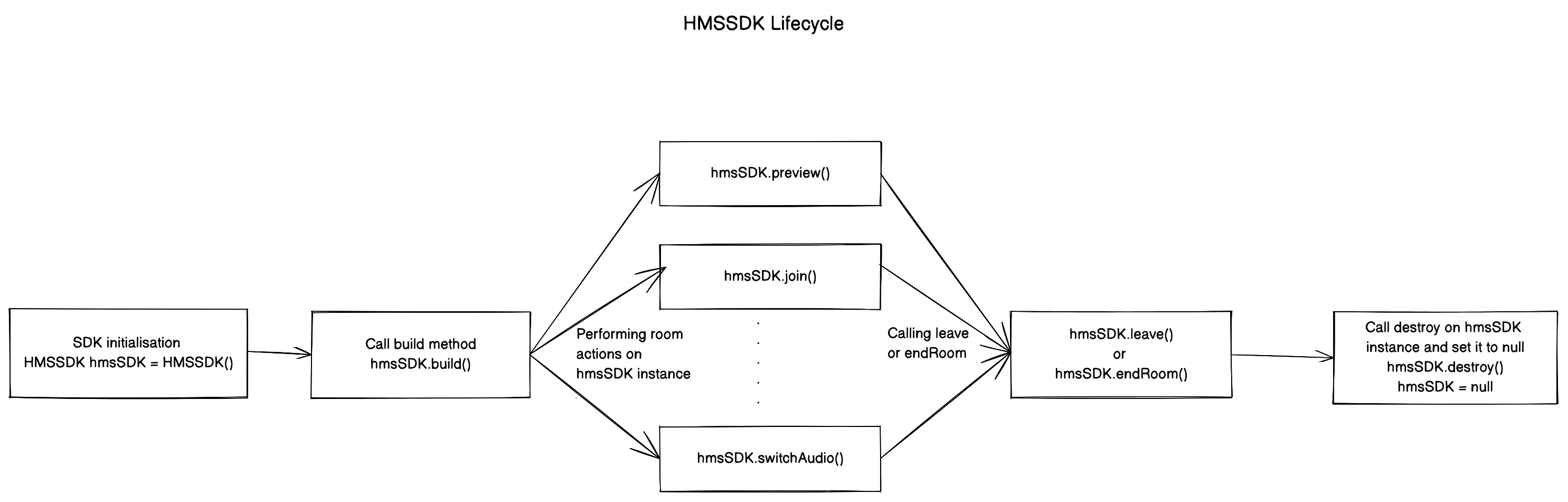
hmsSDK = HMSSDK(); // create an instance of `HMSSDK` by invoking it's constructorawait hmsSDK.build(); // ensure to await while invoking the `build` method
hmsSDK.addUpdateListener(this); // `this` value corresponds to the instance implementing HMSUpdateListenerHMSConfig config = HMSConfig(authToken: 'eyJH5c', // client-side token generated from your token service
userName: 'John Appleseed');
hmsSDK.join(config: config); // Now, we are primed to join the room. All you have to do is call `join` by passing the `config` object.
}
... // implement methods of HMSUpdateListener
}
Once you're done with the meeting and want to exit, call leave on the HMSSDK instance that you created to join the room.
Before calling leave, remove the HMSUpdateListener instance as:
// updateListener is the instance of class in which HMSUpdateListener is implemented
hmsSDK.removeUpdateListener(updateListener);
To leave the meeting, call the leave method of HMSSDK and pass the hmsActionResultListener parameter to get a success callback from SDK in the onSuccess override method as follow.
You will need to implement the HMSActionResultListener interface in a class to get onSuccess and onException callback.
To know about how to implement HMSActionResultListener check the docs here
classMeetingimplementsHMSActionResultListener{
//this is the instance of class implementing HMSActionResultListenerawait hmsSDK.leave(hmsActionResultListener: this);
@overridevoidonSuccess(
{HMSActionResultListenerMethod methodType = HMSActionResultListenerMethod.unknown, Map<String, dynamic>? arguments}) {
switch (methodType) {
caseHMSActionResultListenerMethod.leave:
// Room leaved successfully// Clear the local room statebreak;
...
}
}
}
More information about Leaving a Room is available here.
🛤 HMSTracks Explained
HMSTrack is the super-class of all the tracks that are used inside HMSSDK. Its hierarchy looks like this -
You can send a chat or any other kind of message from a local peer to all remote peers in the room.
To send a message first create an instance of HMSMessage object.
Add the information to be sent in the message property of HMSMessage.
Then use the sendBroadcastMessage function on the instance of HMSSDK for broadcast message, sendGroupMessage for group message and sendDirectMessage for direct message.
When you(the local peer) receives a message from others(any remote peer), void onMessage({required HMSMessage message}) function of HMSUpdateListener is invoked.
More information about Chat Messaging is available here.
// onMessage is HMSUpdateListener method called when a new message is received@overridevoidonMessage({requiredHMSMessage message}) {
//Here we will receive messages sent by other peers
}
///[message]: Message to be sent///[type]: Message type(More about this at the end)///[hmsActionResultListener]: instance of class implementing HMSActionResultListener//Here this is an instance of class that implements HMSActionResultListener i.e. Meeting
hmsSDK.sendBroadcastMessage(
message: message,
type: type,
hmsActionResultListener: this);
///[message]: Message to be sent///[peerTo]: Peer to whom message needs to be sent///[type]: Message type(More about this at the end)///[hmsActionResultListener]: instance of class implementing HMSActionResultListener//Here this is an instance of class that implements HMSActionResultListener i.e. Meeting
hmsSDK.sendDirectMessage(
message: message,
peerTo: peerTo,
type: type,
hmsActionResultListener: this);
///[message]: Message to be sent///[hmsRolesTo]: Roles to which this message needs to be sent///[type]: Message type(More about this at the end)///[hmsActionResultListener]: instance of class implementing HMSActionResultListener//Here this is an instance of class that implements HMSActionResultListener i.e. Meeting
hmsSDK.sendGroupMessage(
message: message,
hmsRolesTo: rolesToSendMessage,
type: type,
hmsActionResultListener: this);
@overridevoidonSuccess(
{HMSActionResultListenerMethod methodType =
HMSActionResultListenerMethod.unknown,
Map<String, dynamic>? arguments}) {
switch (methodType) {
caseHMSActionResultListenerMethod.sendBroadcastMessage:
//Broadcast Message sent successfullybreak;
caseHMSActionResultListenerMethod.sendGroupMessage:
//Group Message sent successfullybreak;
caseHMSActionResultListenerMethod.sendDirectMessage:
//Direct Message sent successfullybreak;
...
}
}
@overridevoidonException(
{HMSActionResultListenerMethod methodType =
HMSActionResultListenerMethod.unknown,
Map<String, dynamic>? arguments,
requiredHMSException hmsException}) {
switch (methodType) {
caseHMSActionResultListenerMethod.sendBroadcastMessage:
// Check the HMSException object for details about the errorbreak;
caseHMSActionResultListenerMethod.sendGroupMessage:
// Check the HMSException object for details about the errorbreak;
caseHMSActionResultListenerMethod.sendDirectMessage:
// Check the HMSException object for details about the errorbreak;
...
}
}