Pakete, Repositories und App-Kategorien suchen

Paketdetailsv0.0.6

image_crop_widget

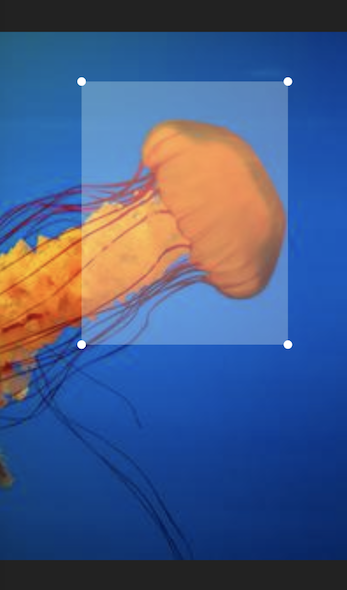
Ein Flutter-Widget zum Zuschneiden von Bildern. Das Widget ist vollständig in Dart geschrieben und hat minimale Abhängigkeiten.

30-Tage-Downloads
18
Likes
9
Pub-Punkte
40

Paket installieren

flutter pub add image_crop_widget

Paketübersicht

Aus öffentlichen Paketdaten erstellte Orientierung.

Ein Flutter-Widget, das für die Bildbeschneidung direkt innerhalb von Apps entwickelt wurde. Vollständig in Dart erstellt mit minimalen Abhängigkeiten bietet es eine leichte und effiziente Lösung für die Bildmanipulation. Das Widget verfügt über intuitive Steuerungen zum Auswählen und Anpassen von Ausschnittbereichen und ist daher ideal für die Bearbeitung von Profilbildern oder die Bildvorverarbeitung. Es lässt sich nahtlos in Flutter-Projekte integrieren und unterstützt responsive Design auf verschiedenen Bildschirmgrößen.

Anwendungsfälle

  • Profilsbild zuschneiden
  • Bildvorverarbeitung vor dem Hochladen
  • Bearbeitung benutzererzeugten Inhalts
  • Foto-Bearbeitungstools in Apps
  • Benutzerdefinierte Bildauswahl-Workflows

Hauptmerkmale

  • Reine Dart-Implementierung
  • Minimale Abhängigkeiten
  • Reaktive Benutzeroberfläche
  • Intuitive Drag-and-Drop-Crop-Steuerung
  • Einfache Integration in Flutter-Projekte

Geeignet für

  • Entwickler, die bildintensive Apps erstellen
  • Apps, die Benutzerbildschneiden erfordern
  • Projekte, die leichtgewichtige Abhängigkeiten priorisieren
  • Frontend-Entwickler, die einfache Lösungen suchen
  • Mobile App-Funktionen mit Bildbearbeitungsanforderungen

Hinweise

  • Beschränkt auf grundlegende Zuschnittfunktionen
  • Keine integrierten Bildfilter oder Verbesserungen
  • Benötigt manuelle Behandlung der geschnittenen Bildausgabe
  • Nicht für sehr große Bilder optimiert
  • Keine Unterstützung für mehrere Schnittbereiche gleichzeitig
Original-README

Originaler README-Schnappschuss aus dem verknüpften Quell-Repository. Aktuelle Inhalte finden Sie im Repository.

image_crop_widget

A Flutter widget to crop images. The widget is completely written in Dart and has minimal dependencies.

The widget displays the image within the given layout space. On top of the image a transparent rectangular overlay, with handles on each corner, is drawn. The overlay handles can be dragged by touch to adjust the cropping area.

Example

By calling the cropImage() method on the widget's state object, the image area that is marked by the overlay is returned as a new image object.

To acquire the widget's state you can use a GlobalKey object.

Example:

import 'dart:ui'; // This imports the 'Image' class.

final key = GlobalKey<ImageCropState>();
Image imageObject = ...

...

ImageCrop(key: key, image: imageObject) // This could be used inside a  build method.

...
await key.currentState.rotateImage(); // Rotate the image be 90° clockwise.
final cropedImage = await key.currentState.cropImage(); // This could be used inside a 'onPress' handler method.

How to create an image object

The Image class from dart:ui is typically not instantiated directly. Instead, you could convert your image data into a Uint8List and instantiate the image like this:

Uint8List bytes = ...
final codec = await instantiateImageCodec(bytes);
final frame = await codec.getNextFrame();
final image = frame.image;

How to display an image object

The Image object can be displayed with the Flutter Image widget. One way to do this, is by converting the image into a Uint8List and pass it into the widget's memory constructor. Please note, that the widget is not the same Image class as the image object itself.

final cropedImage = await key.currentState.cropImage();
final byte = await cropedImage.toByteData(format: ui.ImageByteFormat.png);
final byteList = byte.buffer.asUint8List();

Image.memory(byteList)

How to persist an image object

The Image object can be persisted into a file or a database. To do this, you can convert the image object into a Uint8List and write it into a File or your database object.

final cropedImage = await key.currentState.cropImage();
final byte = await cropedImage.toByteData(format: ui.ImageByteFormat.png);
final byteList = byte.buffer.asUint8List();

final imageFile = File("Some path and filename"); // You can use the path_provider package to locate the right path.
final result = await imageFile.writeAsBytes(byteList);

Kategorien

Quell-Repository

Projekte, die dieses Paket verwenden

Noch keine Daten verfügbar.