Pakete, Repositories und App-Kategorien suchen

Cover von input_history_text_field
Paketdetailsv0.4.0

input_history_text_field

Ein input_history_text_field-Widget wird automatisch gespeichert und bietet Vorschläge, während Sie eingeben.

AndroidiOSWebmacOSWindowsLinux
30-Tage-Downloads
1320
Likes
80
Pub-Punkte
150

Paket installieren

flutter pub add input_history_text_field

Paketübersicht

Aus öffentlichen Paketdaten erstellte Orientierung.

Das Paket input_history_text_field bietet ein Flutter-Widget, das den Eingabehistorie des Benutzers automatisch speichert und Vorschläge liefert, während der Benutzer tippt. Es verbessert die Benutzerfreundlichkeit von Formularen, indem es frühere Eingaben merkt und wiederholtes Tippen reduziert. Ideal für Suchfelder, Anmeldeformulare oder jedes andere Eingabefeld, bei dem vergangene Eingaben wertvoll sind. Das Widget unterstützt mehrere Plattformen wie Android, iOS, Web, macOS, Windows und Linux und gewährleistet konsistentes Verhalten über Geräte hinweg. Entwickelt mit Fokus auf Einfachheit und Leistung, lässt es sich nahtlos in bestehende Flutter-Anwendungen integrieren.

Anwendungsfälle

  • Suchleisten mit Auto-Vervollständigung
  • Formularingaben mit Historiebeibehaltung
  • Anmelde- oder Registrierungsfelder
  • Benutzereinstellungen
  • Schneller Zugriff auf häufig eingegebenen Text
  • Verbesserte Benutzererfahrung bei der Dateneingabe

Hauptmerkmale

  • Automatisches Speichern des Eingabeverlaufs
  • Echtzeitvorschlag beim Tippen
  • Plattformübergreifende Kompatibilität
  • Einfache Integration mit bestehenden Formularen
  • Leicht und leistungsstark
  • Unterstützt alle wichtigen Flutter-Plattformen

Geeignet für

  • Entwickler, die Suchschnittstellen erstellen
  • Apps, die wiederholte Benutzereingaben erfordern
  • Formulare, die darauf abzielen, die Benutzererfahrung zu verbessern
  • Projekte für mehrere Plattformen
  • Teams, die eine minimale Einrichtung für Historienfunktionen wünschen

Hinweise

  • Benötigt manuelle Handhabung der Speicherpersistenz
  • Kann Anpassung für große Datensätze erfordern
  • Aufgrund der lokalen Speicherung nicht für sensible Daten geeignet
  • Eingeschränkte integrierte Stiloptionen
  • Abhängig von externer Zustandsverwaltung für erweiterte Anwendungsfälle

Original-README

Originaler README-Schnappschuss aus dem verknüpften Quell-Repository. Aktuelle Inhalte finden Sie im Repository.

input_history_text_field

A input_history_text_field widget is automatically saved and suggest as you type.

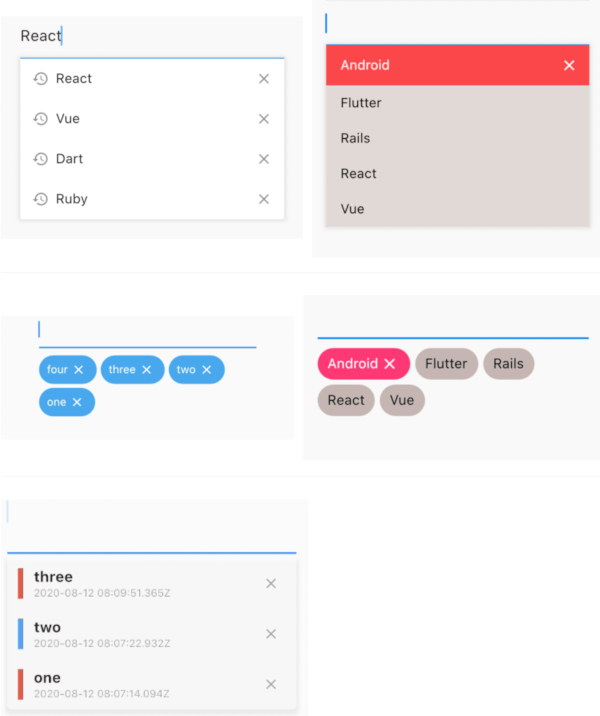
Overview

List

example1 example2
image image

Badge

example1 example2
image image

Customize

 
image

Getting Started

Usage

The only key in the your widget of application set to historyKey, supports like a text_field.

InputHistoryTextField(
    historyKey: "01",
),

a saved automatically as you type.( save up to limit, default to 5 )

input_history_text_field-1

a input history is suggested.

input_history_text_field-2

input history can be deleted.

input_history_text_field-3

Example

simple

All you need is a historyKey.

InputHistoryTextField(
    historyKey: "01",
),
badge style

Change style to badge is listStyle = ListStyle.Badge

InputHistoryTextField(
    historyKey: "01",
    listStyle: ListStyle.Badge,
),

 
image
Default items

If there is an item you want to display from the beginning or an item you want the user to selected.

InputHistoryTextField(
    historyKey: "01",
    lockItems: ['Flutter', 'Rails', 'React', 'Vue'],
),

List
image
change icon

Can hide or change the icon.

InputHistoryTextField(
    historyKey: "01",
    showHistoryIcon: true,
    showDeleteIcon: true,
    historyIcon: Icons.add,
    deleteIcon: Icons.delete,
),
 
image
gradually transmitted

enableOpacityGradient is input history list is gradually transmitted.

InputHistoryTextField(
    historyKey: "01",
    enableOpacityGradient: true,
),
 
image
lines decoration

listRowDecoration is input history lines as a decoration.

InputHistoryTextField(
    historyKey: "01",
    listRowDecoration: BoxDecoration(
        border: Border(
        left: BorderSide(color: Colors.blue, width: 8),
        ),
    ),
),

 
image
list decoration

listDecoration is input history list as a decoration.

InputHistoryTextField(
    historyKey: "01",
    listDecoration: BoxDecoration(
        color: Colors.cyan,
        borderRadius: BorderRadius.only(
            bottomLeft: Radius.circular(20),
            bottomRight: Radius.circular(20)),
        boxShadow: [
        BoxShadow(
            color: Colors.grey.withOpacity(0.2),
            spreadRadius: 8,
            blurRadius: 8,
            offset: Offset(0, 3)),
        ],
    ),
),

 
image
list layout builder

If you want to customize everything, to use historyListItemLayoutBuilder.

InputHistoryTextField(
    historyKey: "01",
    historyListItemLayoutBuilder: (controller, value, index) {
        return InkWell(
        onTap: () => controller.select(value.text),
        child: Row(
            children: [
            Expanded(
                flex: 1,
                child: Container(
                    margin: const EdgeInsets.only(left: 10.0),
                    padding: const EdgeInsets.only(left: 10.0),
                    decoration: BoxDecoration(
                    border: Border(
                        left: BorderSide(
                        width: 5.0,
                        color: index % 2 == 0
                            ? Colors.red
                            : Colors.blue,
                        ),
                    ),
                    ),
                    child: Column(
                    crossAxisAlignment: CrossAxisAlignment.start,
                    children: [
                        Text(
                        value.textToSingleLine,
                        overflow: TextOverflow.ellipsis,
                        style:
                            TextStyle(fontWeight: FontWeight.bold),
                        ),
                        Text(
                        DateTime.fromMillisecondsSinceEpoch(
                                value.createdTime)
                            .toUtc()
                            .toString(),
                        overflow: TextOverflow.ellipsis,
                        style: TextStyle(
                            fontSize: 10,
                            color: Theme.of(context).disabledColor),
                        ),
                    ],
                    )),
            ),
            IconButton(
                icon: Icon(
                Icons.close,
                size: 16,
                color: Theme.of(context).disabledColor,
                ),
                onPressed: () {
                controller.remove(value);
                },
            ),
            ],
        ),
    );}
)
 
image
API
name ex note
historyKey key-01 String a only key in the your application,saved with this key.
limit 5 int max limit of input history
hasFocusExpand true bool show input history of edit text focused
showHistoryIcon true bool icon of input history at left positioned
showDeleteIcon true bool icon of delete at right positioned
enableHistory true bool enabled/disabled of input history
enableSave true bool enabled/disabled saved history
enableOpacityGradient true bool make the input history list gradually transparent
enableFilterHistory true bool suggest filters when input text
showHistoryList true bool show/hide of input history list
historyIcon Icons.add IconData IconData for history icon.
historyIconTheme IconTheme IconTheme IconTheme for history icon.
deleteIcon Icons.delete IconData IconData for delete icon.
deleteIconTheme IconTheme IconTheme IconTheme for delete icon.
listOffset Offset(0, 5) Offset set a position for list.
listTextStyle TextStyle(fontSize: 30) TextStyle sets a text style for list.
listRowDecoration BoxDecoration Decoration a row of input history for decoration
listDecoration BoxDecoration Decoration a list of input history for decoration
listStyle ListStyle.List ListStyle change style List or Badge
textColor Colors.black Color a text color
backGroundColor Colors.grey Color a background color
historyIconColor Colors.white Color a history icon color
deleteIconColor Colors.white Color a delete icon color
lockItems ['Flutter', 'Rails', 'React', 'Vue'] List
fixed shown, cannot be delete items
lockTextColor Colors.black Color a lock items text color
lockBackgroundColor Colors.grey Color a lock items background color
historyListItemLayoutBuilder Widget Widget a customize full layout.
InputHistoryController InputHistoryController InputHistoryController Select or delete the input history list

Kategorien

Abhängigkeiten

Abhängigkeiten 1 Einträge

Quell-Repository

Projekte, die dieses Paket verwenden

Noch keine Daten verfügbar.