Originaler README-Schnappschuss aus dem verknüpften Quell-Repository. Aktuelle Inhalte finden Sie im Repository.
Input Quantity







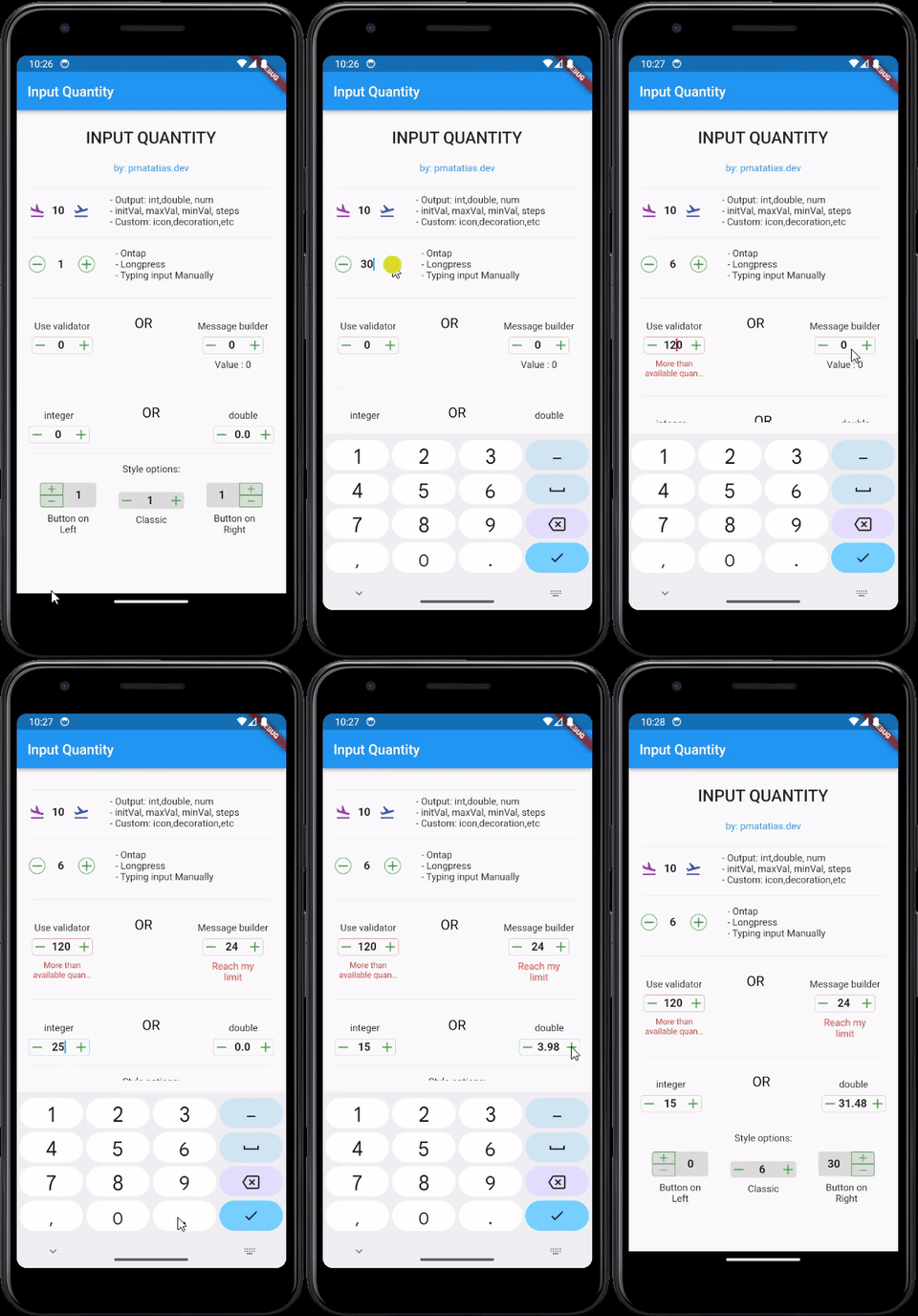
Flutter widget for quantity input. Increase or decrease the input value by pressing the button. It's built with text fields, so InputQty also supports manually typing quantities. Very flexible for large quantities. For example, if the user wants to enter the value 19243, it will be very difficult to only rely on buttons.
Set input limits so that input values automatically return to predefined maximum/minimum values.
Features
- Simple and easy to use
- Customizable
- Output:
int, double, or num
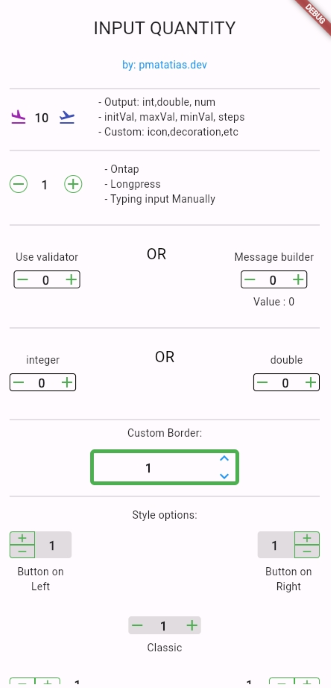
- Style options: classic, button on the left or button on the right
- Tap once to update the value,
longpress for update the value continuously, or type the value manually.
- Add validator form, or use custom message builder
Installation
To use this package, add input_quantity as a dependency in your pubspec.yaml file.
dependencies:
  input_quantity: ^2.5.0
Then, run flutter pub get to install the package.
Usage
Basic Usage
import 'package:input_quantity/input_quantity.dart';

InputQty(
  maxVal: 100,
  initVal: 0,
  minVal: -100,
  steps: 10,
  onQtyChanged: (val) {
    print(val);
  },
)
Typing Manually
If you want to prevent typing manually, you can disable it from enableTyping.
InputQty(
  qtyFormProps: QtyFormProps(enableTyping: false),
  ...
)
Output Types
By default, the output will be as a num.
InputQty(
onQtyChanged: (val) {
print(val.runtimeType);
},
)
To specify the output type as int:
InputQty.int(
onQtyChanged: (val) {
print(val.runtimeType);
},
)
To specify the output type as double:
InputQty.double(
onQtyChanged: (val) {
print(val.runtimeType);
},
)
Customizing Appearance and Behavior
Using QtyFormProps
You can customize the appearance and behavior of the input field using QtyFormProps.
InputQty(
  qtyFormProps: QtyFormProps(
    textAlign: TextAlign.center,
    style: TextStyle(fontWeight: FontWeight.bold),
    cursorColor: Colors.red,
    enableTyping: true,
  ),
)
Using QtyDecorationProps
You can customize the decoration of the input field using QtyDecorationProps.
InputQty(
  decoration: QtyDecorationProps(
    borderShape: BorderShapeBtn.circle,
    btnColor: Colors.blue,
    fillColor: Colors.grey[200],
    isBordered: true,+
  ),
)
Validation
You can use the validator property to validate the input value.
InputQty(
  validator: (value) {
    if (value == null) {
      return "Required field";
    } else if (value >= 200) {
      return "More than available quantity";
    }
    return null;
  },
)
Custom Messages
You can use the messageBuilder property to display custom messages based on the input value.
InputQty(
  messageBuilder: (minVal, maxVal, value) {
    if (value == null) return null;
    if (value < -20) {
      return Text(
        "Reach my limit",
        style: TextStyle(color: Colors.red),
        textAlign: TextAlign.center,
      );
    } else if (value > 20) {
      return Text(
        "Reach my limit",
        style: TextStyle(color: Colors.red),
        textAlign: TextAlign.center,
      );
    } else {
      return Text("Value : $value", textAlign: TextAlign.center);
    }
  },
)
Controlling Input Value Programmatically
You can use TextEditingController to control the input value programmatically.
final TextEditingController _controller = TextEditingController();

InputQty(
  qtyFormProps: QtyFormProps(
    controller: _controller,
  ),
)
Button Orientation
You can change the orientation of the buttons using ButtonOrientation.
InputQty(
  decoration: QtyDecorationProps(
    orientation: ButtonOrientation.horizontal,
  ),
)
Button Position
You can change the position of the buttons using QtyStyle.
InputQty(
  decoration: QtyDecorationProps(
    qtyStyle: QtyStyle.btnOnRight,
  ),
)
Examples
For more examples, check the example directory.
Contributons
To contribute to this project, please follow the guidelines in the CONTRIBUTING.md file.
Thank you to all contributors for their valuable contributions!
Additional Information
- Want to thank me? You can buy me a coffee.