Originaler README-Schnappschuss aus dem verknüpften Quell-Repository. Aktuelle Inhalte finden Sie im Repository.
JSON_GEN_FORM
Generate Flutter forms using JSON, featuring a variety of built-in form controls,
support for validation, custom layouts, custom styles, and unlimited nested form grouping.
English · 中文
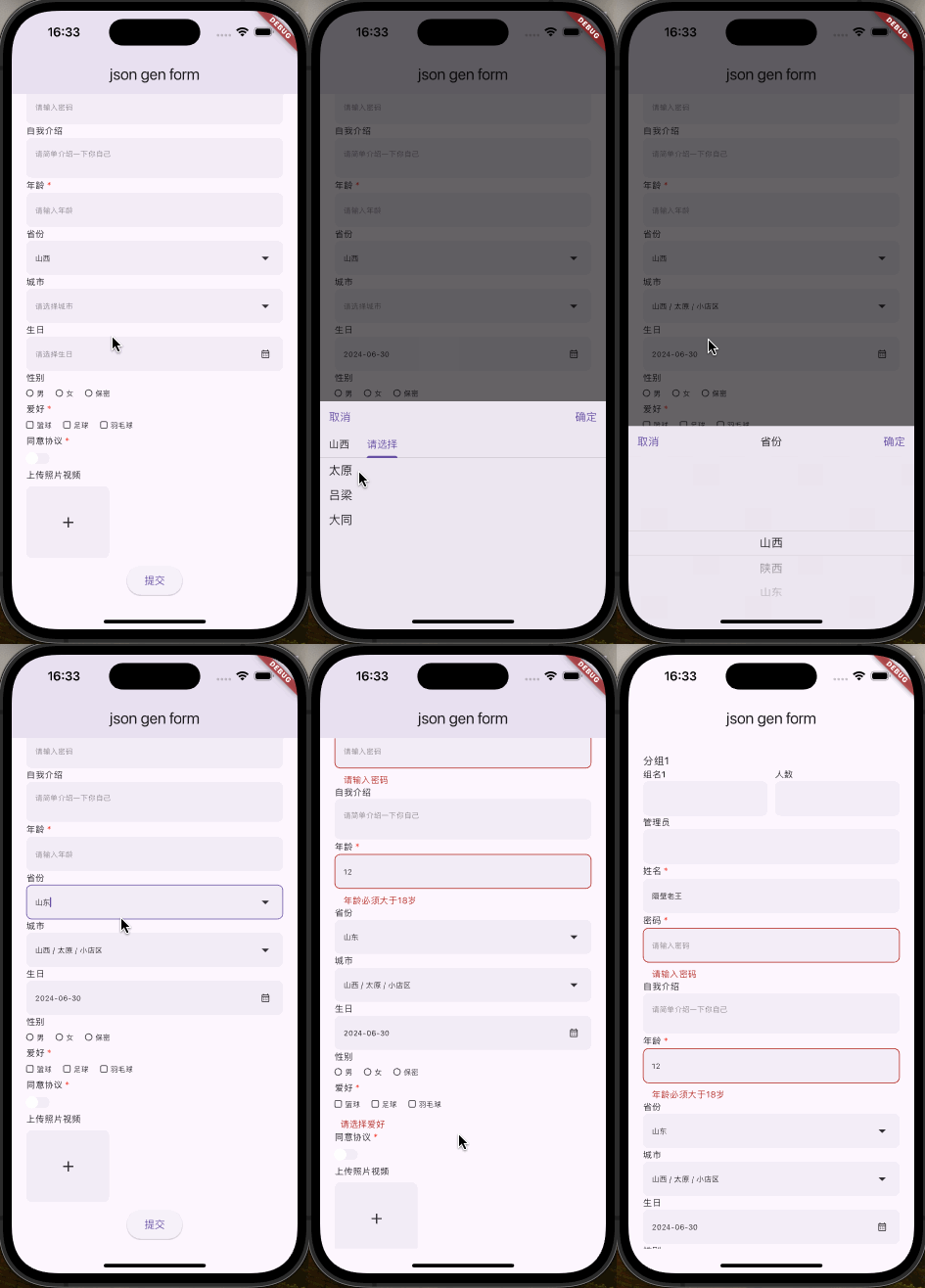
Features
- Render form using JSON
- Form validation
- Custom form styles
- Custom layouts (row, col)
- Infinite form grouping and nesting (group)
- Modify entire form values or individual form control values through methods
- Form controls:
- Text box
- Password box
- Textarea
- Number
- Radio button
- Checkbox
- Dropdown
- Switch
- Multimedia upload
- Date picker
- Time picker
- DateTime picker
Usage
import 'package:flutter/material.dart';
import 'package:json_gen_form/json_gen_form.dart';
void main() {
runApp(const MainApp());
}
class MainApp extends StatefulWidget {
const MainApp({super.key});
@override
State<MainApp> createState() => _MainAppState();
}
class _MainAppState extends State<MainApp> {
final GlobalKey _key = GlobalKey<JsonGenFormState>();
final List<dynamic> _data = [
{
"type": "text",
"field": "name",
"label": "姓名",
"value": "隔壁老王",
"placeholder": "请输入姓名",
"rules": [
{"required": true, "message": "请输入姓名"}
]
},
{
"type": "textarea",
"field": "remark",
"label": "自我介绍",
"value": null,
"placeholder": "请简单介绍一下你自己",
"rules": []
},
{
"type": "number",
"field": "age",
"label": "年龄",
"value": null,
"placeholder": "请输入年龄",
"rules": [
{"required": true, "message": "请输入年龄"},
{"min": 18, "message": "年龄必须大于18岁"}
]
}
];
@override
Widget build(BuildContext context) {
return MaterialApp(
theme: ThemeData(
brightness: Brightness.light,
useMaterial3: true,
),
home: Scaffold(
appBar: AppBar(
title: const Text('json gen form'),
),
body: SafeArea(
child: SingleChildScrollView(
physics: const BouncingScrollPhysics(),
padding: const EdgeInsets.symmetric(
horizontal: 20.0,
vertical: 20.0,
),
child: Column(
children: [
JsonGenForm(
key: _key,
config: _data,
decoration: JsonGenFormDecoration(
controlLabelWrap: (Widget child, dynamic data) {
return Container(
margin: const EdgeInsets.only(bottom: 5),
child: child,
);
},
controlWrap: (Widget child, dynamic data) {
return Container(
margin: const EdgeInsets.only(bottom: 10),
child: child,
);
},
),
),
ElevatedButton(
onPressed: () async {
final formState = _key.currentState as JsonGenFormState;
try {
final data = await formState.validate();
debugPrint('Validation success $data');
} catch (e) {
debugPrint('Validation error: $e');
}
},
child: const Text('Submit'),
),
],
),
),
),
),
);
}
}
General Parameters
Except for group, row, and col, all types have the following general parameters. All types have extra.
| Field |
Description |
Type |
Default Value |
Required |
| type |
Type |
String |
'' |
true |
| field |
Field Name |
String |
'' |
true |
| label |
Label |
String |
- |
- |
| hiddenLabel |
Hidden Label |
bool |
false |
- |
| value |
Default Value |
dynamic |
- |
- |
| disabled |
Disabled |
bool |
false |
- |
| readonly |
Read-Only |
bool |
false |
- |
| rules |
Validation Rules |
List |
[] |
- |
| extra |
Extra Params |
dynamic |
|
- |
Form Types
group
| Field |
Description |
Type |
Default Value |
Required |
| type |
Type |
String |
'group' |
true |
| field |
Field Name |
String |
'' |
- |
| label |
Label |
String |
'' |
- |
| hiddenLabel |
Hidden Label |
bool |
'' |
- |
| children |
Sub-Forms |
List |
[] |
- |
text
| Field |
Description |
Type |
Default Value |
Required |
| type |
Type |
String |
'text' |
true |
| placeholder |
Placeholder |
String |
- |
- |
| General Params |
- |
- |
- |
- |
password
| Field |
Description |
Type |
Default Value |
Required |
| type |
Type |
String |
'password' |
true |
| placeholder |
Placeholder |
String |
- |
- |
| General Params |
- |
- |
- |
- |
textarea
| Field |
Description |
Type |
Default Value |
Required |
| type |
Type |
String |
'textarea' |
true |
| placeholder |
Placeholder |
String |
- |
- |
| General Params |
- |
- |
- |
- |
number
| Field |
Description |
Type |
Default Value |
Required |
| type |
Type |
String |
'number' |
true |
| placeholder |
Placeholder |
String |
- |
- |
| General Params |
- |
- |
- |
- |
radio
| Field |
Description |
Type |
Default Value |
Required |
| type |
Type |
String |
'radio' |
true |
| options |
Options |
List |
[] |
- |
| direction |
Options Direction |
String |
'horizontal' |
- |
| itemHorizontalSpace |
Item Horizontal Space |
double |
16 |
- |
| itemVerticalSpace |
Item Vertical Space |
double |
8 |
- |
| General Params |
- |
- |
- |
- |
checkbox
| Field |
Description |
Type |
Default Value |
Required |
| type |
Type |
String |
'checkbox' |
true |
| options |
Options |
List |
[] |
- |
| direction |
Options Direction |
String |
'horizontal' |
- |
| itemHorizontalSpace |
Item Horizontal Space |
double |
16 |
- |
| itemVerticalSpace |
Item Vertical Space |
double |
8 |
- |
| General Params |
- |
- |
- |
- |
select
| Field |
Description |
Type |
Default Value |
Required |
| type |
Type |
String |
'select' |
true |
| options |
Options |
List |
[] |
- |
| multiple |
Multiple Select |
bool |
false |
- |
| General Params |
- |
- |
- |
- |
switch
| Field |
Description |
Type |
Default Value |
Required |
| type |
Type |
String |
'switch' |
true |
| General Params |
- |
- |
- |
- |
media
| Field |
Description |
Type |
Default Value |
Required |
| type |
Type |
String |
'media' |
true |
| mediaType |
Media Type (media, image, video) |
String |
'media' |
- |
| multiple |
Multiple Uploads |
bool |
false |
- |
| General Params |
- |
- |
- |
- |
ios Configuration info.plist
<key>NSCameraUsageDescription</key>
<string>Need camera for taking photos or scanning codes</string>
<key>NSPhotoLibraryUsageDescription</key>
<string>Need access to photo library for selecting photos or videos</string>
<key>NSMicrophoneUsageDescription</key>
<string>Need microphone access for recording videos</string>
android Configuration AndroidManifest.xml
<uses-permission android:name="android.permission.CAMERA" />
date
| Field |
Description |
Type |
Default Value |
Required |
| type |
Type |
String |
'date' |
true |
time
| Field |
Description |
Type |
Default Value |
Required |
| type |
Type |
String |
'time' |
true |
datetime
| Field |
Description |
Type |
Default Value |
Required |
| type |
Type |
String |
'datetime' |
true |
Layout Types
row
row's children must have type as col.
| Field |
Description |
Type |
Default Value |
Required |
| type |
Type |
String |
'row' |
true |
| gutter |
Spacing |
double |
0 |
- |
| children |
Children |
List |
[] |
- |
col
col's parent must be row.
| Field |
Description |
Type |
Default Value |
Required |
| type |
Type |
String |
'col' |
true |
| flex |
Flex |
int |
1 |
- |
| child |
Child Config |
Map |
|
|
group
| Field |
Description |
Type |
Default Value |
Required |
| type |
Type |
String |
'group' |
true |
| field |
Field Name |
String |
null |
- |
Validation Rules
- required
- type: Shortcut validation type, only supported for text input
- min: For string type, it's string length; for number type, it's a specific number; for array type, it's array length
- max: For string type, it's string length; for number type, it's a specific number; for array type, it's array length
- len: For string type, it's string length; for number type, it's a specific number; for array type, it's array length
- pattern: Regex validation
- message: Error message
