Pakete, Repositories und App-Kategorien suchen

Cover von keyboard_attachable
Paketdetailsv2.2.0

keyboard_attachable

Ein Flutter-Paket zum Erstellen von Widgets, die an die Soft-Tastatur angehängt werden können.

AndroidiOSmacOSWindowsLinux
30-Tage-Downloads
4950
Likes
119
Pub-Punkte
150

Paket installieren

flutter pub add keyboard_attachable

Paketübersicht

Aus öffentlichen Paketdaten erstellte Orientierung.

Ein Flutter-Paket, das Entwicklern ermöglicht, Widgets zu erstellen, die dynamisch an das Bildschirmtastatur angeheftet sind und die Benutzererfahrung durch kontextbezogene Steuerelemente oder Inhalte direkt über der Tastatur verbessern. Es unterstützt mehrere Plattformen wie Android, iOS, macOS, Windows und Linux und sorgt für konsistentes Verhalten über Geräte hinweg. Das Paket vereinfacht die Integration mit bestehenden Benutzeroberflächen durch eine saubere API zum Positionieren und Verwalten angehängter Widgets.

Anwendungsfälle

  • Aktionsschaltflächen über der Tastatur hinzufügen
  • Vorschläge oder Emojis in der Nähe von Eingabefeldern anzeigen
  • Benutzerdefinierte Tastaturüberlagerungen erstellen
  • Verbesserung der Formularnutzbarkeit mit Inline-Steuerelementen
  • Schnellen Zugriff auf Werkzeuge während der Texteingabe aktivieren

Hauptmerkmale

  • Plattformübergreifende Kompatibilität
  • Einfache Integration mit bestehenden Widgets
  • Dynamische Positionierung relativ zur Tastatur
  • Unterstützung für verschiedene Widget-Typen
  • Minimale Boilerplate-Code

Geeignet für

  • Entwickler, die interaktive Formulare erstellen
  • Apps, die häufige Tastaturinteraktion erfordern
  • UI-Designer, die verbesserte Eingabemöglichkeiten suchen
  • Multiplattform-Anwendungen mit tastaturzentrierten Workflows
  • Teams, die bei Texteingaben die Benutzerengagementpriorität haben

Hinweise

  • Kann eine sorgfältige Layoutverwaltung erfordern
  • Leistungseinfluss bei komplexen Widgets
  • Eingeschränkte Anpassungsmöglichkeiten für Änderungen der Tastaturhöhe
  • Mögliche Konflikte mit anderen Overlay-Widgets
  • Testen über verschiedene Gerätegrößen und Ausrichtungen hinweg erforderlich

Original-README

Originaler README-Schnappschuss aus dem verknüpften Quell-Repository. Aktuelle Inhalte finden Sie im Repository.

keyboard_attachable

A Flutter package to build widgets that can be attached to the soft keyboard.

Pub

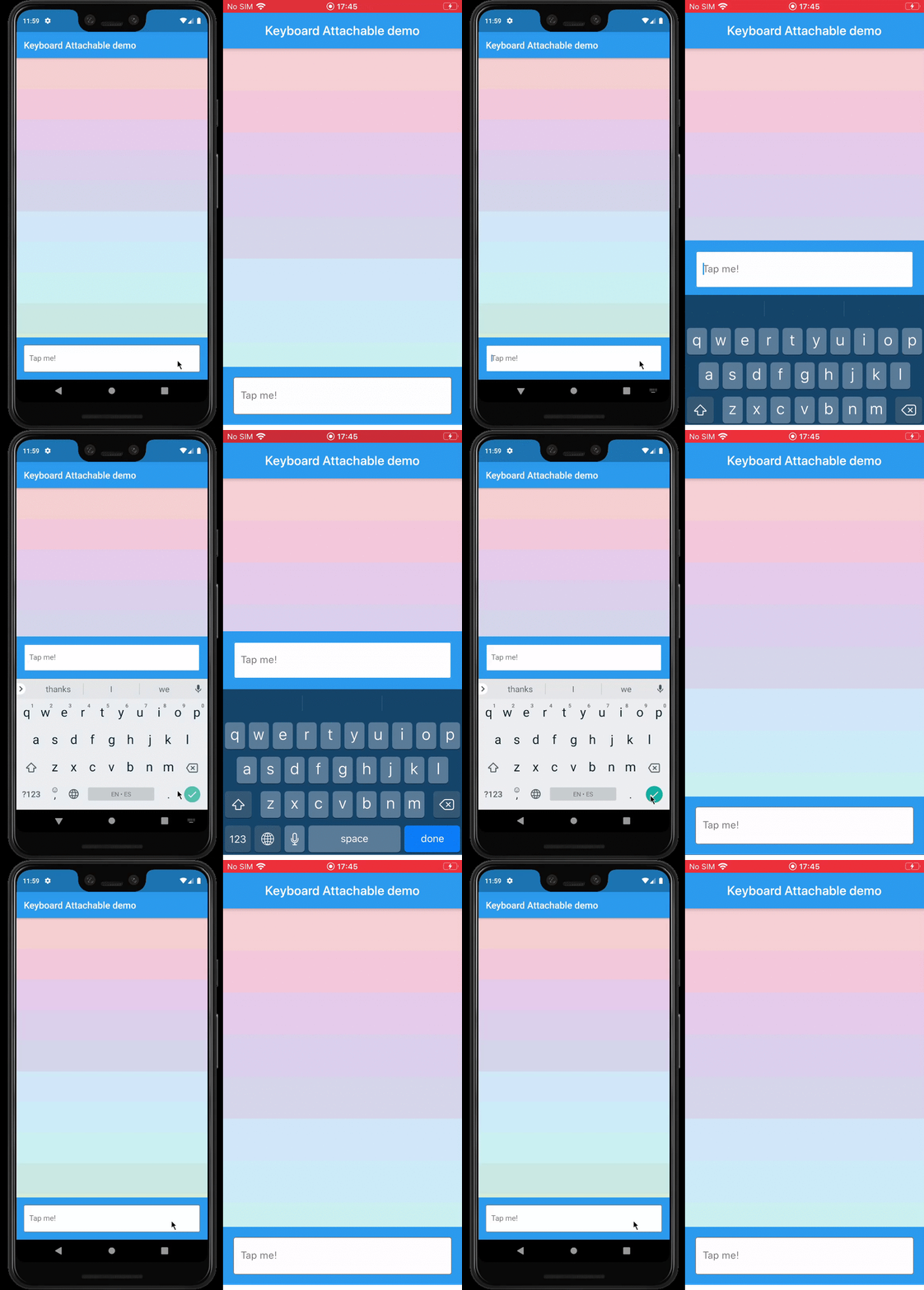
Example

Features

  • An alternative to Scaffold's resizeToAvoidBottomInset, with animations.
  • Control the animations that should happen when the soft keyboard is shown and hidden with a transition builder.
  • Animate the shrinkage and expansion of the page when the soft keyboard is shown and hidden, matching the platform soft keyboard animation.
  • Easily add permanent page footers that can be attached to the top of the soft keyboard.

Usage

This package exposes a FooterLayout stateless widget and a KeyboardAttachable stateful widget.

FooterLayout is a widget that can lay out a child widget above a footer. It does that by positioning a footer widget at the bottom of the available space first, and then positioning a child widget in the remaining space.

    Widget build(BuildContext context) => FooterLayout(
          footer: MyFooterWidget(),
          child: PageMainContent(),
        );

KeyboardAttachable is a widget that adds space below its baseline when the soft keyboard is shown and hidden with an animation that matches that of the platform keyboard. This widget can be used to animate its child when the soft keyboard is shown or hidden, so that the child widget appears to be attached to the keyboard.

You can combine these two widgets by passing a KeyboardAttachable widget as the footer of a FooterLayout to create a page that shrinks and expands when the soft keyboard appears and disappears, with an animation that matches the platform keyboard animation. Additionally, you can pass a child widget to your KeyboardAttachable to have a footer in your page that attaches itself to the soft keyboard when shown.

Warning: In order for this to work with animations, the resizeToAvoidBottomInset parameter of the Scaffold above the page has to be false. In addition to that, when there are SafeAreas involved the layout, it is recommended to set their maintainBottomViewPadding property to true in order for the animations to run smoothly, like so:

/// Builds a [Scaffold] that lays out a footer at the bottom of the page.
class KeyboardAttachablePage extends StatelessWidget {
  @override
  Widget build(BuildContext context) => Scaffold(
        backgroundColor: Colors.blue,
        resizeToAvoidBottomInset: false,
        appBar: AppBar(title: const Text("Keyboard Attachable demo")),
        body: SafeArea(
          maintainBottomViewPadding: true,
          child: FooterLayout(
            footer: KeyboardAttachableFooter(),
            child: ColorsList(),
          ),
        ),
      );
}

Getting started

In the pubspec.yaml of your flutter project, add the following dependency:

dependencies:
  keyboard_attachable: "^[LATEST_VERSION]"

Then run $ flutter pub get. In your library, add the following import:

import 'package:keyboard_attachable/keyboard_attachable.dart';

Author

Diego Rogel - GitHub

Changelog

Check the Changelog page to see what's recently changed.

License

This project is licensed under the MIT License - see the LICENSE file for details.

Kategorien

Abhängigkeiten

Abhängigkeiten 1 Einträge

Quell-Repository

Projekte, die dieses Paket verwenden

Noch keine Daten verfügbar.