Aus öffentlichen Paketdaten erstellte Orientierung.
LuaDardo ist eine in Dart implementierte Lua-5.3-Virtual Machine, die die nahtlose Integration von Lua-Skripten in Dart-Anwendungen ermöglicht. Sie erlaubt Entwicklern, Lua-Code direkt in Flutter und anderen Dart-Umgebungen auf mehreren Plattformen auszuführen. Das Paket bietet eine leichte, einbettbare Skriptlösung, die ideal ist, um Anwendungslogik dynamisch zu erweitern. Mit vollständigem Support für Android, iOS, macOS, Windows und Linux bietet LuaDardo plattformübergreifende Konsistenz und Leistung. Ihr Design legt besonderen Wert auf Kompatibilität mit dem Lua-5.3-Standard, was eine zuverlässige Ausführung von in Lua geschriebenen Skripten sicherstellt.
Anwendungsfälle
Lua-Skripte in Flutter-Apps einbetten
Dynamisches Spiellogik-Scripting
Erweiterbare Konfigurationssysteme
Laufzeitcodebewertung
Plugin-basierte Architektur
Hauptmerkmale
Lua 5.3-Kompatibilität
Plattformübergreifende Unterstützung
Leichte VM
Dart-native Integration
Skriptausführung aus Zeichenketten oder Dateien
Geeignet für
Flutter-Entwickler, die Skripting benötigen
Spielentwicklung mit dynamischem Verhalten
Anwendungen, die Plugin-Erweiterbarkeit erfordern
Werkzeuge, die eingebettete Skripting benötigen
Hinweise
Kenntnis der Lua-Syntax erforderlich
Beschränkt auf Lua 5.3-Funktionen
Die Leistung hängt von der Komplexität des Skripts ab
Keine integrierten Debugging-Tools
Original-README
Originaler README-Schnappschuss aus dem verknüpften Quell-Repository. Aktuelle Inhalte finden Sie im Repository.
LuaDardo
A Lua virtual machine written in Dart, which implements Lua5.3 version.
Example:
dependencies:lua_dardo:^0.0.3
import'package:lua_dardo/lua.dart';
voidmain(List<String> arguments) {
LuaState state = LuaState.newState();
state.openLibs();
state.loadString(r'''
a=10
while( a < 20 ) do
print("a value is", a)
a = a+1
end
''');
state.call(0, 0);
}
Usage
The LuaDardo library is compatible with most Lua C APIs. For the mutual call between Dart and Lua, please refer to the Lua C API guide.
Some simple examples:
LuaState state = LuaState.newState();
// Load the Lua standard library
state.openLibs();
state.loadString("print('hello')");
state.call(0, 0);
Dart calls Lua
Get Lua variables:
-- test.lua
a = 100
b = 120
Dart code:
LuaState ls = LuaState.newState();
ls.openLibs();
ls.doFile("test.lua");

// a push into the stack
ls.getGlobal("a");
if(ls.isNumber(-1)){
    var a = ls.toNumber(-1);
    print("a=$a");
}
// b push into the stack
ls.getGlobal("b");
if(ls.isNumber(-1)){
    var b = ls.toNumber(-1);
    print("b=$b");
}
ls.getGlobal("mytable");
ls.pushString("k1");
// Pop the key at the top of the stack, get the value of the key, and push the result onto the top of the stack
ls.getTable(-2);
if(ls.isInteger(-1)){
// Get the value of key k1var k1 = ls.toInteger(-1);
}
// Repeat
ls.pushString("k2");
ls.getTable(-2);
if(ls.isNumber(-1)){
var k2 = ls.toNumber(-1);
}
A simpler alternative: getField
    ls.getGlobal("mytable");
    ls.getField(-1, "k1");
    if(ls.isInteger(-1)){
      var k1 = ls.toInteger(-1);
    }
Call lua function:
-- test.lua

function myFunc()
    print("myFunc run")
end
The pCall method has three parameters. The first parameter indicates the number of parameters of the called Lua function, and the second parameter indicates the number of return values of the called Lua function.
Lua calls Dart
// Push value onto stack
ls.pushString("Alex");
// Set variable name
ls.setGlobal("name");
Lua:
-- Get global variable name
print(name) -- Alex
Define global table in Dart:
    // Create a table and push it onto the stack
    ls.newTable();
    // Push a key onto the stack
    ls.pushString("name");
    // Push the value onto the stack. Note that at this time the index of the table in the stack becomes -3
    ls.pushString("Alex");
    // Set the above key-value pair to the table, and pop up the key and value
    ls.setTable(-3);
    // Set the variable name to the table, and pop up the table
    ls.setGlobal("students");
Lua:
-- Equivalent to a table:students = {name="Alex"}
print(students.name)
Call Dart function:
import'package:lua_dardo/lua.dart';
import'dart:math';
// wrapper function must use this signature:int Function(LuaState ls)// the return is the number of returned valuesintrandomInt(LuaState ls) {
int max = ls.checkInteger(1);
ls.pop(1);
var random = Random();
var randVal = random.nextInt(max);
ls.pushInteger(randVal);
return1;
}
voidmain(List<String> arguments) {
LuaState state = LuaState.newState();
state.openLibs();
state.pushDartFunction(randomInt);
state.setGlobal('randomInt');
// execute the Lua script to test the randomInt function
state.loadString('''
rand_val = randomInt(10)
print('random value is '..rand_val)
''');
state.call(0, 0);
}
Some people are curious about how to access Lua tables in Dart. Here is a simple example:
  state.loadString('''
rand_val = randomInt(10,{ ["hello"] = "World", ["hello22"] = "World132414" })
print('random value is '..rand_val)
''');
intrandomInt(LuaState ls) {
int? max = ls.checkInteger(1);
ls.getField(2, "hello");
// This is a debugging method that looks at the stack
ls.printStack();
var hello = ls.toStr(-1);
print(hello);
ls.pop(1);
ls.getField(2, "hello22");
var hello22 = ls.toStr(-1);
print(hello22);
ls.pop(1);
var random = Random();
var randVal = random.nextInt(max!);
ls.pushInteger(randVal);
return1;
}
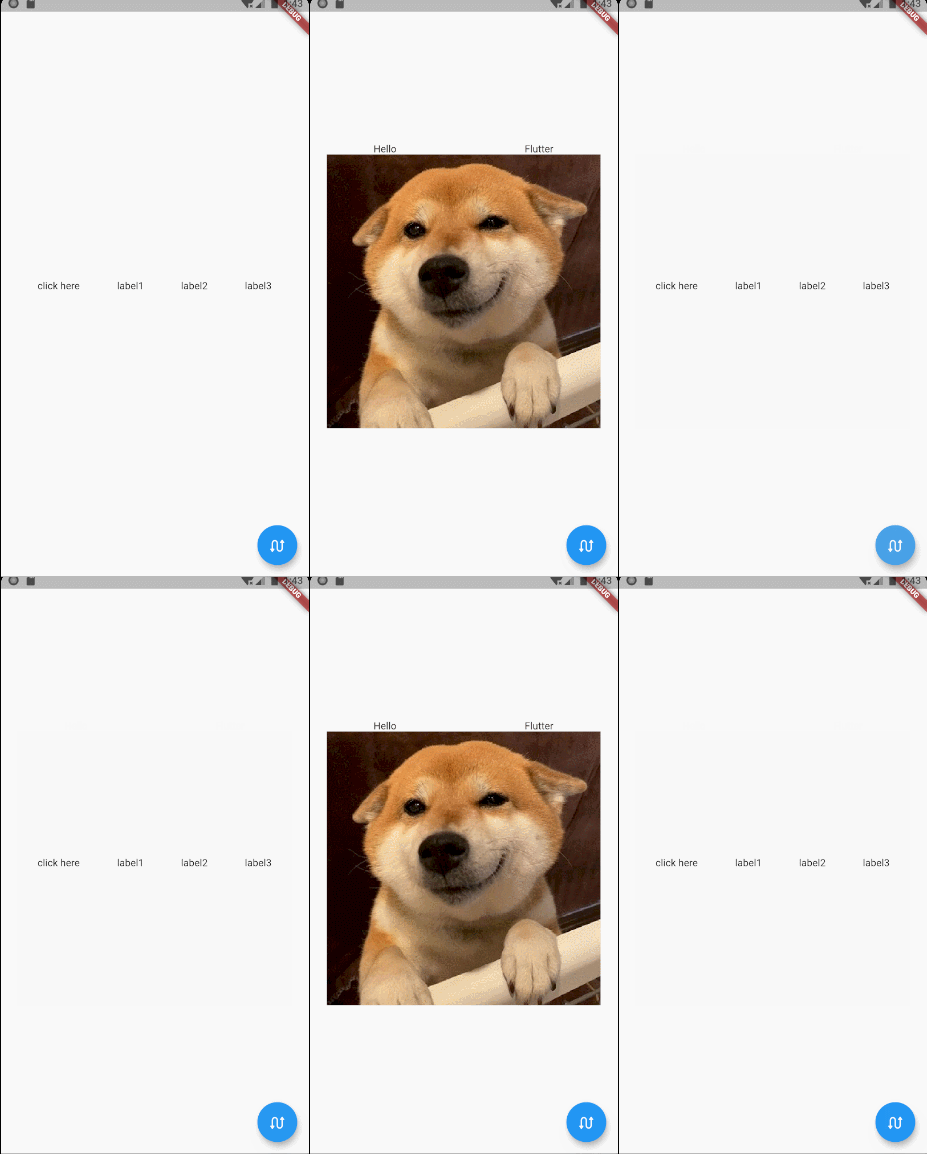
Try on Flutter
function getContent1()
    return Row:new({
        children={
            GestureDetector:new({
                onTap=function()
                    flutter.debugPrint("--------------onTap--------------")
                end,

                child=Text:new("click here")}),
            Text:new("label1"),
            Text:new("label2"),
            Text:new("label3"),
        },
        mainAxisAlign=MainAxisAlign.spaceEvenly,
    })
end

function getContent2()
    return Column:new({
        children={
            Row:new({
                children={Text:new("Hello"),Text:new("Flutter")},
                mainAxisAlign=MainAxisAlign.spaceAround
            }),
            Image:network('https://gitee.com/arcticfox1919/ImageHosting/raw/master/img/flutter_lua_test.png'
                ,{fit=BoxFit.cover})
        },
        mainAxisSize=MainAxisSize.min,
        crossAxisAlign=CrossAxisAlign.center
    })
end