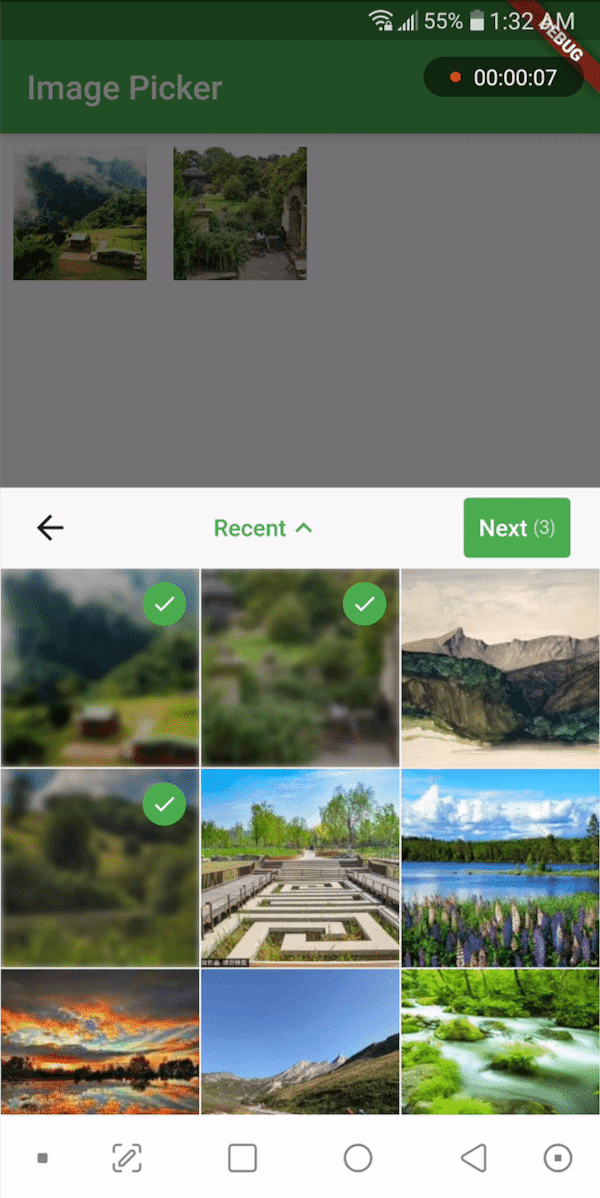
Aus öffentlichen Paketdaten erstellte Orientierung.
Ein Flutter-Widget, das Benutzern die Auswahl von Mediendateien aus dem Gerätespeicher ermöglicht. Es kann überall im Widget-Baum platziert werden und bietet Flexibilität bei der UI-Integration. Das Widget verarbeitet die Dateiauswahl mit minimalem Boilerplate und unterstützt verschiedene Medientypen wie Bilder und Videos. Es bietet eine saubere, wiederverwendbare Schnittstelle zum Auswählen von Medien, ohne tiefgehendes plattformspezifisches Wissen zu erfordern. Ideal für Apps, die eine einfache und konsistente Funktion zur Eingabe von Medien benötigen.
Anwendungsfälle
Medienauswahl in Formulare integrieren
Benutzern das Hochladen von Fotos oder Videos erlauben
Inhalts-Erstellungstools erstellen
Medienauswahl zu Profilbearbeitungsbildschirmen hinzufügen
Galerie- oder Album-Schnittstellen erstellen
Hauptmerkmale
Wiederverwendbar im gesamten Widget-Baum
Einfache Integration mit minimalem Setup
Unterstützt mehrere Medientypen
Leichtgewichtig und auf Kernfunktionen fokussiert
Funktioniert ohne plattformspezifischen Code
Geeignet für
Entwickler, die medienintensive Apps erstellen
Apps, die benutzerbereitgestellte Inhalte erfordern
UI-Komponenten, die eine flexible Medienauswahl erfordern
Projekte, die Einfachheit und Wiederverwendbarkeit priorisieren
Hinweise
Enthält keine Medienverarbeitungsfunktionen
Beschränkt auf grundlegende Dateiauswahl
Keine integrierte Vorschau oder Beschneidung
Erfordert manuelle Handhabung von Dateipfaden
Abhängig von den zugrundeliegenden Plattformberechtigungen
Original-README
Originaler README-Schnappschuss aus dem verknüpften Quell-Repository. Aktuelle Inhalte finden Sie im Repository.
media_picker_widget
A widget that picks media files from storage and allows you to place it anywhere in the widget tree. You can use this widget in a dialog, bottom sheet, or anywhere else as you wish. It supports picking single or multiple images or videos. Use the PickerDecoration class to decorate the UI.
If you find this widget useful, consider supporting the developer by buying them a coffee.
Installation
Add the following line to your pubspec.yaml file:
media_picker_widget:$latest_version
The latest version of the package is
Android
To use this widget on Android, you need to add the following permissions to your AndroidManifest.xml file, located in <project root>/android/app/src/main/AndroidManifest.xml:
Starting with version 0.8.1 the iOS implementation uses PHPicker to pick (multiple) images on iOS 14 or higher.
As a result of implementing PHPicker it becomes impossible to pick HEIC images on the iOS simulator in iOS 14+. This is a known issue. Please test this on a real device, or test with non-HEIC images until Apple solves this issue. 63426347 - Apple known issue
Add the following keys to your Info.plist file, located in <project root>/ios/Runner/Info.plist:
NSPhotoLibraryUsageDescription - describe why your app needs permission for the photo library. This is called Privacy - Photo Library Usage Description in the visual editor.
NSCameraUsageDescription - describe why your app needs access to the camera. This is called Privacy - Camera Usage Description in the visual editor.
NSMicrophoneUsageDescription - describe why your app needs access to the microphone, if you intend to record videos. This is called Privacy - Microphone Usage Description in the visual editor.
To use the media_picker_widget, follow these steps:
Make sure your app's minSdkVersion is set to 21 in the app/build.gradle file.
Within your Flutter widget tree, simply add the MediaPicker widget, which extends StatefulWidget. Here's an example:
MediaPicker(
  mediaList: mediaList, //let MediaPicker know which medias are already selected by passing the previous mediaList
  onPicked: (selectedList){
    print('Got Media ${selectedList.length}');
  },
  onCancel: ()=> print('Canceled'),
  mediaCount: MediaCount.single,
  mediaType: MediaType.image,
  decoration: PickerDecoration(),
)
Customization
Customize the widget as needed. You can use the PickerDecoration class to decorate the UI.
Custom Header
New header customization have been added. MediaPicker widget has HeaderBuilder property. You can pass a HeaderBuilder to customize the header. HeaderBuilder is a function that returns a Widget. You can use HeaderBuilder to customize the header as you wish. You can use MediaPickerHeader class to get the default header. MediaPickerHeader class has a MediaPickerHeaderProps class that takes MediaPicker properties as parameters. You can use MediaPickerHeaderProps class to customize the header.
Like this,