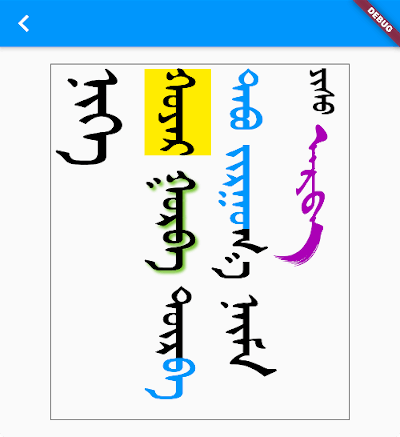
Aus öffentlichen Paketdaten erstellte Orientierung.
Das mongol-Paket ist eine Flutter-Widget-Bibliothek zur Darstellung und Bearbeitung vertikaler mongolischer Texte. Es unterstützt das einzigartige horizontale-zu-vertikalen Schreibsystem, das in der traditionellen mongolischen Schrift verwendet wird, und ermöglicht die genaue Anzeige sowie Interaktion mit Texten, die von oben nach unten fließen. Ideal für Apps, die sich an mongolischsprachige Benutzer richten oder kulturell spezifische Typografie erfordern, integriert es sich nahtlos in Flutter-Projekte auf allen wichtigen Plattformen. Das Paket verarbeitet Layout, Ausrichtung und Eingabelogik, die an die Konventionen der mongolischen Schrift angepasst sind.
Anwendungsfälle
Anzeige traditioneller mongolischer Schrift
Vertikale mongolische Schrift bearbeiten
Mehrsprachige Apps mit mongolischer Unterstützung
Kulturelle oder pädagogische Anwendungen
Digitale Veröffentlichung für mongolisches Content
Hauptmerkmale
Vertikale Textwiedergabe für die mongolische Schrift
interaktive Textbearbeitung
Plattformübergreifende Kompatibilität
Unterstützung für mongolische Unicode-Zeichen
Anpassbarer Textlayout
Geeignet für
Entwickler, die auf mongolischsprachige Zielgruppen abzielen
Apps, die traditionelle mongolische Typografie erfordern
Pädagogische oder sprachliche Software
Projekte, die ostasiatische oder zentralasiatische Schriften betreffen
Hinweise
Kenntnisse der mongolischen Schriftstruktur erforderlich
This all assumes you've added one or more Mongolian fonts to your app assets.
Adding a Mongolian font
The library does not include a Mongolian font. This allows the library to be smaller and also gives developers the freedom to choose any Mongolian font they like.
Since it's likely that some of your users' devices won't have a Mongolian font installed, you should include at least one Mongolian font with your project. Here is what you need to do:
Now you won't have to manually set the font for every Mongolian text widget. If you want to use a different font for some widgets, though, you can still set the fontFamily as you normally would inside TextStyle.
You may also consider using mongol_code with a Menksoft font if your users have devices that don't support OpenType Unicode font rendering. mongol_code converts Unicode to Menksoft code, which a Menksoft font can display without any special rendering requirements.
Editing vertical text
You can use MongolTextField to receive and edit text from the system keyboard. This widget includes most of the functionality of the standard Flutter TextField widget.
Here is it on iOS and Android interacting with a system keyboard:
If you want to use an outlined text field with a label, use MongolOutlineInputBorder:
Note: There is currently a bug in the MongolTextField for maxLines: null. PRs are welcome!
In order to correctly handle right/left and up/down keys on the web and desktop (or for physical keyboards connected to a mobile app), you need to return the MongolTextEditingShortcuts widget from the builder method of your MaterialApp (or CupertinoApp or WidgetsApp) at the top of your widget tree:
For something a little fancier, you can also use the MongolListTile widget just like you would use ListTile. Here is an example from the example project:
There are Mongol equivalents to all of the Flutter buttons:
MongolTextButton
MongolOutlinedButton
MongolElevatedButton
MongolFilledButton
MongolFilledButton.tonal
MongolTextButton.icon
MongolOutlinedButton.icon
MongolElevatedButton.icon
MongolFilledButton.icon
MongolFilledButton.tonalIcon
MongolIconButton
MongolIconButton.filled
MongolIconButton.filledTonal
MongolIconButton.outlined
The reason for the Mongol icon button is to provide a vertical tooltip that will appear for a longpress on mobile and for a mouse hover on desktop and web.
Other widgets
MongolAlertDialog
This alert dialog works mostly the same as the Flutter AlertDialog.
TODO
Improve keyboard (this may be better as a separate package)
Various other text based widgets
Support WidgetSpan.
Add more tests
For MongolTextAlign.bottom don't count final space in line height