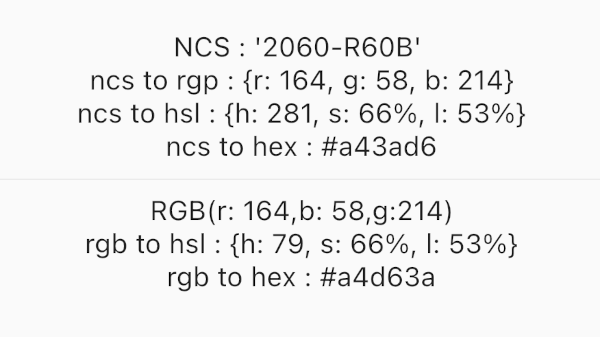
Ein umfassendes Dart-Paket zur Umwandlung von NCS-Farben (Natural Color System) in die Formate RGB, HSL und HEX mit zusätzlichen RGB-Umwandlungswerkzeugen.
Aus öffentlichen Paketdaten erstellte Orientierung.
ncscolor ist ein Dart-Paket, das eine nahtlose Konvertierung zwischen NCS-Farben (Natural Color System) und gängigen Formaten wie RGB, HSL und HEX ermöglicht. Es bietet genaue Farbtransformationen, die für Design- und Entwicklungsworkflows mit präziser Farbdarstellung unerlässlich sind. Das Paket enthält zudem zusätzliche Hilfsfunktionen zur RGB-Manipulation, was seine Verwendbarkeit in UI/UX-Anwendungen erhöht. Für den plattformübergreifenden Einsatz konzipiert, unterstützt es Android, iOS, Web, macOS, Windows und Linux.
Anwendungsfälle
Implementierung des Design-Systems
Farbkompatibilität in digitalen Schnittstellen
Entwicklung kreativer Werkzeuge
barrierefreie Farbauswahl
UI-Prototypen
Hauptmerkmale
NCS zu RGB/HSL/HEX-Umwandlung
RGB-Nützfunktionen
Hochpräzise Farbberechnungen
Plattformübergreifende Kompatibilität
Einfache API-Integration
Geeignet für
Designer, die NCS-Farbstandards verwenden
Entwickler, die Farbwähler erstellen
Anwendungen, die eine genaue Farbübersetzung erfordern
Frontend-Teams, die mit Designsystemen arbeiten
Kreatives Software integriert NCS
Hinweise
Erfordert Verständnis des NCS-Farbmodells
Beschränkt auf Farbformatumwandlung
Keine integrierte Farbauswahl-Oberfläche
Am besten zusammen mit Design-Tools verwendet
Nicht für die Echtzeitfarbebearbeitung optimiert
Original-README
Originaler README-Schnappschuss aus dem verknüpften Quell-Repository. Aktuelle Inhalte finden Sie im Repository.
NCSColor 🎨
A comprehensive Dart package for converting NCS (Natural Color System) colors to RGB, HSL, and HEX formats, with additional RGB conversion utilities. Perfect for Flutter apps and Dart projects that need to work with NCS color specifications.
Experience NCSColor in action with our live Flutter web demo! Test color conversions, explore the NCS color system, and see real-time previews of your color transformations.
✨ Features
🎯 NCS to RGB conversion - Convert NCS color codes to RGB values
🌈 NCS to HSL conversion - Get HSL representation of NCS colors
🎨 NCS to HEX conversion - Generate hex color codes from NCS
🔄 RGB to HSL conversion - Convert RGB values to HSL format
🔄 RGB to HEX conversion - Convert RGB values to hex format
✅ Input validation - Proper NCS format validation with clear error messages
📱 Flutter ready - Works seamlessly with Flutter Color widgets
🚀 Modern Dart - Built with latest Dart features and null safety
🚀 Installation
Add this to your package's pubspec.yaml file:
dependencies:ncscolor:^1.0.0
Then run:
flutter pub get
📖 Usage
Import the package
import'package:ncscolor/ncscolor.dart';
NCS Color Conversions
// Create an NCS color instancefinal ncsColor = NCSColor(ncsCode: '2060-R60B');
// Convert to RGBfinal rgb = ncsColor.toRgb();
print(rgb); // {r: 164, g: 58, b: 214}// Convert to HSLfinal hsl = ncsColor.toHsl();
print(hsl); // {h: 281, s: 66%, l: 53%}// Convert to HEXfinal hex = ncsColor.toHex();
print(hex); // #a43ad6
Map<String, String> rgbToHsl({required int r, required int g, required int b})
String rgbToHex({required int r, required int g, required int b})
⚠️ Error Handling
The package provides clear error messages for invalid NCS codes:
try {
  final ncsColor = NCSColor(ncsCode: 'invalid-code');
  final rgb = ncsColor.toRgb();
} catch (e) {
  print(e); // ArgumentError: Invalid NCS color format...
}
🧪 Testing
Run the test suite:
flutter test
🤝 Contributing
Contributions are welcome! Please feel free to submit a Pull Request. For major changes, please open an issue first to discuss what you would like to change.
Fork the repository
Create your feature branch (git checkout -b feature/amazing-feature)
Commit your changes (git commit -m 'Add some amazing feature')
Push to the branch (git push origin feature/amazing-feature)