Pakete, Repositories und App-Kategorien suchen

Cover von nice_intro
Paketdetailsv0.2.1

nice_intro

Lassen Sie Ihre Benutzer Ihre App einfach kennenlernen! Dieses Paket hilft Ihnen, wunderschöne Einführungsseiten für Ihre App zu erstellen.

30-Tage-Downloads
45
Likes
93
Pub-Punkte
60

Paket installieren

flutter pub add nice_intro

Paketübersicht

Aus öffentlichen Paketdaten erstellte Orientierung.

Nice Intro ist ein Flutter-Paket, das die Erstellung visuell ansprechender Onboarding-Bildschirme für mobile Anwendungen vereinfachen soll. Es ermöglicht Entwicklern, reibungslose, anpassbare Einführungsfolien zu erstellen, die Nutzern helfen, die Funktionen der App schnell zu verstehen und damit zu interagieren. Mit einer intuitiven Konfiguration und einer sauberen API unterstützt es Animationen, Inhaltsplatzierung und Übergänge, die speziell auf erste Benutzererfahrungen zugeschnitten sind. Das Paket legt Wert auf Ästhetik und Benutzerfreundlichkeit und macht das Onboarding sowohl ansprechend als auch effektiv.

Anwendungsfälle

  • Neue Benutzer onboarden
  • App-Funktionsdemonstrationen
  • Erste Benutzererfahrung
  • Einführungen zum Produktlaunch
  • Verbesserung der Nutzereinbindung
  • Einfache Tutorial-Flows

Hauptmerkmale

  • Anpassbare Folienentwürfe
  • Glatte Animationen
  • Einfache Integration mit Flutter
  • Unterstützung für Text, Bilder und Symbole
  • Reaktionssicheres Layout-Handling
  • Konfigurierbare Navigationssteuerungen

Geeignet für

  • Mobile-App-Entwickler
  • UX-Designer
  • Startups, die Apps veröffentlichen
  • Apps, die eine Benutzerbildung erfordern
  • Projekte mit Onboarding-Anforderungen

Hinweise

  • Eingeschränkte plattformspezifische Anpassung
  • Keine integrierte Lokalisierungssupport
  • Erfordert manuelle Behandlung der Zustandsverwaltung
  • Abhängig von externen Abhängigkeiten für erweiterte Funktionen
  • Nicht für komplexe Workflows mit mehreren Schritten optimiert

Original-README

Originaler README-Schnappschuss aus dem verknüpften Quell-Repository. Aktuelle Inhalte finden Sie im Repository.

nice_intro

Get your users to know your app with ease

Getting Started

Onboarding is a great way to introduce your app to newcomers, to help them quickly adapt to the new conditions so that they can get the most out of your app

Pub Version Donate

A Flutter package to build awesome intro slides for your apps.

Demo

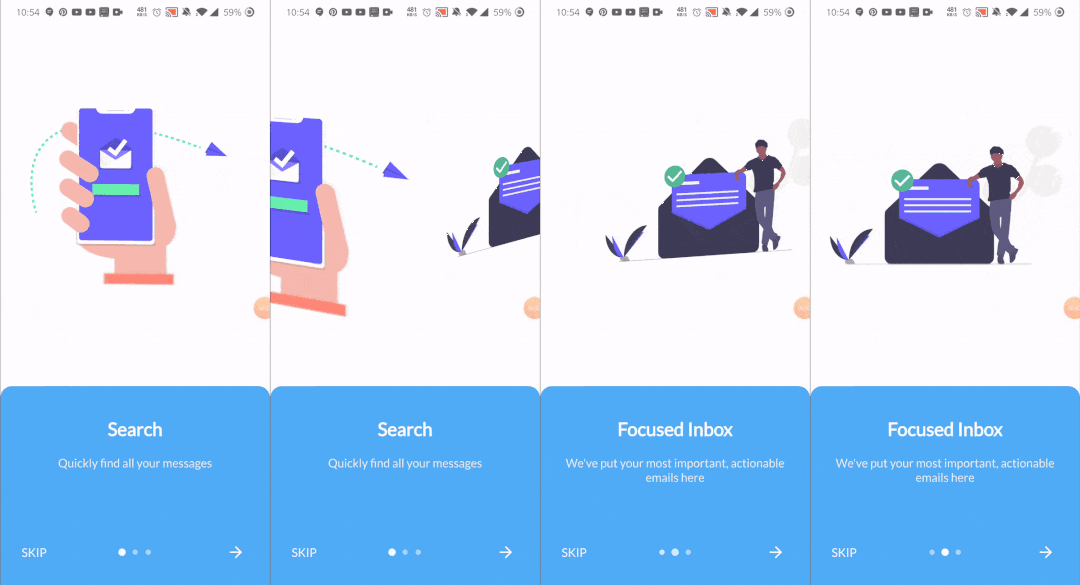
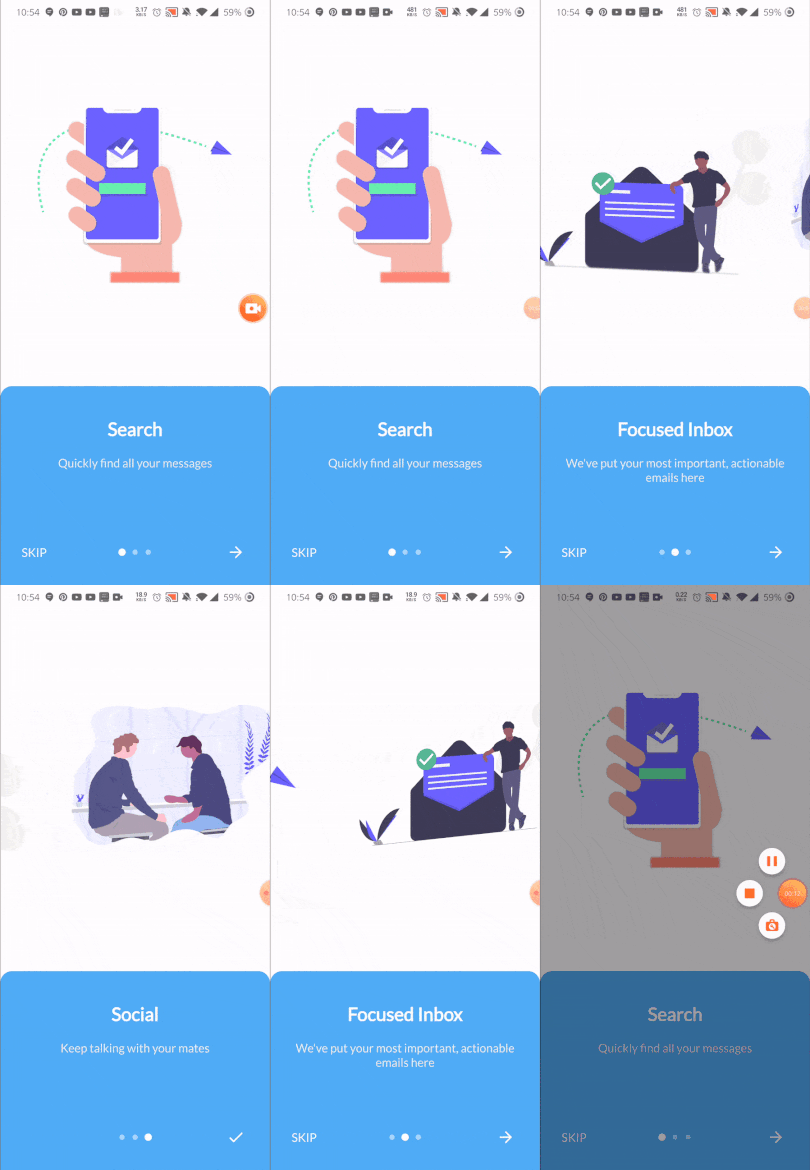
This is somehow what you can expect from this package :)

Package Demo package demo

Installation

Add the following to pubspec.yaml:

dependencies:
  nice_intro: ^0.2.0

Usage Example

First, import the following files

import 'package:nice_intro/intro_screen.dart';
import 'package:nice_intro/intro_screens.dart';

Then, create a list of screens each one with the IntroSreen class:

List<IntroScreen> pages =  [
        IntroScreen(
          title: 'Search',
          imageAsset: 'assets/img/1.png',
          description: 'Quickly find all your messages',
          headerBgColor: Colors.white,
        ),
        IntroScreen(
          title: 'Focused Inbox',
          headerBgColor: Colors.white,
          imageAsset: 'assets/img/2.png',
          description: "We've put your most important, actionable emails here",
        ),
        IntroScreen(
          title: 'Social',
          headerBgColor: Colors.white,
          imageAsset: 'assets/img/3.png',
          description: "Keep talking with your mates",
        ),
      ];

You'll come up with a list of nice slides screens.

Finally, pass the pages to an instance of IntroScreens class:

IntroScreens introScreens = IntroScreens(
      footerBgColor: TinyColor(Colors.blue).lighten().color,
      activeDotColor: Colors.white,
      footerRadius: 18.0,
      indicatorType: IndicatorType.CIRCLE,
      pages:pages

    return Scaffold(
      body: introScreens,
    );

And pass it to your scaffold widget.

Documentation
IntroScreen widget's properties
Name Type Default Description
title String required Set the title of your slide screen
description String required Set the description of your slide screen
header String Container() Set the widget to use as the header part of your screen
imageAsset String null Set the image path of your slide screen
textStyle TextStyle null Set the style of the title and description of your slide
headerBgColor Color Colors.white Set the background color of the slide
headerPadding EdgeInsets EdgeInsets.all(12) Set the padding of the header part of your slide screen
containerBg Color Colors.white Set the wrapper container's background color
IntroScreens widget's properties
Name Type Default Description
slides List<IntroScreen> required list of your slides
onDone Function required Set the action to do when the last slide is reached
onSkip Function required Set the action to do when the user skips the slides
footerRadius double 12.0 Set the radius of the footer part of your slides
footerBgColor Color Color(0xff51adf6) Set the background color of the footer part of your slides
footerGradients List<Color> [] Set the list of colors for the gradient of the footer part of your slides
footerPadding EdgeInsets EdgeInsets.all(24) Set the padding of the footer part of your slides
indicatorType IndicatorType IndicatorType.CIRCLE Set the type of indicator for your slides
activeDotColor Color Colors.white Set the color of the active indicator color
inactiveDotColor Color null Set the color of an inactive indicator color
skipText String "Skip" Set the text of the skip widget
nextWidget Widget Set the widget to use for next interaction of your slides
doneWidget Widget Set the widget to display when the last slide is reached
viewPortFraction double 1.0 Set the viewport fraction of your slides
textColor Color Colors.white Set the text color of the footer part of your slides
physics ScrollPhysics BouncingScrollPhysics Set the physics for the page view
IndicatorType enum properties
  • IndicatorType.CIRCLE
  • IndicatorType.LINE
  • IndicatorType.DIAMOND

Now enjoy!

Refer to example folder and the source code for more information.

Kategorien

Abhängigkeiten

Abhängigkeiten 1 Einträge

Quell-Repository

Projekte, die dieses Paket verwenden

Noch keine Daten verfügbar.