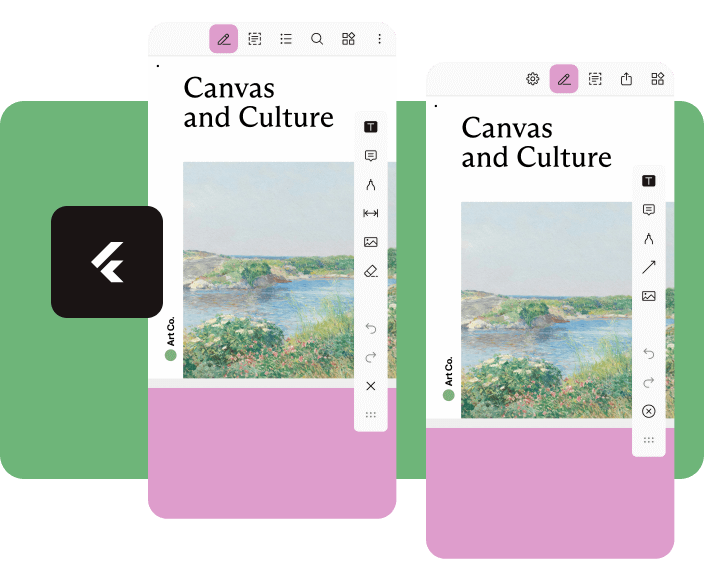
Aus öffentlichen Paketdaten erstellte Orientierung.
Nutrient Flutter ist ein leistungsstarkes Plugin, das den Nutrient PDF SDK in Flutter-Anwendungen integriert und erweiterte Funktionen zum Anzeigen und Bearbeiten von PDFs ermöglicht. Es unterstützt die Darstellung, Hervorhebungen, Unterschriften und Manipulation von PDFs mit hoher Leistung auf Android- und iOS-Plattformen. Speziell für Entwickler konzipiert, die eine nahtlose, vollständige PDF-Erfahrung suchen, bietet es eine native Art von Benutzeroberfläche mit anpassbaren Werkzeugen und robuster Dokumentverwaltung. Das Plugin vereinfacht komplexe PDF-Arbeitsabläufe und ist daher ideal für Apps, die erweiterte Dokumentinteraktion erfordern.
Anwendungsfälle
Dokumentenverwaltungs-Apps
E-Signatur-Workflows
Bildungsplattformen
PDF-Anmerkungswerkzeuge
Kooperatives Bearbeitungsumfeld
Hauptmerkmale
Leistungsstarkes PDF-Rendern
interaktive Anmerkungen
Unterstützung der digitalen Signatur
Anpassbare Benutzeroberflächenkomponenten
Plattformübergreifende Kompatibilität
Geeignet für
Entwickler, die dokumentenbasierte Apps erstellen
Teams, die sichere PDF-Verarbeitung benötigen
Apps, die Benutzerzusammenarbeit bei Dokumenten erfordern
Unternehmensweites PDF-Integration
Hinweise
Erfordert Lizenzierung von nutrient.io
Kann die App-Größe aufgrund der SDK-Integration erhöhen
Eingeschränkte Anpassungsmöglichkeiten ohne erweiterte Konfiguration
Abhängig von externen SDK-Aktualisierungen
Möglicher Lernkurve für neue Benutzer
Original-README
Originaler README-Schnappschuss aus dem verknüpften Quell-Repository. Aktuelle Inhalte finden Sie im Repository.
Flutter Document SDK by Nutrient
Add powerful PDF functionality to your Flutter apps with the Nutrient Flutter SDK. View, annotate, and edit PDFs seamlessly across Android, iOS, and Web platforms.
Requirements
Flutter SDK (latest stable version)
For Android:
Android Studio (latest stable version)
Android NDK
Android Virtual Device or physical device
For iOS:
Xcode 16 or later
iOS 17.0 or later
For Web:
Modern web browser with WebAssembly support
Installation
Add the Nutrient Flutter SDK to your pubspec.yaml:
dependencies:nutrient_flutter:any
Run the following command:
flutter pub get
Platform Setup
Android Setup
Update your Android configuration in android/app/build.gradle:
Note: Replace 1.13.0 with the latest version of Nutrient Web SDK. Check the latest releases for the current version.
Option 2: Local Installation
Download Nutrient Web SDK. The download will start immediately and save a .tar.gz archive like PSPDFKit-Web-binary-<version>.tar.gz to your computer.
Once downloaded, extract the archive and copy the entire contents of its dist folder to your project's web/assets folder.
Verify your assets folder contains:
nutrient-viewer.js file
nutrient-viewer-lib directory with library assets
Add the Nutrient library to your web/index.html:
<scriptsrc="assets/nutrient-viewer.js"></script>
Note: Your server must have the Content-Type: application/wasm MIME type configured for WebAssembly files.
Sample Document Setup
Create a PDFs directory in your project root:
mkdir PDFs
Download our sample PDF document and save it as Document.pdf in the PDFs directory.
Add the assets directory to your pubspec.yaml:
flutter:assets:-PDFs/
Usage
Create a new file lib/main.dart with the following content:
import'package:flutter/material.dart';
import'package:nutrient_flutter/nutrient_flutter.dart';
import'dart:io';
import'package:flutter/foundation.dart';
constString documentPath = 'PDFs/Document.pdf';
voidmain() async {
WidgetsFlutterBinding.ensureInitialized();
// Initialize the Nutrient SDK with your license keyawaitNutrient.initialize(
androidLicenseKey: 'YOUR_ANDROID_LICENSE_KEY',
iosLicenseKey: 'YOUR_IOS_LICENSE_KEY',
webLicenseKey: 'YOUR_WEB_LICENSE_KEY',
);
runApp(constMaterialApp(
home: MyApp(),
));
}
classMyAppextendsStatelessWidget{
constMyApp({super.key});
Future<String> extractAsset(BuildContext context, String assetPath) async {
if (kIsWeb) {
return assetPath;
}
final bytes = awaitDefaultAssetBundle.of(context).load(assetPath);
final list = bytes.buffer.asUint8List();
final tempDir = awaitNutrient.getTemporaryDirectory();
final tempDocumentPath = '${tempDir.path}/$assetPath';
final file = File(tempDocumentPath);
await file.create(recursive: true);
file.writeAsBytesSync(list);
return file.path;
}
@overrideWidgetbuild(BuildContext context) {
returnScaffold(
body: FutureBuilder<String>(
future: extractAsset(context, documentPath),
builder: (context, snapshot) {
if (snapshot.hasData) {
/// NutrientView is a widget that displays a PDF document.returnNutrientView(
documentPath: snapshot.data!,
);
} elseif (snapshot.hasError) {
returnCenter(
child: Text('${snapshot.error}'),
);
} else {
returnconstCenter(
child: CircularProgressIndicator(),
);
}
}),
);
}
}
Note: Replace 'YOUR_ANDROID_LICENSE_KEY', 'YOUR_IOS_LICENSE_KEY', and 'YOUR_WEB_LICENSE_KEY' with your actual license keys. Do not pass any license keys if you want to run the SDK in demo mode, the SDK will run in demo mode with a watermark.