Aus öffentlichen Paketdaten erstellte Orientierung.
OCR Scan Text ist ein Flutter-Paket, das die Google ML Kit-Texterkennungsbibliothek umschließt und Entwicklern ermöglicht, Text aus Bildern zu extrahieren, die über die Kamera aufgenommen oder aus der Galerie des Geräts ausgewählt wurden. Es bietet genaue und schnelle Texterkennung mit Unterstützung für mehrere Sprachen und Handschrifterkennung. Das Paket vereinfacht die Integration fortschrittlicher OCR-Funktionen in mobile Apps, ohne tiefgehende Kenntnisse über zugrunde liegende Machine-Learning-Frameworks zu erfordern. Für Android und iOS entwickelt, sorgt es für konsistente Textscanning-Funktionalität über Plattformen hinweg.
Anwendungsfälle
Text aus Dokumenten extrahieren
Geschäfts-Karten scannen
Handschriftliche Notizen lesen
Text aus Bildschirmfotos erfassen
Daten-Eingabe automatisieren
Hauptmerkmale
Echtzeit-Texterkennung
Unterstützung für mehrere Sprachen
Handschriftenerkennung
Kameraintegration
Offline-Betrieb
Geeignet für
Dokumentenscanner-Apps
Notizwerkzeuge
Daten-Eingabe-Automatisierung
Barrierefreiheitsfunktionen
Mobile Inventarsysteme
Hinweise
Kameraberechtigungen erforderlich
Die Leistung variiert je nach Gerät
Beste Ergebnisse mit klaren Bildern
Beschränkt auf die Erkennung von Text
Kann Bildvorverarbeitung für Eingaben mit geringer Qualität erfordern
Original-README
Originaler README-Schnappschuss aus dem verknüpften Quell-Repository. Aktuelle Inhalte finden Sie im Repository.
Flutter OCR Scan Text
OCR Flutter
v1.3.1
Flutter OCR Scan Text is a wrapper around the "Google ML kit Text Recognition" library.
It helps to facilitate accurate text search and display of results from the camera. It also allows to manage text searches from an image or a pdf.
Features
Allows you to easily scan text from the camera, extract accurate results and display them to the user.
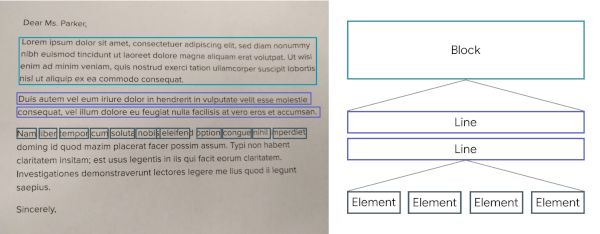
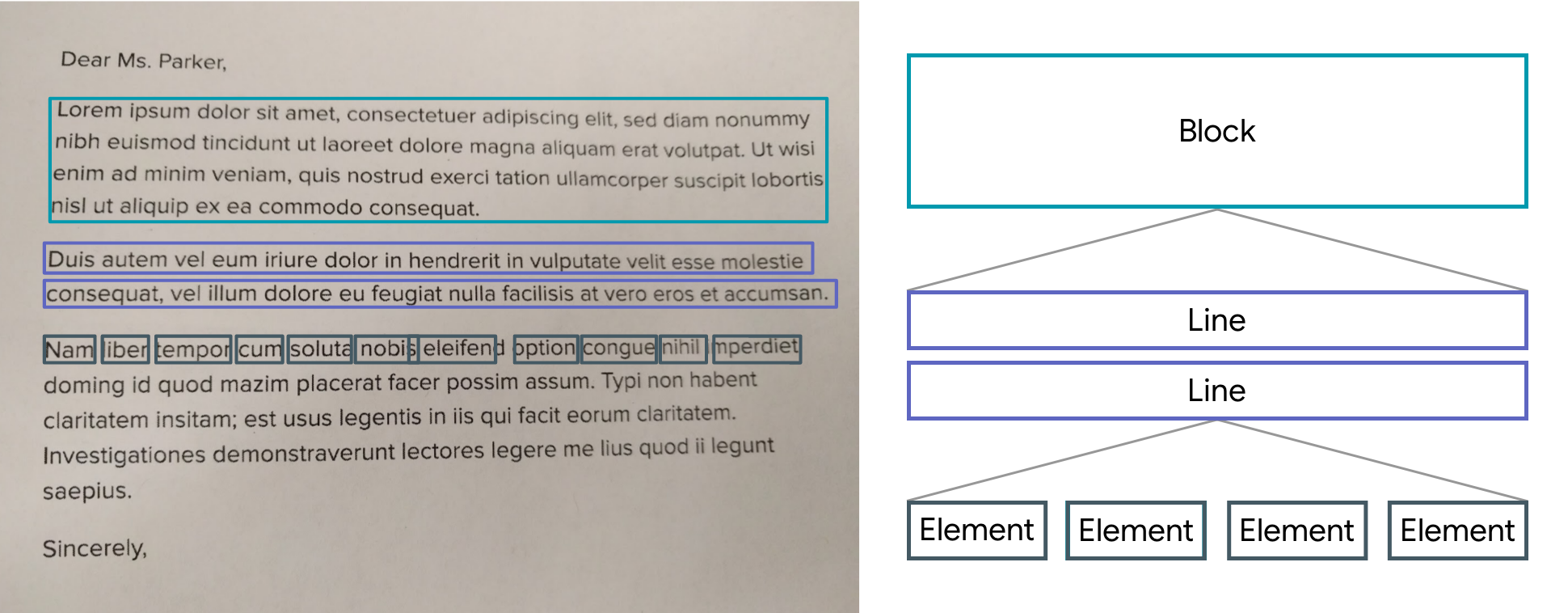
The results are returned by list of Block.
A Block contains: the global text of the block, a list of Lines and the position.
A Line contains: the global text of the line, a list of Elements and the position.
An Element contains: a word and the position.
Note: The library uses the Camera package, be sure to ask for permission.
A LiveScanWidget needs a module list to start detection.
Validated results will be returned to the "matchedResult" method.
Create a scan module :
In this example (see the /example folder), we consider all Elements to be results.
Create a scan module :
classScanAllModuleextendsScanModule
The constructor of a module:
label: A label (optional) that will be displayed to the user during rendering
color: A color (optional) that will be used for rendering
validateCountCorrelation: The number of times the same result must be found in the same place for it to be valid. (As the camera moves certain numbers / letters may be misinterpreted over several frames).
The purpose of a module is to search among the Blocks for a list of results (ScanResult) and to return it using the "matchedResult" method.
@overrideFuture<List<ScanResult>> matchedResult(List<TextBlock> textBlock, String text) async {
List<ScanResult> list = [];
for (var block in textBlock) {
for (var line in block.lines) {
for (var element in line.elements) {
list.add(ScanResult(cleanedText: element.text, scannedElementList: [element]));
}
}
}
return list;
}
Start a module :
module.start();
Stop a module :
module.stop();
Scan file with Widget (Supported extension : png, jpg and pdf )
You can use TextBlockHelper methods to help find results.
TextBlockHelper.extractTextElementsWithRegex :
Find the list of elements that match with the regex
TextBlockHelper.nextTextElement :
Find the next TextElement a right or left of TextElement
TextBlockHelper.combineRecreateTextLine :
When texts are on the same line but distant, MLKit can create two different TextBlock. The "combineRecreateTextLine" method will create a TextLine, from a starting TextElement, taking into account the Elements of each TextBlock
TextBlockHelper.combineLeftTextElement :
Return a List of TextElement with all TextElement to the left of startElement including startElement.
TextBlockHelper.combineRightTextElement :
Return a List of TextElement with all TextElement to the right of startElement including startElement.
TextBlockHelper.combineBetweenTextElement :
Return a List of TextElement between startElement and endElement