Aus öffentlichen Paketdaten erstellte Orientierung.
OptimalWrapText ist ein Flutter-Widget, das die Textlayoutgestaltung durch intelligente Umbruchverarbeitung von mehrzeiligen Texten verbessert, um visuell ausgewogene Zeilen mit ähnlicher Länge zu erzeugen. Im Gegensatz zu Standard-Text-Widgets minimiert es ungleichmäßige Zeilenumbrüche und verbessert so Lesbarkeit und ästhetische Qualität in Benutzeroberflächen mit kurzen Absätzen oder Beschriftungen. Es eignet sich besonders für Interfaces, bei denen typografische Harmonie wichtig ist, wie beispielsweise Dashboards, Karten oder Formulare. Das Paket unterstützt alle wichtigen Plattformen und lässt sich nahtlos in bestehende Flutter-Projekte integrieren.
Anwendungsfälle
Verbesserung des visuellen Gleichgewichts in textlastigen Benutzeroberflächen
Lesbarkeit in kompakten Layouts verbessern
Konsistente Zeilenlängen in Beschriftungen und Karten erstellen
Optimierung der Textanzeige in responsiven Designs
Verwendung in Dashboards und Datenzusammenfassungen
Hauptmerkmale
Bewertet zeilenlängen intelligent aus
Unangenehme Zeilenumbrüche reduzieren
Unterstützt alle Flutter-Plattformen
Einfache Integration mit bestehenden Text-Widgets
Erhält den ursprünglichen Textinhalt und die Formatierung
Geeignet für
Designer, die typografische Harmonie priorisieren
Entwickler, die responsive Benutzeroberflächen erstellen
Apps mit dichtem Textinhalt
Projekte, die eine verfeinerte Textpräsentation erfordern
Details zu Teams, die sich auf Benutzererfahrung konzentrieren
Hinweise
Kann die Rendering-Komplexität leicht erhöhen
Aufgrund der Leistung nicht geeignet für sehr lange Texte
Eingeschränkte Anpassung über die Linienbalancierung hinaus
Erfordert sorgfältige Tests über verschiedene Bildschirmgrößen
Am besten geeignet für kurze bis mittellange Textblöcke
Original-README
Originaler README-Schnappschuss aus dem verknüpften Quell-Repository. Aktuelle Inhalte finden Sie im Repository.
Optimal Wrap Text
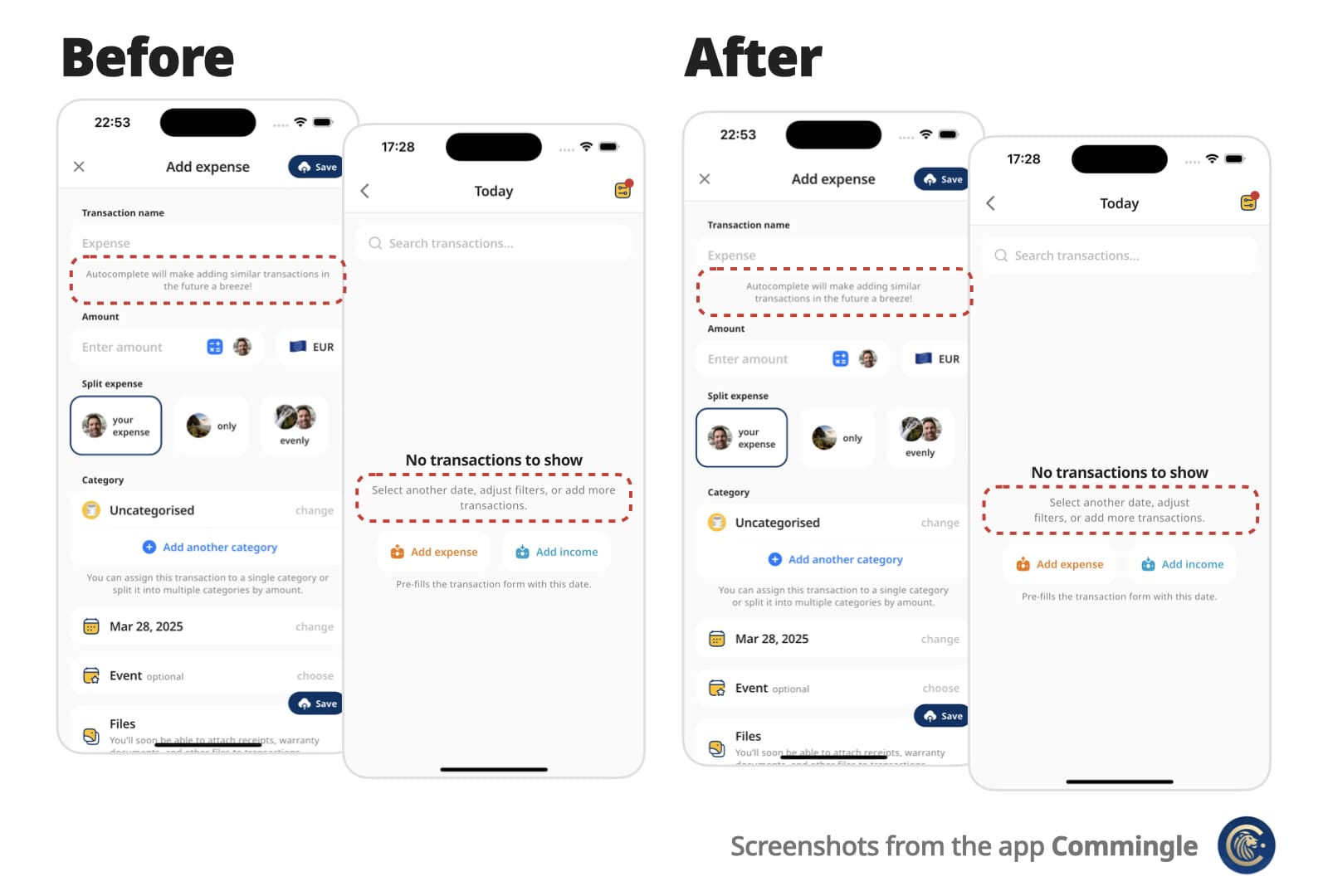
A Flutter Text replacement that wraps short multi-line text over similarly sized lines for better visual balance.
Instead of awkward standard line breaks like these:
My slightly longer text that will span 2 or
3 lines

My slightly longer text that will span 2 or
                  3 lines
You get cleaner, balanced output like these:
My slightly longer text that
will span 2 or 3 lines

        My slightly longer text that
           will span 2 or 3 lines
Perfect for small, informative footnotes or short multi-line messages that deserve to look good.
✨ Features
Drop-in replacement for the Text widget
Supports all Text attributes, including style, textDirection (RTL), textHeightBehavior…
Rich text via OptimalWrapRichText, including WidgetSpan (icons and other inline widgets)
Automatically finds optimal line breaks — no more manual \n
Optional minLines to wrap onto at least that many lines when there are enough words
Adjusts to different screen sizes and text scaling
📌 For centered or right-aligned text, you may still want to wrap it in a Center, Align, or Row, just like with a regular Text widget.
Use minLines to wrap onto at least that many lines when the text has enough
words. A single unbreakable word is never forced to break.
OptimalWrapText(
  'Hello there friend',
  minLines: 2,
  textAlign: TextAlign.center,
)
Use shrinkWrap: true when the parent should hug the optimally wrapped width
(for example a chip or speech bubble). By default the widgets expand to the
available width via Align, matching typical full-width text layout.
For custom rich-text children, wrap them with the exported OptimalWrapChild
primitive instead.
🧠 How does it work?
Optimal Wrap Text uses TextPainter to determine how many lines your text will take at full available width in the given widget tree.
It runs a binary search to find the narrowest width that still fits in the same number of lines — ensuring optimal wrapping. With minLines, that target is raised so the text wraps onto at least that many lines when there are enough words.
e.g.
300px → 2 lines (width from the current BuildContext)
150px → 4 lines ❌
225px → 2 lines ✅
188px → 3 lines ❌
206px → 2 lines ✅
... and so on
Worst-case scenario for mobile screen widths (e.g. iPhone) is about 9 iterations, but typical cases resolve in 6 attempts.
It wraps the final Text in a SizedBox constrained to that optimal width.
⚠️ Known Limitations
It uses LayoutBuilder to get width in the given widget tree, which doesn’t work inside some slivers, such as SliverFillRemaining, which rely on intrinsic sizing.
For OptimalWrapRichText with WidgetSpans, prefer intrinsically sized inline children (icons, small badges, fixed-size boxes). Same as Flutter’s Text.rich, each inline widget is constrained by the paragraph’s max width — very wide or full-bleed children can prevent meaningful narrowing.
💡 You can work around this by passing a manual width:
CustomScrollView(
  slivers: [
    ...,
    SliverFillRemaining(
      child: Padding(
        padding: EdgeInsets.only(left: 15, right: 30),
        child: OptimalWrapText(
          'My slightly longer text that will span 2 or 3 lines',
          width: MediaQuery.sizeOf(context).width - 15 - 30
        ),
      )
    ),
  ]
)
📄 Copyright and License
Optimal Wrap Text is maintained by Chris Rutkowski as part of the Commingle app, and open-sourced under the MIT License.