Kategorien, Pakete und Repositories suchen

Cover von overlay_tutorial
Paketdetailsv3.0.0

overlay_tutorial

Ein Flutter-Paket zum Anzeigen von Overlay-Tutorials durch Ausschneiden eines Lochs im Widget. Es ermöglicht auch, Hinweise neben dem Loch hinzuzufügen.

AndroidiOSWebmacOSWindowsLinux
30-Tage-Downloads
1580
Likes
69
Pub-Punkte
130

Paket installieren

flutter pub add overlay_tutorial

Paketübersicht

Aus öffentlichen Paketdaten erstellte Orientierung.

OverlayTutorial ist ein Flutter-Paket, das entwickelt wurde, um Benutzer durch die Funktionen einer App zu führen, indem bestimmte Widgets mit einer Ausschnitt-Überlagerung hervorgehoben werden. Es ermöglicht Entwicklern, interaktive Hinweise neben dem hervorgehobenen Bereich anzuzeigen, wodurch Onboarding und Benutzerengagement verbessert werden. Das Paket unterstützt mehrere Plattformen wie Android, iOS, Web, macOS, Windows und Linux und ist somit vielseitig für plattformübergreifende Anwendungen geeignet. Durch einfache Integration über pub add wird die Funktionsentdeckung ohne Störung der Benutzeroberfläche verbessert.

Anwendungsfälle

  • Neue Benutzer onboarden
  • Hervorhebung wichtiger Benutzeroberflächenelemente
  • Benutzer durch komplexe Workflows führen
  • Verbesserung der App-Nutzbarkeit
  • Neue Funktionen vorstellen
  • Benutzer über die App-Funktionalität aufklären

Hauptmerkmale

  • Ausschnittloch über Zielwidget
  • Anpassbare Hinweispunkte
  • Plattformübergreifende Unterstützung
  • Einfache Integration mit pub
  • Konfigurierbare Overlay-Appearance
  • Unterstützt mehrere Plattformziele

Geeignet für

  • App-Onboarding-Flows
  • Feature-Entdeckungstools
  • Benutzerbildungs-Schnittstellen
  • Mobile und Web-Anwendungen
  • UX-Verbesserungsprojekte
  • Interaktive Tutorials

Hinweise

  • Kann eine sorgfältige Positionierung erfordern, um die optimale Benutzererfahrung zu gewährleisten
  • Leistungsbeeinträchtigung bei vielen Überlagerungen
  • Eingeschränkte Anpassungsmöglichkeiten jenseits der grundlegenden Gestaltung
  • Abhängig von der korrekten Widget-Hierarchie
  • Nicht geeignet für statische Dokumentation
  • Testen auf allen Zielplattformen erforderlich

Original-README

Originaler README-Schnappschuss aus dem verknüpften Quell-Repository. Aktuelle Inhalte finden Sie im Repository.

overlay_tutorial

A Flutter package for displaying overlay tutorial.

Feature

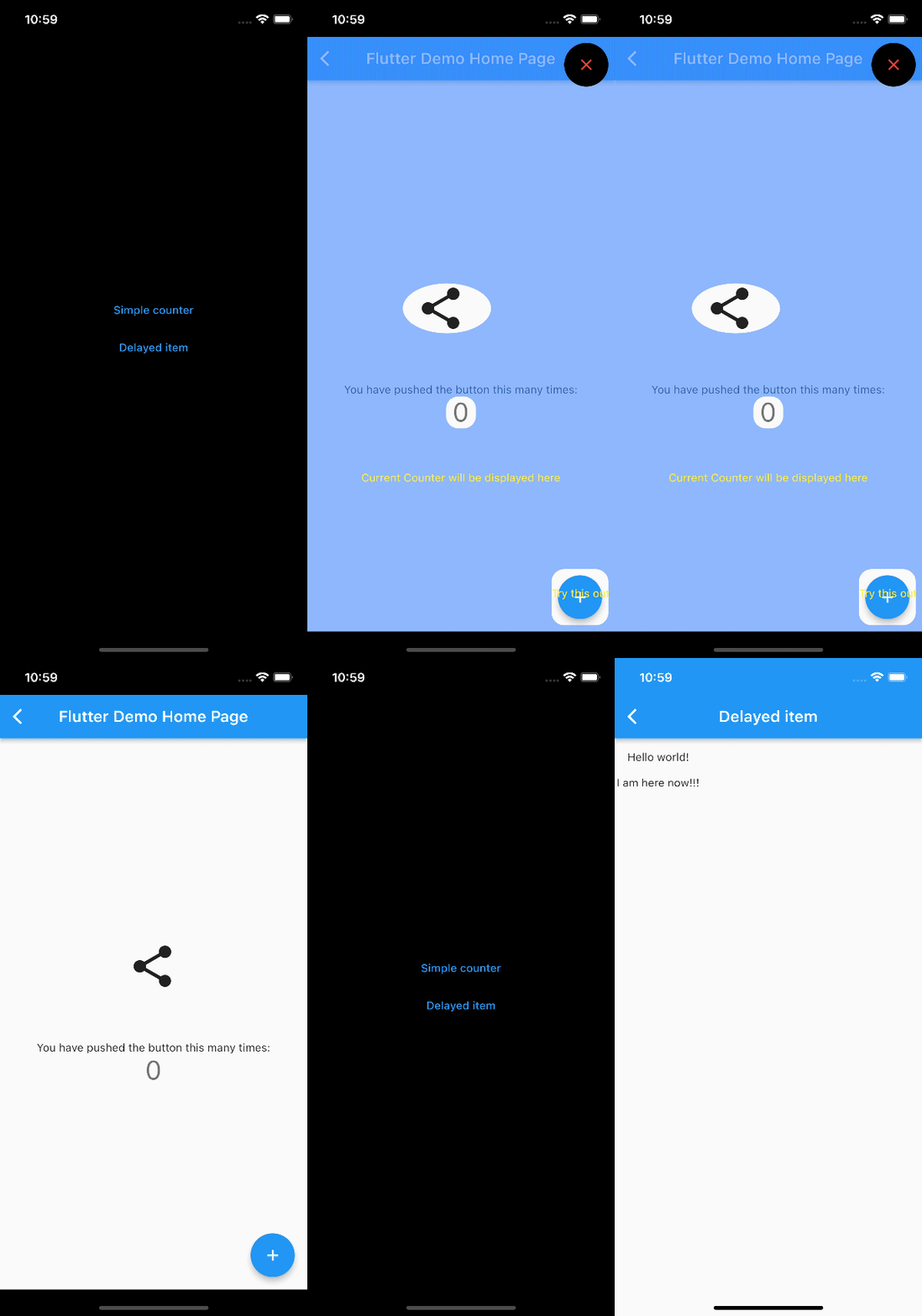
  • Allow to display an overlay tutorial with hole cropping.
  • Allow to display hint aside hole.
  • Allow to customize hole shape.

Usage

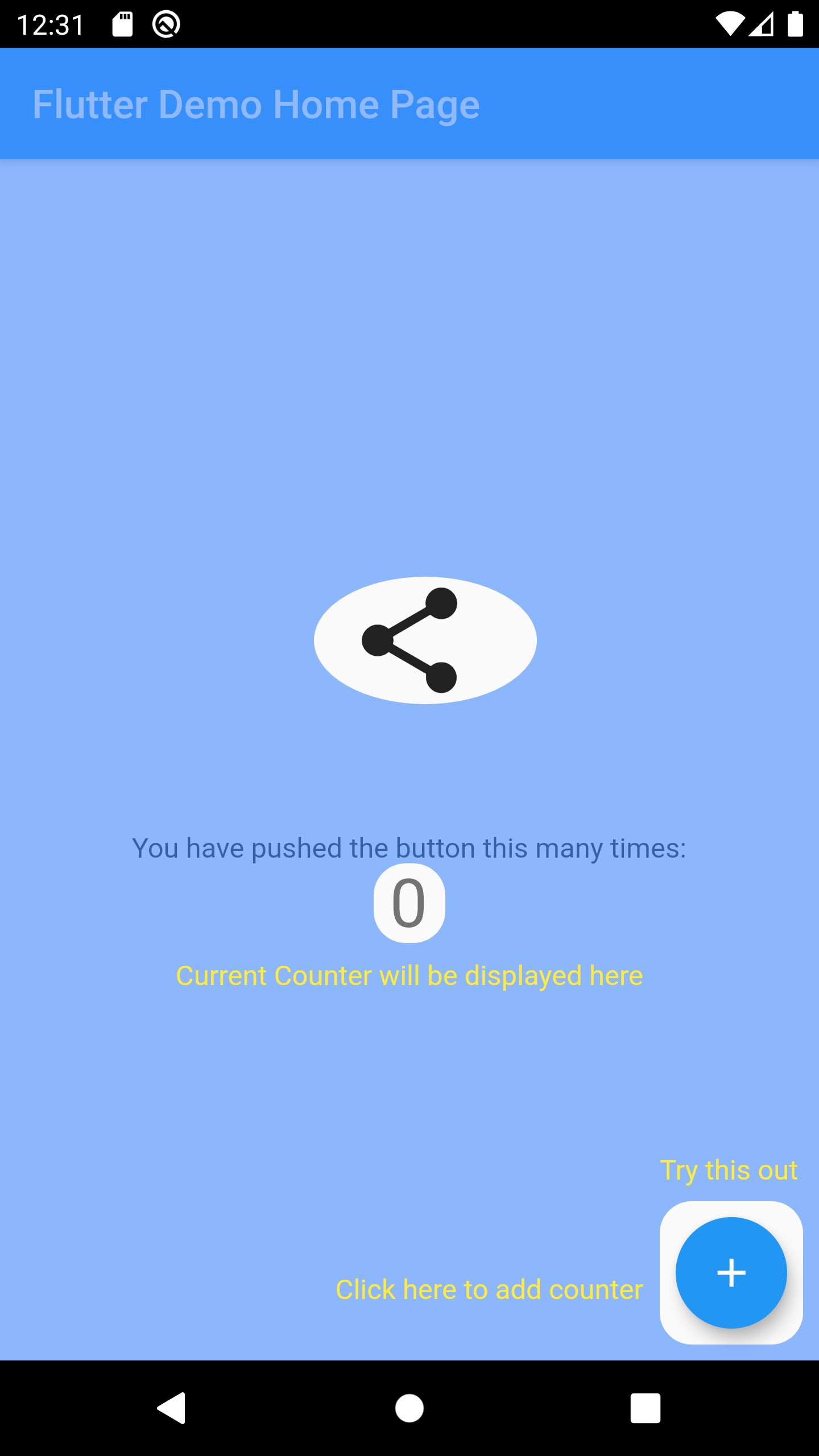
Wrap the widget that you want to create a hole using OverlayTutorialHole. Ensure you have OverlayTutorialScope as a parent of these holes.

  1. Use OverlayTutorialScope.enabled property to control the visibility of the overlay tutorial. If this is false, the entire overlay tutorial will be hidden.
  2. Use OverlayTutorialHole.enabled property to control the visibility of the holes.

Wrap your UI


Widget build(BuildContext context) {
  final textTheme = Theme.of(context).textTheme;
  const tutorialColor = Colors.yellow;
  return SafeArea(
    child: Stack(
      children: [
        OverlayTutorialScope(
          enabled: _isTutorialEnabled,
          overlayColor: Colors.blueAccent.withOpacity(.6),
          // Disable all the widgets. All the widgets are now non-interactive.
          child: AbsorbPointer(
            absorbing: _isTutorialEnabled,
            child: Scaffold(
              appBar: AppBar(
                title: Text(widget.title),
              ),
              body: Center(
                child: Column(
                  mainAxisAlignment: MainAxisAlignment.center,
                  children: <Widget>[
                    AnimatedBuilder(
                      animation: _tweenAnimation,
                      builder: (context, child) {
                        return SlideTransition(
                          position: _tweenAnimation,
                          child: child,
                        );
                      },
                      child: OverlayTutorialHole(
                        enabled: true,
                        overlayTutorialEntry: OverlayTutorialCustomShapeEntry(
                          shapeBuilder: (rect, path) {
                            path = Path.combine(
                              PathOperation.difference,
                              path,
                              Path()
                                ..addOval(Rect.fromLTWH(
                                  rect.left - 16,
                                  rect.top,
                                  112,
                                  64,
                                )),
                            );
                            return path;
                          },
                        ),
                        child: const Icon(
                          Icons.share,
                          size: 64,
                        ),
                      ),
                    ),
                    const SizedBox(height: 64),
                    const Text(
                      'You have pushed the button this many times:',
                    ),
                    OverlayTutorialHole(
                      enabled: true,
                      overlayTutorialEntry: OverlayTutorialRectEntry(
                        padding: const EdgeInsets.symmetric(horizontal: 8.0),
                        radius: const Radius.circular(16.0),
                        overlayTutorialHints: <OverlayTutorialWidgetHint>[
                          OverlayTutorialWidgetHint(
                            position: (rect) => Offset(0, rect.bottom),
                            builder: (context, entryRect) {
                              return SizedBox(
                                width: MediaQuery.of(context).size.width,
                                child: Center(
                                  child: Padding(
                                    padding: const EdgeInsets.all(8.0),
                                    child: Text(
                                      'Current Counter will be displayed here',
                                      style: textTheme.bodyText2!
                                          .copyWith(color: tutorialColor),
                                    ),
                                  ),
                                ),
                              );
                            },
                          ),
                        ],
                      ),
                      child: Text(
                        '$_counter',
                        style: Theme.of(context).textTheme.headline4,
                      ),
                    ),
                  ],
                ),
              ),
              floatingActionButton: OverlayTutorialHole(
                enabled: true,
                overlayTutorialEntry: OverlayTutorialRectEntry(
                  padding: const EdgeInsets.all(8.0),
                  radius: const Radius.circular(16.0),
                  overlayTutorialHints: [
                    OverlayTutorialWidgetHint(
                      builder: (context, entryRect) {
                        return Positioned(
                          top: entryRect.rRect!.top - 24.0,
                          left: entryRect.rRect!.left,
                          child: Text(
                            'Try this out',
                            style: textTheme.bodyText2!
                                .copyWith(color: tutorialColor),
                          ),
                        );
                      },
                    ),
                    OverlayTutorialWidgetHint(
                      position: (rect) => Offset(0, rect.center.dy),
                      builder: (context, entryRect) {
                        return SizedBox(
                          width: entryRect.rRect!.left,
                          child: Padding(
                            padding: const EdgeInsets.only(right: 8.0),
                            child: Row(
                              mainAxisAlignment: MainAxisAlignment.end,
                              children: [
                                Flexible(
                                  child: Text(
                                    'Click here to add counter',
                                    style: textTheme.bodyText2!
                                        .copyWith(color: tutorialColor),
                                  ),
                                ),
                              ],
                            ),
                          ),
                        );
                      },
                    ),
                  ],
                ),
                child: FloatingActionButton(
                  onPressed: _incrementCounter,
                  tooltip: 'Increment',
                  child: const Icon(Icons.add),
                ),
              ),
            ),
          ),
        ),
        if (_isTutorialEnabled)
          Align(
            alignment: Alignment.topRight,
            child: GestureDetector(
              onTap: () {
                _isTutorialEnabled = false;
                setState(() {});
              },
              child: Padding(
                padding: const EdgeInsets.all(8.0),
                child: Container(
                  padding: const EdgeInsets.all(16),
                  decoration: const BoxDecoration(
                    shape: BoxShape.circle,
                    color: Colors.black,
                  ),
                  child: const Icon(
                    Icons.close,
                    color: Colors.red,
                  ),
                ),
              ),
            ),
          ),
      ],
    ),
  );
}

Hole Shape

  • OverlayTutorialRectEntry draws a Rectangle shape
  • OverlayTutorialCircleEntry draws a Circle shape
  • OverlayTutorialCustomShapeEntry allows to draw a customized shape

Disabling Widget

Disabling widget is not provided by this package out of the box. You can achieve this using one of the Flutter widget: AbsorbPointer or IgnorePointer. Make sure you do not wrap the OverlayTutorialScope with these widgets as this will disable the widget in OverlayTutorialWidgetHint.

Screenshot
API

Check Dart Documentation

License

License.

Kategorien

Abhängigkeiten

Abhängigkeiten 3 Einträge

Quell-Repository

Projekte, die dieses Paket verwenden

Noch keine Daten verfügbar.