Pakete, Repositories und App-Kategorien suchen

Cover von page_route_animator
Paketdetailsv1.0.4

page_route_animator

Flutter-Seitenroutenübergangspaket mit 62 verschiedenen Übergängen.

AndroidiOSWebmacOSWindowsLinux
30-Tage-Downloads
138
Likes
95
Pub-Punkte
160

Paket installieren

flutter pub add page_route_animator

Paketübersicht

Aus öffentlichen Paketdaten erstellte Orientierung.

Ein Flutter-Paket, das 62 integrierte Seitenrouten-Übergänge bietet, um Navigationsanimationen zu verbessern. Es vereinfacht die Implementierung dynamischer und visuell ansprechender Bildschirmübergänge über Plattformen hinweg. Entwickler können vordefinierte Animationen wie Verschieben, Ausblenden, Skalieren und benutzerdefinierte Effekte mit minimalem Code anwenden. Das Paket unterstützt alle wichtigen Plattformen, einschließlich Android, iOS, Web, macOS, Windows und Linux, und gewährleistet konsistentes Verhalten auf Geräten. Ideal für Apps, die die Benutzererfahrung durch reibungslose und ansprechende Navigationsflüsse verbessern möchten.

Anwendungsfälle

  • Verbesserung der App-Navigation durch sanfte Übergänge
  • Immersive Onboarding-Erfahrungen erstellen
  • Visuelle Aufwertung bei Register- oder Bildschirmwechseln
  • Interaktive Tutorials erstellen
  • Modernes UI mit animierter Navigation gestalten
  • Verbesserung der Benutzerengagement durch dynamische Übergänge

Hauptmerkmale

  • 62 vordefinierte Übergangsanimationen
  • Einfache API mit intuitiver Konfiguration
  • Plattformübergreifende Kompatibilität
  • Anpassbare Animationsparameter
  • Unterstützung für Push- und Pop-Übergänge
  • Leichtgewichtig und einfach zu integrieren

Geeignet für

  • Flutter-Entwickler, die reichhaltige Navigations-Effekte suchen
  • Apps, die ein abgerundetes Onboarding oder Tutorial-Flow erfordern
  • Designer, die sich auf Benutzererfahrung und Motion Design konzentrieren
  • Projekte mit Ziel einer modernen, animierten Benutzeroberfläche
  • Entwickler, die eine schnelle Übergangsimplementierung ohne komplexe Codierung wünschen

Hinweise

  • Kann die Bundle-Größe leicht erhöhen aufgrund der enthaltenen Animationen
  • Einige fortgeschrittene Animationen erfordern möglicherweise eine Leistungsoptimierung auf geringwertigen Geräten
  • Eingeschränkte Anpassungsmöglichkeiten für hoch einzigartige Übergangslogik
  • Nicht ideal für Apps, die Minimalismus gegenüber Animation bevorzugen
  • Erfordert Verständnis des Flutter-Navigator- und Routing-Systems

Original-README

Originaler README-Schnappschuss aus dem verknüpften Quell-Repository. Aktuelle Inhalte finden Sie im Repository.

Page Route Animator Package

Flutter page route transition package, with 62 different page transitions.

flutter platform pub package BSD-3-Clause effective dart

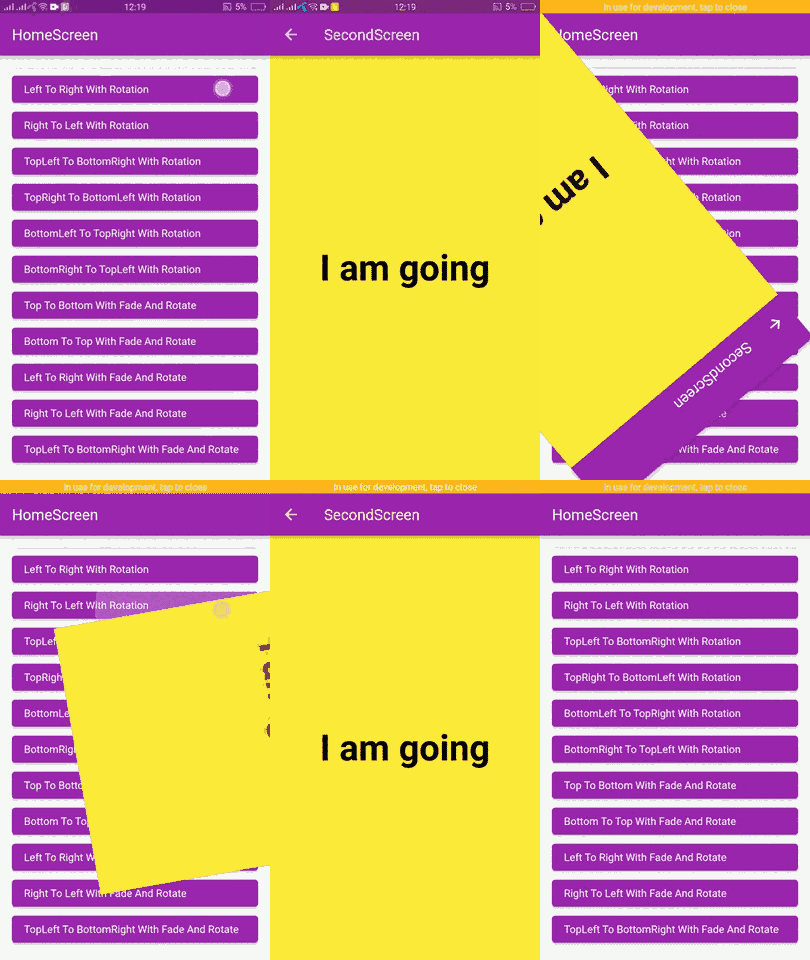
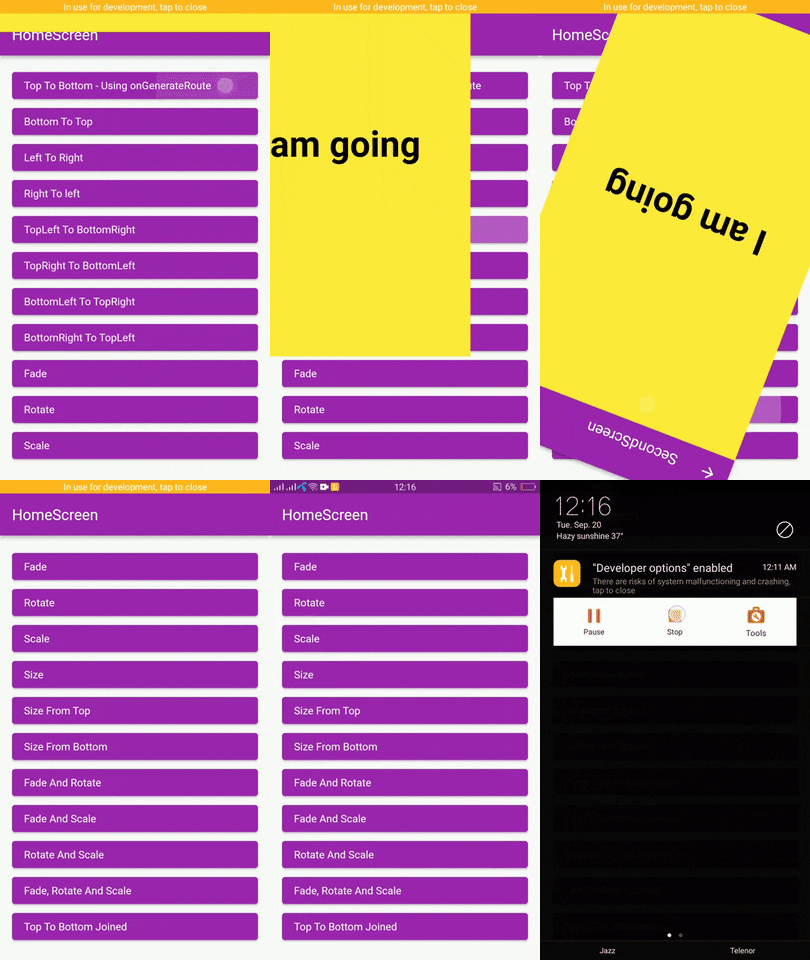
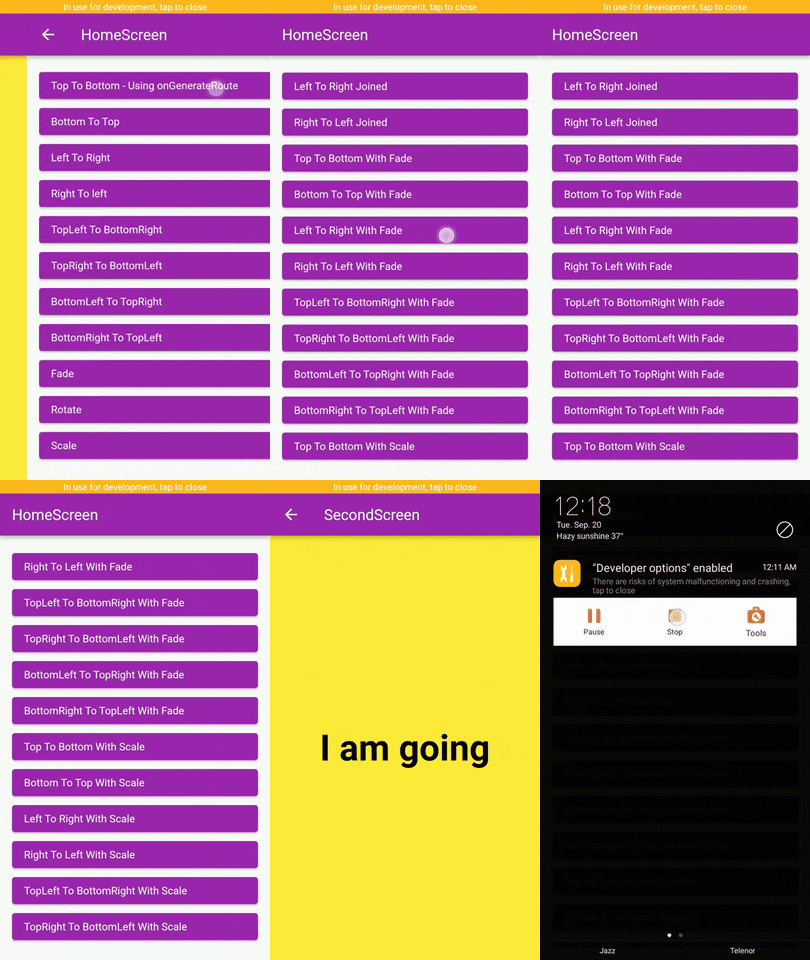
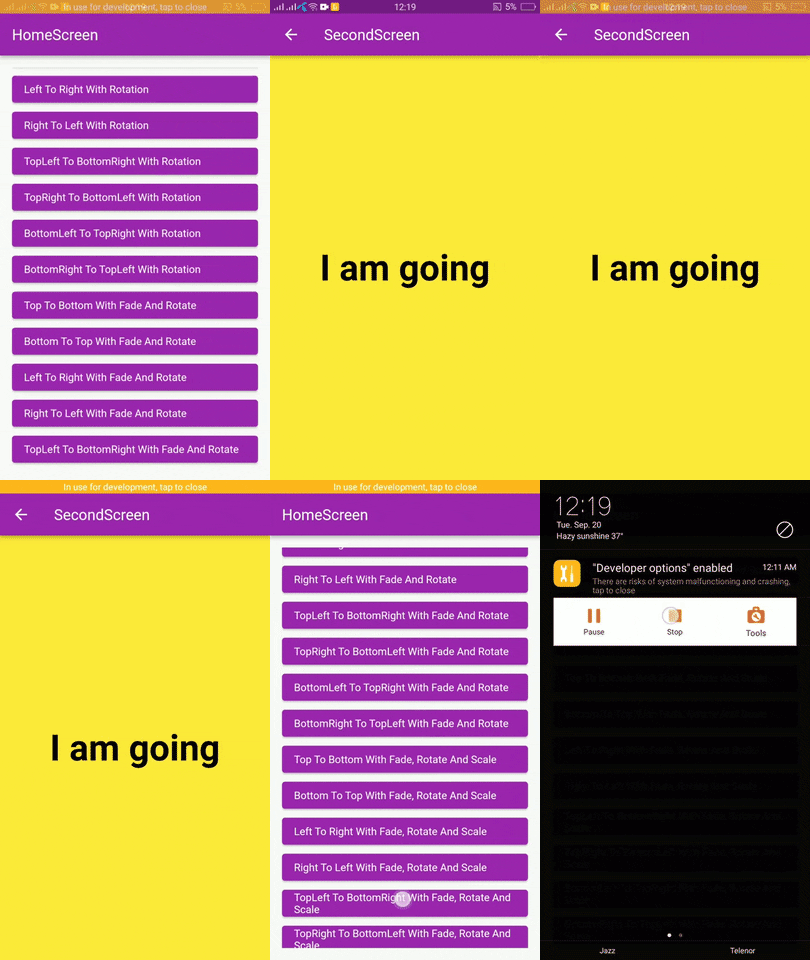
Examples

page_route_animator_20_transitions_p1 page_route_animator_20_transitions_p2 page_route_animator_20_transitions_p3

Getting Started

In the pubspec.yaml of your flutter project, add the following dependency:

dependencies:
  page_route_transition: ^1.0.4

Usage

To use this package you have to import it in your file by using below command:

import 'package:page_route_animator/page_route_animator.dart';

Code Example

import 'package:flutter/material.dart';
import 'package:page_route_animator/page_route_animator.dart';

void main(List<String> args) => runApp(const MyApp());

/// This widget is the root of your app.
class MyApp extends StatelessWidget {
  const MyApp({Key? key}) : super(key: key);

  @override
  Widget build(BuildContext context) {
    return MaterialApp(
      debugShowCheckedModeBanner: false,
      title: 'Page Route Animator Code Example',
      theme: ThemeData(primarySwatch: Colors.purple),
      home: const HomeScreen(),

      /// using onGenerateRoute
      onGenerateRoute: (settings) {

        switch (settings.name) {
          case '/second-screen':
            return PageRouteAnimator(
              child: const SecondScreen(),
              routeAnimation: RouteAnimation.topToBottom,
              settings: settings,
              curve: Curves.linear,
              duration: const Duration(milliseconds: 500),
              reverseDuration: const Duration(milliseconds: 500),
            );
          default:
            return null;
        }
      },
    );
  }
}

/// HomeScreen
class HomeScreen extends StatelessWidget {
  const HomeScreen({Key? key}) : super(key: key);

  @override
  Widget build(BuildContext context) {
    return Scaffold(
      appBar: AppBar(
        title: const Text('HomeScreen'),
      ),
      body: Padding(
        padding: const EdgeInsets.all(16.0),
        child: ListView(
          children: [
            /// Push using onGenerateRoute
            /// Navigator.pushNamed()
            ElevatedButton(
              onPressed: () {
                Navigator.pushNamed(
                  context,
                  '/second-screen',
                  arguments: 'I am going',
                );
              },
              child: getText('Top To Bottom - onGenerateRoute'),
            ),

            /// Navigator.push()
            ElevatedButton(
              onPressed: () {
                Navigator.push(
                  context,
                  PageRouteAnimator(
                    child: const SecondScreen(),
                    routeAnimation: RouteAnimation.bottomToTop,
                    settings: const RouteSettings(arguments: 'I am going'),
                    curve: Curves.slowMiddle,
                    duration: const Duration(milliseconds: 500),
                    reverseDuration: const Duration(milliseconds: 500),
                  ),
                );
              },
              child: getText('Bottom To Top'),
            ),

            ElevatedButton(
              onPressed: () {
                Navigator.push(
                  context,
                  PageRouteAnimator(
                    child: const SecondScreen(),
                    routeAnimation: RouteAnimation.leftToRight,
                    settings: const RouteSettings(arguments: 'I am going'),
                    curve: Curves.linear,
                  ),
                );
              },
              child: getText('Left To Right'),
            ),

            ElevatedButton(
              onPressed: () {
                Navigator.push(
                  context,
                  PageRouteAnimator(
                    child: const SecondScreen(),
                    routeAnimation: RouteAnimation.rightToLeft,
                    settings: const RouteSettings(arguments: 'I am going'),
                    curve: Curves.easeOut,
                  ),
                );
              },
              child: getText('Right To left'),
            ),

            ElevatedButton(
              onPressed: () {
                Navigator.push(
                  context,
                  PageRouteAnimator(
                    child: const SecondScreen(),
                    routeAnimation: RouteAnimation
                        .bottomRightToTopLeftWithFadeRotateAndScale,
                    settings: const RouteSettings(arguments: 'I am going'),
                    curve: Curves.easeOut,
                  ),
                );
              },
              child:
                  getText('BottomRight To TopLeft With Fade, Rotate And Scale'),
            ),
          ],
        ),
      ),
    );
  }
}

/// SecondScreen
class SecondScreen extends StatelessWidget {
  const SecondScreen({Key? key}) : super(key: key);

  @override
  Widget build(BuildContext context) {
    String? argument = ModalRoute.of(context)?.settings.arguments as String?;
    return Scaffold(
      backgroundColor: Colors.yellow,
      appBar: AppBar(
        title: const Text('SecondScreen'),
      ),
      body: Center(
        child: Text(
          argument ?? 'No Data',
          style: const TextStyle(
            fontSize: 48.0,
            fontWeight: FontWeight.bold,
            color: Colors.black,
          ),
        ),
      ),
    );
  }
}

// Helper Widget
Widget getText(String text) {
  return Align(
    alignment: Alignment.centerLeft,
    child: Text(text),
  );
}

Types Of Transitions

  • topToBottom,
  • bottomToTop,
  • leftToRight,
  • rightToLeft,
  • fade,
  • rotate,
  • scale,
  • size,
  • sizeFromTop,
  • sizeFromBottom,
  • fadeAndRotate,
  • fadeAndScale,
  • rotateAndScale,
  • fadeRotateAndScale,
  • topToBottomJoined,
  • bottomToTopJoined,
  • leftToRightJoined,
  • rightToLeftJoined,
  • topLeftToBottomRight,
  • topRightToBottomLeft,
  • bottomLeftToTopRight,
  • bottomRightToTopLeft,
  • topToBottomWithFade,
  • bottomToTopWithFade,
  • leftToRightWithFade,
  • rightToLeftWithFade,
  • topLeftToBottomRightWithFade,
  • bottomLeftToTopRightWithFade,
  • bottomRightToTopLeftWithFade,
  • topRightToBottomLeftWithFade,
  • topToBottomWithRotation,
  • bottomToTopWithRotation,
  • leftToRightWithRotation,
  • rightToLeftWithRotation,
  • topLeftToBottomRightWithRotation,
  • bottomLeftToTopRightWithRotation,
  • bottomRightToTopLeftWithRotation,
  • topRightToBottomLeftWithRotation,
  • topToBottomWithFadeAndRotate,
  • bottomToTopWithFadeAndRotate,
  • leftToRightWithFadeAndRotate,
  • rightToLeftWithFadeAndRotate,
  • topLeftToBottomRightWithFadeAndRotate,
  • topRightToBottomLeftWithFadeAndRotate,
  • bottomLeftToTopRightWithFadeAndRotate,
  • bottomRightToTopLeftWithFadeAndRotate,
  • topToBottomWithScale,
  • bottomToTopWithScale,
  • leftToRightWithScale,
  • rightToLeftWithScale,
  • topLeftToBottomRightWithScale,
  • topRightToBottomLeftWithScale,
  • bottomLeftToTopRightWithScale,
  • bottomRightToTopLeftWithScale,
  • topToBottomWithFadeRotateAndScale,
  • bottomToTopWithFadeRotateAndScale,
  • leftToRightWithFadeRotateAndScale,
  • rightToLeftWithFadeRotateAndScale,
  • topLeftToBottomRightWithFadeRotateAndScale,
  • topRightToBottomLeftWithFadeRotateAndScale,
  • bottomLeftToTopRightWithFadeRotateAndScale,
  • bottomRightToTopLeftWithFadeRotateAndScale,

Curves

Learn about Curves from official docs, curves.

License

BSD 3-Clause

Kategorien

Quell-Repository

Projekte, die dieses Paket verwenden

Noch keine Daten verfügbar.