Pakete, Repositories und App-Kategorien suchen

Paketdetailsv0.1.6

passkeys_windows

Windows-Implementierung des Passkeys-Plugins. Verwaltet die Erstellung von Passkeys auf Windows-Geräten mit Windows Hello und der WebAuthn-API.

Windows
30-Tage-Downloads
156.000
Likes
0
Pub-Punkte
150

Paket installieren

flutter pub add passkeys_windows

Paketübersicht

Aus öffentlichen Paketdaten erstellte Orientierung.

Das passkeys_windows-Paket bietet eine Windows-spezifische Implementierung zur Verwaltung von Passkeys mithilfe von Windows Hello und der WebAuthn-API. Es ermöglicht sichere, biometrische Authentifizierung auf Windows-Geräten, indem Benutzer Passkeys lokal erstellen und speichern können. Dieses Plugin integriert sich nahtlos in Flutter-Anwendungen für Windows und bietet ein natives Erlebnis für die Passwortlose Anmeldung. Es unterstützt Geräteebenen-Sicherheitsfunktionen wie PINs, Fingerabdrücke oder Gesichtserkennung über Windows Hello. Das Paket ist Teil der Corbado Flutter Passkeys-Suite und gewährleistet die Einhaltung moderner Web-Authentifizierungsstandards.

Anwendungsfälle

  • Passwortloses Anmelden in Windows-Apps
  • sichere biometrische Authentifizierung
  • Integration mit WebAuthn-fähigen Diensten
  • Lokale Passkey-Speicherung unter Windows
  • Erweiterte App-Sicherheit mit Windows Hello

Hauptmerkmale

  • Windows Hello-Integration
  • WebAuthn-API-Unterstützung
  • Biometrische Authentifizierung (PIN, Fingerabdruck, Gesicht)
  • Sichere lokale Schlüssel-Aufbewahrung
  • Flutter-kompatibles Windows-Plugin

Geeignet für

  • Flutter-Apps für Windows
  • Entwickler, die Passkeys implementieren
  • Anwendungen, die eine starke lokale Authentifizierung erfordern
  • Unternehmensqualitäre Sicherheitslösungen
  • Passwortlose Identitätssysteme

Hinweise

  • Erfordert Windows 10 oder höher
  • Beschränkt auf die Windows-Plattform
  • Abhängig von der Verfügbarkeit von Windows Hello
  • Erforderliche Gerätekonfiguration
  • Benötigt möglicherweise die Zustimmung des Benutzers für den biometrischen Zugriff

Original-README

Originaler README-Schnappschuss aus dem verknüpften Quell-Repository. Aktuelle Inhalte finden Sie im Repository.

GitHub Repo Cover

Flutter passkeys

Flutter packages to enable passkey authentication (based on WebAuthn / FIDO2).

Android iOS Linux macOS Web Windows
Support :white_check_mark: :white_check_mark: :x: :white_check_mark: :white_check_mark: :white_check_mark:
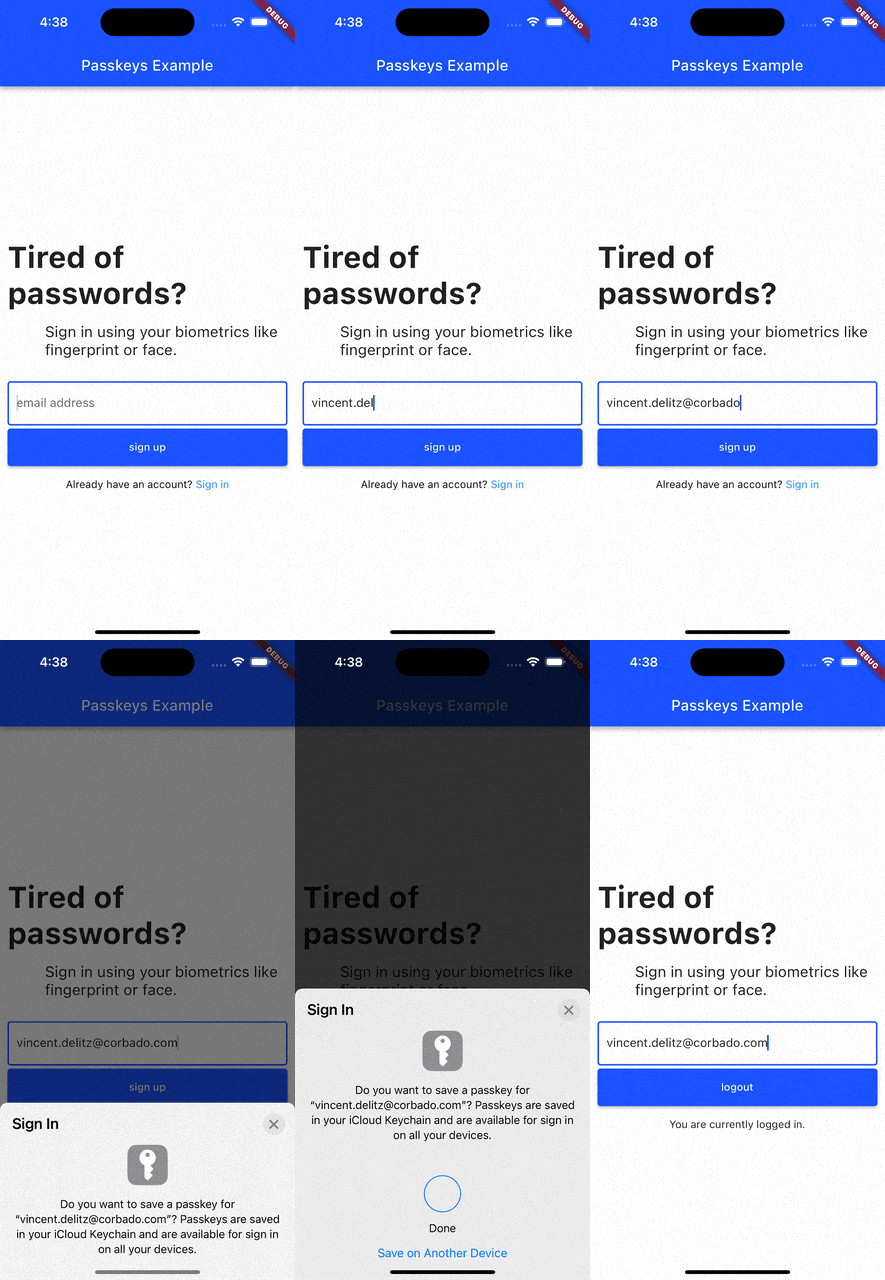
passkey-signup

Current list of packages

1. Passkeys
Description

A Flutter package that enables simple passkey authentication. Currently Android, iOS, macOS, Web and Windows are supported.

Features
  • sign up and login users with passkeys
  • connect your own relying party server or use pre-implemented ones

Read more

2. Corbado Auth
Description

A Flutter package that builds on the passkeys package. It adds additional functionalities to make it simpler to use passkey authentication in your own Flutter app.

integration-guides

Features
  • sign up and login users with passkeys
  • connect Corbado as pre-implemented relying party server
  • keep users logged in even if they close the app (automatic session refresh)

Read more

3. Corbado Auth Firebase

A Flutter package that builds on the corbado_auth and the passkeys package. It helps you to integrate passkey authentication into your Flutter app that uses Firebase as a backend.

Note: This package is currently broken and will be fixed in the future. There is no specific ETA on when the fix will be available.

Features
  • allow new users to sign up and log in using passkeys
  • allow existing users (that you created with Firebase authentication) to setup a passkey and then log in with it
  • email OTP codes as fallback mechanism for situations when passkeys can not be used (e.g. when a user logs in to a device where none of his passkeys is available)

Read more

4. Supabase

The passkeys package can be used as the platform authenticator for supabase_flutter. Supabase Auth acts as the relying party server, while passkeys handles the native passkey prompts on iOS, Android, macOS, Windows and Web.

It requires supabase_flutter 2.15.0 or later and passkeys 2.21.0 or later.

Setup

Add both packages to your pubspec.yaml:

dependencies:
  supabase_flutter: ^2.15.0
  passkeys: ^2.21.0

Initialize Supabase as usual and create a PasskeyAuthenticator that you pass to the passkey methods:

import 'package:passkeys/authenticator.dart';
import 'package:supabase_flutter/supabase_flutter.dart';

await Supabase.initialize(
  url: supabaseUrl,
  anonKey: supabaseAnonKey,
);

final supabase = Supabase.instance.client;
final authenticator = PasskeyAuthenticator();
Registering a passkey

Registering a passkey requires a signed in (non-anonymous) user. It adds a passkey to the current account:

try {
  final passkey = await supabase.auth.registerPasskey(authenticator);
  print('Registered passkey ${passkey.id}');
} on AuthException catch (e) {
  print(e);
}
Signing in with a passkey
try {
  final res = await supabase.auth.signInWithPasskey(authenticator);
  print('Signed in as ${res.user?.email}');
} on AuthException catch (e) {
  print(e);
}

For custom flows there is also a two-step API under the supabase.auth.passkey namespace (startRegistration/verifyRegistration and startAuthentication/verifyAuthentication), as well as methods to list, rename and delete passkeys.

For the full guide and configuration steps, see the Supabase passkeys documentation.

Contributing

We're happy to receive your pull requests. For major changes, please open an issue first to discuss what you would like to change.

Support

If you have questions, feedback or wishes regarding features, please reach out to us via [email](mailto:contact@corbado.com) or join our passkeys community on Slack.


License

BSD-3-clause

Kategorien

Abhängigkeiten

Abhängigkeiten 2 Einträge

Quell-Repository

Projekte, die dieses Paket verwenden

Noch keine Daten verfügbar.

Ranglisten