Aus öffentlichen Paketdaten erstellte Orientierung.
Ein Flutter-Paket, das die Erstellung anpassbarer Muster – wie Streifen, Punkte und Raster – auf Canvas-Elementen oder Widgets ermöglicht. Es ist ideal für dekorative Hintergründe, Texturen oder visuelle Effekte in Apps mit Fokus auf Design und Ästhetik. Das Paket unterstützt mehrere Plattformen wie Android, iOS, Web, macOS, Windows und Linux und ist somit vielseitig für plattformübergreifende Entwicklung geeignet. Mit einfachen APIs können Entwickler die Musterdarstellung problemlos in ihre UI-Komponenten integrieren.
Anwendungsfälle
Texturierte Hintergründe erstellen
Benutzerdefinierte UI-Elemente gestalten
Dekorative Überlagerungen hinzufügen
Wiederholende Muster generieren
Verbesserung von App-Visuals mit Shadern
Künstlerische Schnittstellen erstellen
Hauptmerkmale
Unterstützt Streifen-, Punkte- und Rastermuster
Plattformübergreifende Kompatibilität
Einfache Integration mit Canvas und Widgets
Anpassbare Mustergröße und Farbe
Leistungsstarkes Rendern
erweiterbare Musterdefinitionen
Geeignet für
UI-Designer, die visuelle Vielfalt suchen
Entwickler, die künstlerische oder kreative Apps erstellen
Apps, die dynamische Hintergrundeffekte erfordern
Projekte, die sich auf Zeichnen und Malen konzentrieren
Teams, die an Multiplattform-Designs arbeiten
Hinweise
Kann die Leistung bei komplexen Mustern beeinträchtigen
Kenntnisse der Canvas-Rendertechnik erforderlich
Beschränkt auf musterbasierte Grafiken
Nicht geeignet für hochpräzise Vektorgrafiken
Am besten in Kombination mit optimierten Rendering-Strategien verwendet
Original-README
Originaler README-Schnappschuss aus dem verknüpften Quell-Repository. Aktuelle Inhalte finden Sie im Repository.
Patterns
Flutter library to draw patterns like stripes or dots on Canvas elements or widgets.
patterns_canvas
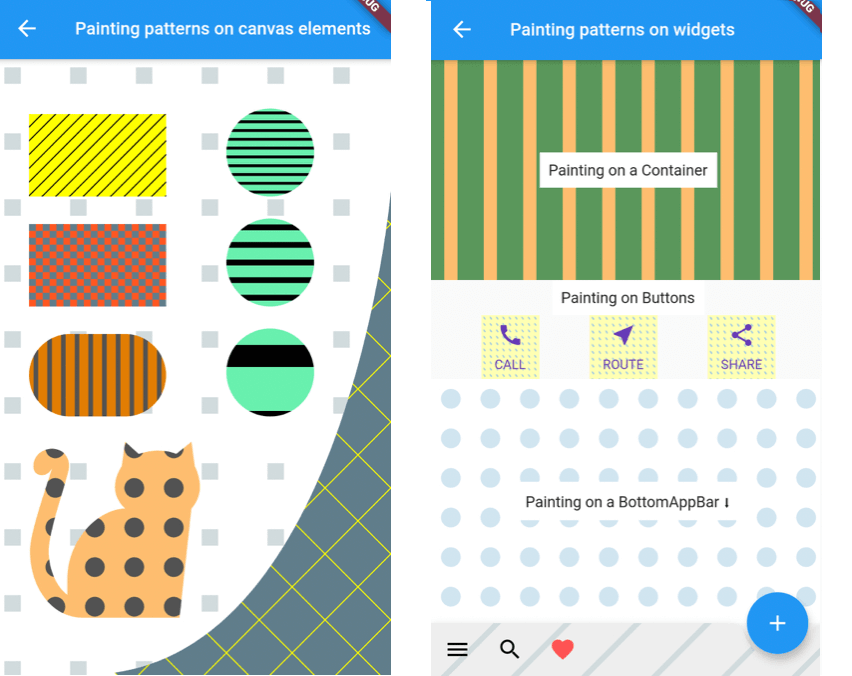
A utility library that lets you paint Canvas shapes or widgets with patterns like dots, stripes, squares, etc.:
Simple Example
Inside your CustomPainter class's paint method, create a Pattern class with background (bgColor) and foreground (fgColor) colors and use one of its paintOn methods:
classMyPainterextendsCustomPainter{
@overridevoidpaint(Canvas canvas, Size size) {
// Prepare a rectangle shape to draw the pattern on.final rect = Rect.fromLTWH(80, 50, 200, 100);
// Create a Pattern object of diagonal stripes with the colors we want.finalPattern pattern = DiagonalStripesThick(bgColor: Colors.lightGreenAccent, fgColor: Colors.black);
// Paint the pattern on the rectangle.
pattern.paintOnRect(canvas, size, rect);
}
}
Results in this pattern drawn:
Pattern constructors and types:
You can construct a Pattern with three different ways:
Rectangular widgets, like Containers, Rows, Columns, IconButtons, etc. can be painted directly with the above method. For widgets that have a custom shape, like a BottomAppbar, you need to provide a different clipBehavior property, e.g. Clip.antiAlias, to make sure the pattern is clipped to the special shape. Check the second screen in the example app for more.
Patterns and settings
Available patterns
All Patterns require a background and foreground color on instantiation. The currently available patterns are:
Description
Class
PatternType enum
Horizontal Stripes Light
HorizontalStripesLight(Color bgColor, Color fgColor)
PatternType.horizontalLight
Horizontal Stripes Thick
HorizontalStripesThick(Color bgColor, Color fgColor)
PatternType.horizontalThick
Vertical Stripes Light
VerticalStripesLight(Color bgColor, Color fgColor)
PatternType.verticalLight
Vertical Stripes Thick
VerticalStripesThick(Color bgColor, Color fgColor)
PatternType.verticalThick
Diagonal Stripes Light
DiagonalStripesLight(Color bgColor, Color fgColor)
PatternType.diagonalLight
Diagonal Stripes Thick
DiagonalStripesThick(Color bgColor, Color fgColor)
PatternType.diagonalThick
Checkers
Checkers(Color bgColor, Color fgColor)
PatternType.checkers
Crosshatch
Crosshatch(Color bgColor, Color fgColor)
PatternType.crosshatch
Dots
Dots(Color bgColor, Color fgColor)
PatternType.dots
Raindrops
Raindrops(Color bgColor, Color fgColor)
PatternType.raindrops
Subtle Patch
SubtlePatch(Color bgColor, Color fgColor)
PatternType.subtlepatch
Texture
TexturePattern(Color bgColor, Color fgColor)
PatternType.texture
Setting the number of pattern features to draw
You can pass a featuresCount argument when creating a Pattern, to set how many features, e.g. how many stripes, you want to be drawn.
All patterns are by default scaled to their container (patternScaleBehavior = PatternScaleBehavior.container). This means that, regardless of its size, a Rectangle will contain 15 diagonal stripes or 10 dots.
You can change this behavior by providing a different argument to the paintOn method:
Pass patternScaleBehavior: PatternScaleBehavior.canvas to scale the pattern to the whole Canvas area. Now the Canvas will contain 15 diagonal stripes or 10 dots, so, a Rectangle will contain as many dots or stripes as it can fit:
Pass patternScaleBehavior: PatternScaleBehavior.customRect and a customRect (e.g. a Rectangle with half the Canvas height) to further customize the Pattern size: