Pakete, Repositories und App-Kategorien suchen

Cover von payment_card
Paketdetailsv0.0.1

payment_card

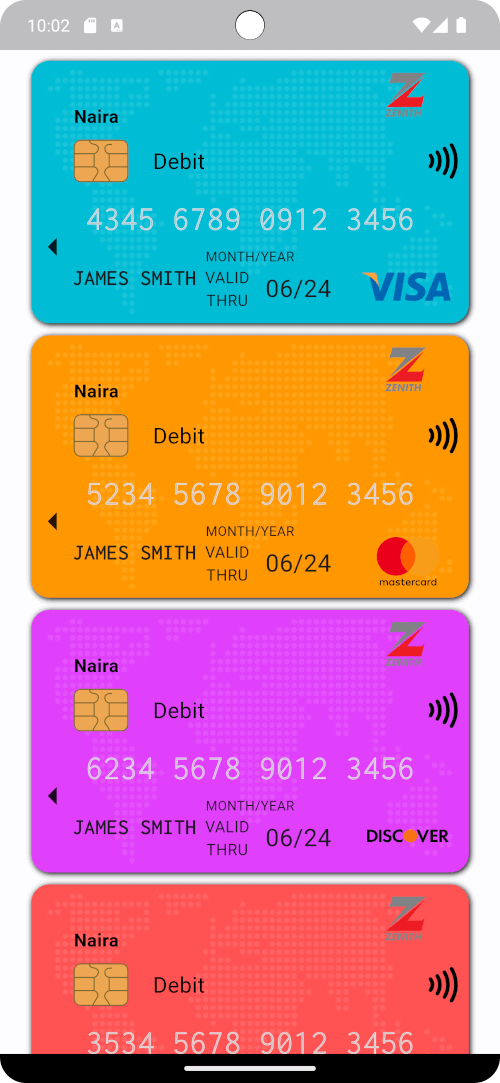
Ein benutzerdefinierter Widget zum Erstellen schöner Zahlungskarten (z. B. Kredit- oder Debitkarten) in Flutter.

AndroidiOSWebmacOSWindowsLinux
30-Tage-Downloads
11
Likes
11
Pub-Punkte
130

Paket installieren

flutter pub add payment_card

Paketübersicht

Aus öffentlichen Paketdaten erstellte Orientierung.

Ein Flutter-Widget, das zur Erstellung visuell ansprechender Zahlungskarten wie Kredit- oder Debitkarten mit anpassbaren Stilen und Layouts entwickelt wurde. Es unterstützt mehrere Plattformen wie Android, iOS, Web, macOS, Windows und Linux und ist daher ideal für plattformübergreifende Anwendungen, die Kartenelemente benötigen. Das Paket bietet eine saubere, wiederverwendbare Schnittstelle zum Anzeigen von Karteninformationen wie Nummer, Ablaufdatum und Name, was die Benutzererfahrung in Zahlungsprozessen verbessert.

Anwendungsfälle

  • Zahlungsformular-Schnittstellen
  • Digitale Brieftasche Anzeigen
  • E-Commerce-Kassenbildschirme
  • Karten-Vorschau-Komponenten
  • Benutzerprofilkartenverwaltung

Hauptmerkmale

  • Anpassbare Kartenansicht
  • Plattformübergreifende Kompatibilität
  • Unterstützung für responsive Layouts
  • Einfache Integration mit Formularen
  • Unterstützt die Formatierung der Kartennummer

Geeignet für

  • Entwickler, die E-Commerce-Apps erstellen
  • Designer, die eine konsistente Karten-UI benötigen
  • Apps mit Zahlungsverarbeitungsfunktionen
  • Frontend-orientierte Flutter-Projekte

Hinweise

  • Behandelt keine echte Zahlungsabwicklung
  • Benutzerdefinierte Eingabeverifizierung erforderlich
  • Eingeschränkte integrierte Sicherheitsmaßnahmen
  • Nicht für Produktionszahlungsgateways vorgesehen

Original-README

Originaler README-Schnappschuss aus dem verknüpften Quell-Repository. Aktuelle Inhalte finden Sie im Repository.

PaymentCard

pub package pub points popularity likes Star on Github Awesome Flutter License: BSD

Overview

The PaymentCard widget is a flexible Flutter widget designed to display payment card information with customizable properties. It enables developers to showcase payment card details such as the card number, card type, cardholder name, and background image in a visually appealing manner.

Table of Contents

Installation

To use PaymentCard in your Flutter project, add the following dependency to your pubspec.yaml file:

dependencies:
  payment_card: ^0.0.1

Then, run:

flutter pub get

Usage

Import the package:

import 'package:payment_card/payment_card.dart';

Add the PaymentCard widget to your UI, providing the necessary parameters:

PaymentCard(
  cardIssuerIcon: Icons.credit_card,
  backgroundColor: Colors.blue,
  currency: 'USD',
  cardNumber: '1234567890123456',
  validity: '12/24',
  holder: 'John Doe',
  cardType: CardNetwork.visa,
  cardTypeTextStyle: TextStyle(fontSize: 16, fontWeight: FontWeight.bold),
  cardNumberStyles: CardNumberStyles.lightStyle1,
  margin: EdgeInsets.all(16),
)

Features

  • Customization: Customize various aspects of the payment card, including the card issuer icon, background color, background image, currency, card number, validity, cardholder name, card type, and more.
  • Flexible Design: The PaymentCard widget allows for flexible design configurations, enabling developers to tailor the appearance of the payment card to suit their app's visual style and branding.
  • Easy Integration: Integrating the PaymentCard widget into Flutter projects is straightforward, making it accessible to developers of all skill levels.
  • Highly Configurable: With support for customizing card number styles, card type text styles, and margins, developers can fine-tune the presentation of payment card details to meet specific requirements.

Examples

Here's a basic example demonstrating the usage of the PaymentCard widget:

import 'package:flutter/material.dart';
import 'package:payment_card/payment_card.dart';

void main() {
  runApp(const MyApp());
}

class MyApp extends StatelessWidget {
  const MyApp({super.key});

  @override
  Widget build(BuildContext context) {
    return MaterialApp(
      debugShowCheckedModeBanner: false,
      home: Scaffold(
        backgroundColor: Colors.black12,
        body: SingleChildScrollView(
          child: Padding(
            padding: const EdgeInsets.all(16.0),
            child: Column(
              crossAxisAlignment: CrossAxisAlignment.stretch,
              children: [
                buildPaymentCardExample1(),
                const SizedBox(height: 16),
                buildPaymentCardExample2(),
                const SizedBox(height: 16),
                buildPaymentCardExample3(),
                const SizedBox(height: 16),
                buildPaymentCardExample4(),
              ],
            ),
          ),
        ),
      ),
    );
  }

  Widget buildPaymentCardExample1() {
    return const PaymentCard(
      cardIssuerIcon: CardIcon(icon: Icons.credit_card),
      backgroundColor: Colors.blue,
      backgroundGradient: LinearGradient(
        colors: [Colors.purple, Colors.indigo],
        begin: Alignment.topLeft,
        end: Alignment.bottomRight,
      ),
      currency: Text('EUR'),
      cardNumber: '1234567890123456',
      validity: '10/24',
      holder: 'Jane Doe',
      isStrict: false,
      cardNetwork: CardNetwork.visa,
      cardTypeTextStyle: TextStyle(fontSize: 16, fontWeight: FontWeight.bold),
      cardNumberStyles: CardNumberStyles.darkStyle4,
      backgroundImage: null,
    );
  }

  Widget buildPaymentCardExample2() {
    return const PaymentCard(
      cardIssuerIcon: CardIcon(icon: Icons.credit_card),
      currency: Text('GBP'),
      cardNumber: '1234567890123456',
      isStrict: false,
      validity: '08/23',
      holder: 'John Smith',
      cardNetwork: CardNetwork.mastercard,
      cardTypeTextStyle: TextStyle(fontSize: 16, fontWeight: FontWeight.bold, color: Colors.white),
      cardNumberStyles: CardNumberStyles.lightStyle2,
      backgroundImage: null,
      backgroundColor: Colors.grey,
    );
  }

  Widget buildPaymentCardExample3() {
    return const PaymentCard(
      cardIssuerIcon: CardIcon(icon: Icons.credit_card),
      backgroundColor: Colors.green,
      backgroundImage: null,
      currency: Text('USD'),
      cardNumber: '1234567890123456',
      validity: '06/22',
      holder: 'Alice Johnson',
      isStrict: false,
      cardNetwork: CardNetwork.americanExpress,
      cardTypeTextStyle: TextStyle(fontSize: 16, fontWeight: FontWeight.bold),
      cardNumberStyles: CardNumberStyles.lightStyle3,
    );
  }

  Widget buildPaymentCardExample4() {
    return const PaymentCard(
      cardIssuerIcon: CardIcon(icon: Icons.credit_card),
      backgroundColor: Colors.orange,
      currency: Text('USD'),
      cardNumber: '1234567890123456',
      validity: '09/25',
      holder: 'Robert Brown',
      isStrict: false,
      cardNetwork: CardNetwork.discover,
      cardTypeTextStyle: TextStyle(fontSize: 16, fontWeight: FontWeight.bold),
      cardNumberStyles: CardNumberStyles.darkStyle5,
      backgroundImage: null,
    );
  }
}

Screenshots

Screenshot 1 Screenshot 2 Screenshot 3
Screenshot 4 Screenshot 5 Screenshot 6

Contributing

Contributions are welcome! Feel free to open issues or submit pull requests.

  • Issues: If you encounter any bugs, have feature requests, or want to suggest improvements, please open an issue on our GitHub repository. Provide as much detail as possible to help us understand the problem or idea better.

  • Pull Requests: If you'd like to contribute code changes, feel free to submit a pull request. Before doing so, make sure to fork the repository and create a new branch for your changes. Follow the existing coding style and guidelines, and write clear and concise commit messages. Your pull request will undergo review, and we'll work together to ensure the changes align with the project's goals.

  • Feature Requests: If you have ideas for new features or enhancements, please open an issue to discuss them. We value community feedback and want to ensure that new features align with the project's direction and objectives.

  • Spread the Word: Help us grow the FontResoft community by sharing the project with others. Whether through social media, blog posts, or word of mouth, spreading the word about FontResoft helps attract more users and contributors.

License

This project is licensed under the BSD 3-Clause License - see the LICENSE file for details.

Kategorien

Abhängigkeiten

Abhängigkeiten 1 Einträge

Quell-Repository

Projekte, die dieses Paket verwenden

Noch keine Daten verfügbar.