Pakete, Repositories und App-Kategorien suchen

Cover von place_picker
Paketdetailsv0.10.0

place_picker

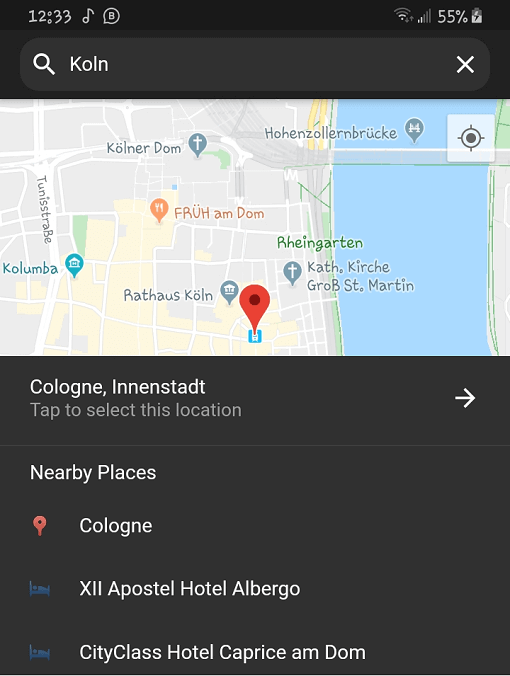
Ortsauswahl vollständig in Dart für Flutter geschrieben. Mit Autocomplete-Vorschlägen und Liste naher Orte. Auch Lokalisierung.

30-Tage-Downloads
322
Likes
147
Pub-Punkte
60

Paket installieren

flutter pub add place_picker

Paketübersicht

Aus öffentlichen Paketdaten erstellte Orientierung.

Place Picker ist ein vollständig in Dart geschriebenes Flutter-Paket zur Auswahl von Orten mit automatischer Vervollständigung und einer Liste nahegelegener Orte. Es unterstützt Lokalisierung und ermöglicht mehrsprachige Benutzererfahrungen. Für eine nahtlose Integration in Flutter-Apps entwickelt, vereinfacht es die Eingabe von Adressen und Standorten durch intuitive UI-Komponenten. Das Paket nutzt Google Maps im Hintergrund für genaue Geodaten und verbessert die Benutzererfahrung durch intelligente Vorschläge und Echtzeitfeedback. Ideal für Apps, die eine präzise Standortauswahl erfordern.

Anwendungsfälle

  • Adresseneingabe in Formularen
  • Standortauswahl für Lieferdienste
  • Reise- und Kartierungsanwendungen
  • Benutzerprofilstandort-Einrichtung
  • Ereignis- oder Veranstaltungsortregistrierung

Hauptmerkmale

  • Vorschläge zur Autovervollständigung
  • Liste der nahe gelegenen Orte
  • Eingebaute Lokalisierung
  • Google Maps-Integration
  • Vollständig anpassbare Benutzeroberfläche
  • Dart-einziges Implementierung

Geeignet für

  • Mobile Apps, die Standorteingabe benötigen
  • Apps für internationale Nutzer
  • Entwickler, die reine Dart-Lösungen verwenden
  • Projekte, die leichte Standortauswahl benötigen
  • Flutter-Apps mit kartengestützten Funktionen

Hinweise

  • Google Maps API-Schlüssel erforderlich
  • Beschränkt auf Google Maps Backend
  • Kann zusätzliche Stilisierung für benutzerdefinierte Themen erfordern
  • Abhängig von der Internetverbindung
  • Nicht geeignet für die Offline-Standortauswahl

Original-README

Originaler README-Schnappschuss aus dem verknüpften Quell-Repository. Aktuelle Inhalte finden Sie im Repository.

Flutter Place Picker Pub

The missing location picker made in Flutter for Flutter. With dark theme and custom localization support.

⚠️ Please note: This library will NOT be affected by the deprecation of Place Picker as indicated here.

🍭 Remember to enable Places API, Maps SDK for Android, Maps SDK for iOS and Geocoding API for your API key.

Usage

To use this plugin, add place_picker as a dependency in your pubspec.yaml file.

Getting Started

This package relies on google_maps_flutter to display the map. Follow these guidelines to add your API key to the Android and iOS packages.

Get an API key at https://cloud.google.com/maps-platform/ if you haven't already.

Android

Specify your API key in the application manifest android/app/src/main/AndroidManifest.xml and add ACCESS_FINE_LOCATION permission:

<manifest ...

  <!-- Add this permission -->
  <uses-permission android:name="android.permission.ACCESS_FINE_LOCATION" />

  <application ...
    <!-- Add your api key here -->
    <meta-data android:name="com.google.android.geo.API_KEY"
               android:value="YOUR KEY HERE"/>
    <activity ..../>
  </application>
</manifest>

Update your gradle.properties file with this:

android.enableJetifier=true
android.useAndroidX=true
org.gradle.jvmargs=-Xmx1536M

Please also make sure that you have those dependencies in your build.gradle:

  // parent level build.gradle (android/build.gradle)
  dependencies {
      classpath 'com.android.tools.build:gradle:3.3.0'
      classpath 'com.google.gms:google-services:4.2.0'
  }
  ...

  // app level build.gradle (android/app/build.gradle)
  compileSdkVersion 28
iOS

Specify your API key in the application delegate ios/Runner/AppDelegate.m:

#include "AppDelegate.h"
#include "GeneratedPluginRegistrant.h"
#import "GoogleMaps/GoogleMaps.h"

@implementation AppDelegate

- (BOOL)application:(UIApplication *)application
    didFinishLaunchingWithOptions:(NSDictionary *)launchOptions {
  [GMSServices provideAPIKey:@"YOUR KEY HERE"];
  [GeneratedPluginRegistrant registerWithRegistry:self];
  return [super application:application didFinishLaunchingWithOptions:launchOptions];
}
@end

Or in your swift code, specify your API key in the application delegate ios/Runner/AppDelegate.swift:

import UIKit
import Flutter
import GoogleMaps

@UIApplicationMain
@objc class AppDelegate: FlutterAppDelegate {
  override func application(
    _ application: UIApplication,
    didFinishLaunchingWithOptions launchOptions: [UIApplicationLaunchOptionsKey: Any]?
  ) -> Bool {
    GMSServices.provideAPIKey("YOUR KEY HERE")
    GeneratedPluginRegistrant.register(with: self)
    return super.application(application, didFinishLaunchingWithOptions: launchOptions)
  }
}

Opt-in to the embedded views preview by adding a boolean property to the app's Info.plist file with the key io.flutter.embedded_views_preview and the value YES.

info.plist

Also add these to the dict values in Info.plist for location request to work on iOS info.plist

Sample Usage

Import the package into your code

import 'package:place_picker/place_picker.dart';

Create a method like below, and call it in onTap of a button or InkWell. A LocationResult will be returned with the name and lat/lng of the selected place. You can then handle the result in any way you want. Pass in an optional LatLng displayLocation to display that location instead. This is useful when you want the map to display the previously selected location.

void showPlacePicker() async {
    LocationResult result = await Navigator.of(context).push(MaterialPageRoute(
        builder: (context) =>
            PlacePicker("YOUR API KEY",
                        displayLocation: customLocation,
                        )));

    // Handle the result in your way
    print(result);
}

Kategorien

Abhängigkeiten

Abhängigkeiten 3 Einträge

Quell-Repository

Projekte, die dieses Paket verwenden

Noch keine Daten verfügbar.