Aus öffentlichen Paketdaten erstellte Orientierung.
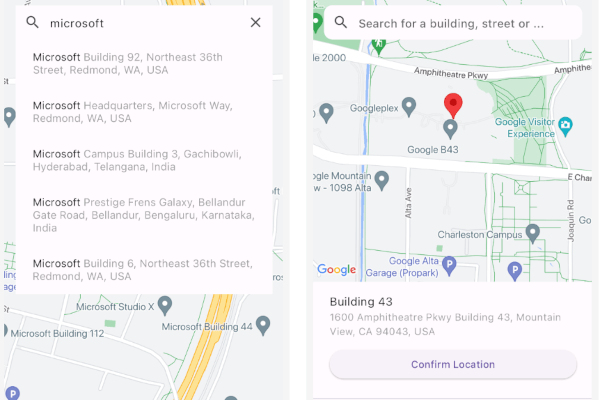
Ein Flutter-Paket, das die nahtlose Integration von Google Maps für die Ortsauswahl ermöglicht und vollständig in Dart implementiert ist. Es bietet eine intuitive Oberfläche zur Auswahl von Standorten aus Google Maps und unterstützt sowohl Android als auch iOS. Das Paket vereinfacht den Prozess der Auswahl von Adressen oder Koordinaten, indem es die Google Maps-API direkt innerhalb von Flutter-Anwendungen nutzt. Ideal für Anwendungen, die Ortseingaben erfordern, wie Lieferdienste, Reise-Apps oder Veranstaltungsplanungstools.
Anwendungsfälle
Standortauswahl in Liefer-Apps
Adresseneingabe für Reisebuchungen
Geolocation für die Veranstaltungsplanung
Einrichtung der Benutzerprofiladresse
Kartenbasierte Formulareingaben
Hauptmerkmale
Vollständig in Dart geschrieben
Integration mit der Google Maps API
Unterstützt Android und iOS
Einfache API für die Ortswahl
Anpassbare Benutzeroberflächenkomponenten
Geeignet für
Entwickler, die ortsbasierte Flutter-Apps erstellen
Apps, die eine Google Maps-Integration benötigen
Projekte, die Adressenauswahl-Funktionalität erfordern
Mobile Apps mit Geolokationsfunktionen
Plattformübergreifende Lösungen für Standorteingaben
Hinweise
Erfordert Google Maps-API-Schlüssel
Abhängig von der Internetverbindung
Möglicherweise sind zusätzliche Berechtigungen für den Standortzugriff erforderlich
Möglicher Leistungseinbruch bei intensiver Kartendarstellung
Begrenzte Anpassungsmöglichkeiten ohne erweiterte Konfiguration
Original-README
Originaler README-Schnappschuss aus dem verknüpften Quell-Repository. Aktuelle Inhalte finden Sie im Repository.
Place Picker Google
A comprehensive, cross-platform google maps place picker library for Flutter.
The package provides common operations for Place picking,
Places autocomplete, My Location, and Nearby places from google maps given you have enabled
Places API, Maps SDK for Android, Maps SDK for iOS and Geocoding API for your API key.
The following permissions are not required to use Google Maps Android API v2, but are recommended.
android.permission.ACCESS_COARSE_LOCATION Allows the API to use WiFi or mobile cell data (or both) to determine the
device's location. The API returns the location with an accuracy approximately equivalent to a city block.
android.permission.ACCESS_FINE_LOCATION Allows the API to determine as precise a location as possible from the
available location providers, including the Global Positioning System (GPS) as well as WiFi and mobile cell data.
On iOS you'll need to add the following entries to your Info.plist file (located under ios/Runner) in order to access the device's location.
Simply open your Info.plist file and add the following:
<key>NSLocationWhenInUseUsageDescription</key><string>This app needs access to location when open.</string><key>NSLocationAlwaysUsageDescription</key><string>This app needs access to location when in the background.</string><key>NSLocationAlwaysAndWhenInUseUsageDescription</key><string>This app needs access to location when open and in the background.</string>
Web
You'll need to modify the web/index.html file of your Flutter Web application to include the Google Maps JS SDK.
Get an API Key for Google Maps JavaScript API.
Get started here.
Modify the <head> tag of your web/index.html to load the Google Maps JavaScript API, like so:
<head><!-- // Other stuff --><!-- TODO: Add your Google Maps API key --><scriptsrc="https://maps.googleapis.com/maps/api/js?key=YOUR_API_KEY"></script></head>
Check the google_maps_flutter_web README
for the latest information on how to prepare your App to use Google Maps on the
web.
Note
Browser-based apps can't use dart:io library for the Platform API.
Only servers, command-line scripts, and Flutter mobile apps can import and use dart:io.
A native solution to switch between the platforms would be to use the flutter/foundation library.
import'package:flutter/foundation.dart';
if (kIsWeb) {
/// Web specific code
}
elseif (defaultTargetPlatform == TargetPlatform.iOS || defaultTargetPlatform == TargetPlatform.android) {
/// Android/iOS specific code
}
Google places API prevents CORS. So we can't make a request from client-side.
And As the PlacesAutocomplete widget makes http request to the Google places API like this:
This client-side request will be prevented.
The Google API was not made to be call from browser.
You need to use a proxy server that add the CORS to your request. e.g cors-anywhere.
Deploy the proxy server in Heroku or Vercel. You'll get a URL after deployment.
After that you need to add the URL before your API endpoint while making the calls. i.e "proxy_server_url/google_api_endpoint".
The proxy server will add the necessary headers.
For example with the proxy server it would look like
You can use PlacePicker by pushing to a new page using Navigator, OR put as a child of any widget.
When the user picks a place on the map, it will return result to onPlacePicked with LocationResult type.
Alternatively, you can build your own way with selectedPlaceWidgetBuilder and fetch result from it (See the instruction below).
If you do want to fetch places from a custom location or refresh them when the user moves the map, you must enable /nearbysearch queries in Place Picker.
To do that, enable enableNearbyPlaces flag in the package.
Customizing selected place UI
By default, when a user selects a place by using auto complete search or dragging/tapping the map,
we display the information at the bottom of the map.
However, if you don't like this UI/UX, simply override the builder using selectedPlaceWidgetBuilder.
Note that using this customization WILL NOT INVOKE onPlacePicked callback
Free Geocoding (Reduce Google API Billing)
This package supports free geocoding using the geocoding package, which leverages the device’s native geocoding capabilities on iOS and Android.
Set useFreeGeocoding in PlacePicker as true to access geocoding API's.
Benefits
Avoids Google Geocoding API calls → Reduce billing costs
On-device geocoding for common address lookups
Works offline for some platforms (cached or approximated results)
Note:
Native geocoding may provide less detailed results than Google Geocoding API.
For precise or international addresses, use Google’s API as a fallback.
Not available on the web.
Packages Used
Below are the information about the packages used.