Pakete, Repositories und App-Kategorien suchen

Cover von rotated_corner_decoration
Paketdetailsv2.1.0+1

rotated_corner_decoration

Das RotatedCornerDecoration-Paket wurde entwickelt, um Eckenabzeichen zu erstellen und anzuwenden. Es bietet automatische Rotation von TextSpans.

AndroidiOSWebmacOSWindowsLinux
30-Tage-Downloads
118
Likes
113
Pub-Punkte
150

Paket installieren

flutter pub add rotated_corner_decoration

Paketübersicht

Aus öffentlichen Paketdaten erstellte Orientierung.

RotatedCornerDecoration ist ein Flutter-Paket, das entwickelt wurde, um Eckenabzeichen mit automatischer Textrotation zu erstellen und anzuwenden. Es ermöglicht Entwicklern, dekorative Eckelemente – wie Bänder oder Abzeichen – einfach zu Widgets hinzuzufügen, wobei die Textbeschriftungen auch in Ecken korrekt ausgerichtet bleiben. Ideal für UI-Verbesserungen wie „Neu“- oder „Verkauf“-Etiketten unterstützt es mehrere Plattformen wie Android, iOS, Web, macOS, Windows und Linux. Das Paket vereinfacht den Prozess der Ausrichtung von Text innerhalb gedrehter Container mithilfe der automatischen Rotation von TextSpan.

Anwendungsfälle

  • Dekorative Eckenabzeichen hinzufügen
  • Dynamische Bandbeschriftungen erstellen
  • Verbesserung der Benutzeroberfläche mit visuellen Indikatoren
  • Status-Tag in Ecken anzeigen
  • Anpassen von Widget-Ecken-Dekorationen
  • Werbebanner erstellen

Hauptmerkmale

  • Auto-rotiert TextSpans
  • Unterstützt mehrere Plattformen
  • Einfache Integration mit bestehenden Widgets
  • Flexible Eckenpositionierung
  • Minimale Boilerplate-Code
  • Plattformübergreifende Kompatibilität

Geeignet für

  • UI-Designer, die visuellen Glanz suchen
  • Entwickler, die E-Commerce-Apps erstellen
  • Teams, die Dashboard-Oberflächen erstellen
  • Apps, die Statusanzeigen benötigen
  • Projekte mit benutzerdefinierten Badge-Anforderungen

Hinweise

  • Verständnis der TextSpan-Layouts erforderlich
  • Könnte für komplexe Layouts feinabgestimmt werden müssen
  • Beschränkt auf Anwendungsfälle für Ecken-Dekoration
  • Nicht geeignet für Vollbild-Overlay
  • Am besten mit einfachem Textinhalt verwenden

Original-README

Originaler README-Schnappschuss aus dem verknüpften Quell-Repository. Aktuelle Inhalte finden Sie im Repository.

Pay attention!

If you need a regular (not rotated) text at the corner of widgets please consider to use Stack with Containers and Text widgets.
This package was developed to provide auto rotation of TextSpans.

Example

Take a look at the provided example application for how to use the CornerDecoration.

How to use

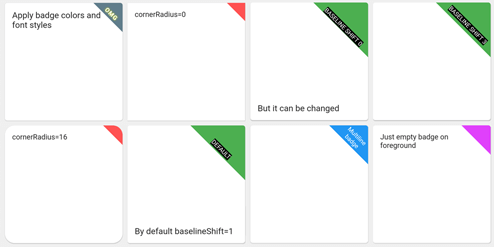
screenshot1678647469887

Container(
  foregroundDecoration: RotatedCornerDecoration.withColor(
    color: Color(0xffffd700),
    badgeSize: Size(16, 16),
  ),
),

screenshot1678647470825

Container(
  foregroundDecoration: RotatedCornerDecoration.withColor(
    color: Colors.red,
    spanBaselineShift: 4,
    badgeSize: Size(64, 64),
    badgeCornerRadius: Radius.circular(8),
    badgePosition: BadgePosition.topStart,
    textSpan: TextSpan(
      text: 'OMG',
      style: TextStyle(
        color: Colors.white,
        fontSize: 12,
        letterSpacing: 1,
        fontWeight: FontWeight.bold,
        shadows: [
          BoxShadow(color: Colors.yellowAccent, blurRadius: 8),
        ],
      ),
    ),
  ),
),

screenshot1678647471437

Container(
  foregroundDecoration: RotatedCornerDecoration.withColor(
    color: Colors.blue,
    badgeSize: Size(64, 64),
    textSpan: TextSpan(
      text: 'Multiline\nbadge',
      style: TextStyle(fontSize: 10),
    ),
  ),
),

screenshot1678647472293

Container(
  foregroundDecoration: RotatedCornerDecoration.withColor(
    color: Colors.black87,
    badgeSize: Size(64, 64),
    spanBaselineShift: 2,
    textSpan: TextSpan(
      children: [
        TextSpan(
          text: 'LOREM\n',
          style: TextStyle(
            fontSize: 10,
            fontWeight: FontWeight.bold,
            color: Colors.redAccent,
          ),
        ),
        TextSpan(
          text: 'IPSUM',
          style: TextStyle(
            fontSize: 7,
            fontStyle: FontStyle.italic,
            letterSpacing: 5,
            color: Colors.yellow,
          ),
        ),
      ],
    ),
  ),
),

screenshot1678647473029

Container(
  foregroundDecoration: RotatedCornerDecoration.withColor(
    color: Colors.brown,
    badgeSize: Size(112, 56),
    textSpan: TextSpan(
      text: 'WEIRD BADGE',
      style: TextStyle(fontSize: 10),
    ),
  ),
),

screenshot1678647473739

Container(
  foregroundDecoration: RotatedCornerDecoration.withColor(
    color: Colors.blueGrey,
    badgeSize: Size(64, 64),
    textSpan: TextSpan(
      text: 'WOW',
      style: TextStyle(fontSize: 10),
    ),
    spanHorizontalOffset: -12,
  ),
),

screenshot1678647478380

Container(
  foregroundDecoration: RotatedCornerDecoration.withColor(
    color: Colors.green,
    badgeSize: Size(64, 64),
    textSpan: TextSpan(
      text: 'SHIFT 1',
      style: TextStyle(fontSize: 10, backgroundColor: Colors.black),
    ),
  ),
),

screenshot1678647479092

Container(
  foregroundDecoration: RotatedCornerDecoration.withColor(
    color: Colors.green,
    badgeSize: Size(64, 64),
    spanBaselineShift: 3,
    textSpan: TextSpan(
      text: 'SHIFT 4',
      style: TextStyle(fontSize: 10, backgroundColor: Colors.black),
    ),
  ),
),

screenshot1678647479917

Container(
  foregroundDecoration: RotatedCornerDecoration.withGradient(
    gradient: LinearGradient(
      begin: Alignment.topRight,
      end: Alignment.bottomLeft,
      colors: [Colors.blue, Colors.lightGreenAccent],
    ),
    badgeSize: Size(64, 64),
  ),
  decoration: RotatedCornerDecoration.withGradient(
    badgePosition: BadgePosition.topStart,
    gradient: LinearGradient(
      begin: Alignment.topLeft,
      end: Alignment.topRight,
      stops: [0, 0.5, 1],
      colors: [
        Colors.purpleAccent,
        Colors.amber,
        Colors.blue,
      ],
    ),
    badgeSize: Size(64, 64),
  ),
),

screenshot1678647480605

Container(
  foregroundDecoration: RotatedCornerDecoration.withGradient(
    gradient: RadialGradient(
      center: Alignment.topRight,
      radius: 1.5,
      stops: const [0, 0.25, 0.5],
      colors: [
        Colors.redAccent,
        Colors.redAccent.withOpacity(0.5),
        Colors.redAccent.withOpacity(0),
      ],
    ),
    badgeSize: const Size(64, 64),
  ),
  decoration: RotatedCornerDecoration.withGradient(
    badgePosition: BadgePosition.topStart,
    gradient: SweepGradient(
      center: const FractionalOffset(0.27, -0.65),
      colors: List.generate(360, _generator),
    ),
    badgeSize: const Size(64, 64),
  ),
),

screenshot1678647483564

Container(
  foregroundDecoration: RotatedCornerDecoration.withColor(
    color: Colors.lightBlue,
    badgeSize: Size(64, 64),
    badgeShadow: BadgeShadow(color: Colors.black, elevation: 4),
  ),
),

screenshot1678647484300

Container(
  foregroundDecoration: RotatedCornerDecoration.withColor(
    color: Colors.indigo,
    badgeSize: Size(64, 64),
    badgePosition: BadgePosition.bottomStart,
    textDirection: TextDirection.ltr,
  ),
),

screenshot1678647485147

Container(
  foregroundDecoration: RotatedCornerDecoration.withColor(
    color: Colors.indigo,
    badgeSize: Size(64, 64),
    badgePosition: BadgePosition.bottomStart,
    textDirection: TextDirection.rtl,
  ),
),

EXPERIMENTAL FEATURE!

use isEmoji: true to disable span rotating
you can shift span position with spanHorizontalOffset and TextStyle.height parameters screenshot1678649657350

Container(
  foregroundDecoration: RotatedCornerDecoration.withColor(
    color: Colors.purple,
    badgeSize: Size(64, 64),
    isEmoji: true,
    textSpan: TextSpan(
      text: '🤮',
      style: TextStyle(fontSize: 20, height: 1.7),
    ),
  ),
),

Kategorien

Quell-Repository

Projekte, die dieses Paket verwenden

Noch keine Daten verfügbar.