
Kategorien, Pakete und Repositories suchen

Paketdetailsv0.0.2

scrollable_reorderable_navbar

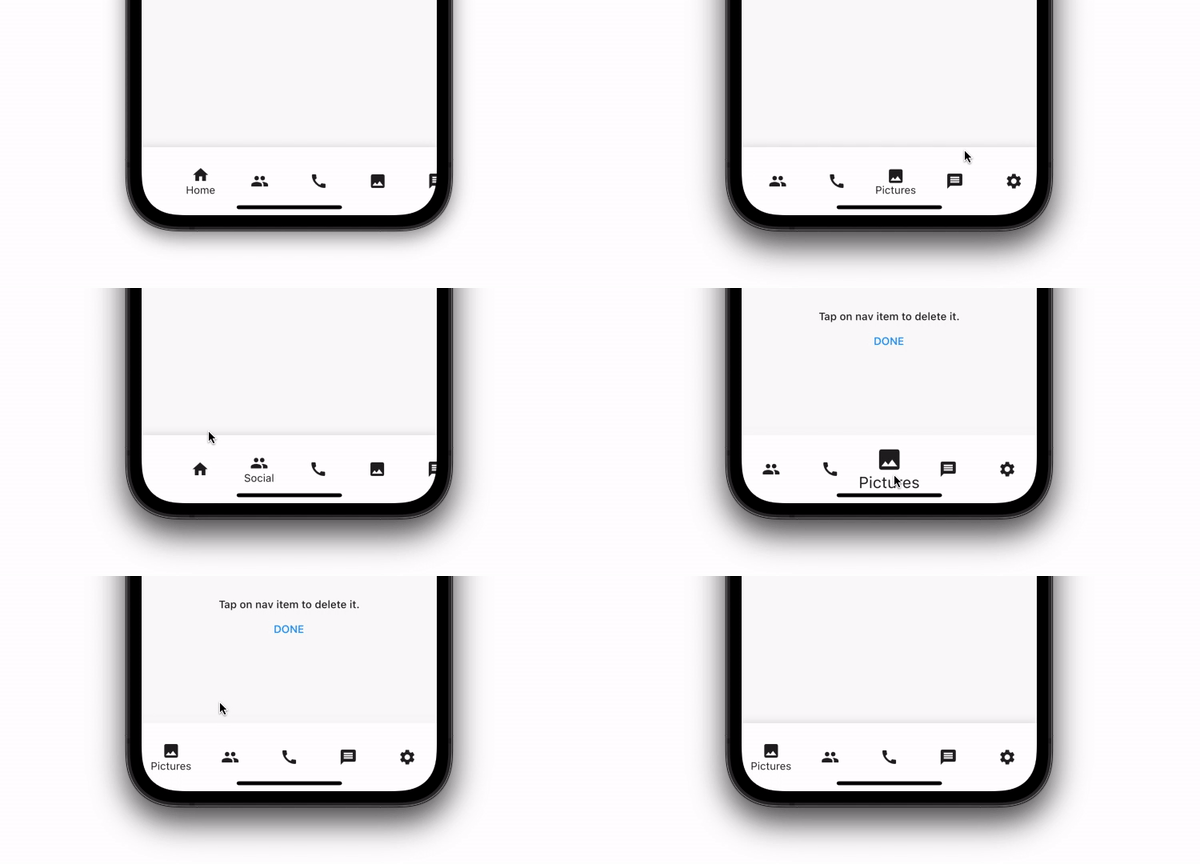
Eine untere Navigationsleiste, die bei mehr als 5 Navigationspunkten scrollbar ist. Sie ermöglicht auch das Verschieben von Elementen per Swipe und das Löschen von Elementen aus der Navigationsleiste.

AndroidiOSWebmacOSWindowsLinux
30-Tage-Downloads
15
Likes
30
Pub-Punkte
140

Paket installieren

flutter pub add scrollable_reorderable_navbar

Paketübersicht

Aus öffentlichen Paketdaten erstellte Orientierung.

Eine scrollbare und umsortierbare Bottom-Navigation für Flutter, die sich dynamisch anpasst, wenn mehr als fünf Elemente vorhanden sind. Benutzer können per Wischen Elemente neu anordnen und direkt aus der Navigationsleiste löschen. Speziell für intuitive Navigation in Apps mit vielen Tabs entwickelt, verbessert sie die Benutzerfreundlichkeit sowohl auf mobilen als auch auf Desktop-Plattformen. Das Paket unterstützt alle wichtigen Plattformen einschließlich Android, iOS, Web, macOS, Windows und Linux. Es kombiniert flüssiges Scrollen mit gestenbasiertem Umordnen und Löschen und bietet eine flexible Oberfläche zur Verwaltung von Navigationselementen.

Anwendungsfälle

  • Apps mit mehr als 5 Navigationspunkten
  • Anpassbare Bottom-Navigation-Layouts
  • Benutzergetriebenes Umordnen von Tabs
  • Dynamische Verwaltung von Navigationselementen
  • Desktop- und mobile Cross-Plattform-Apps

Hauptmerkmale

  • Scrollbar, wenn mehr als 5 Elemente vorhanden sind
  • Funktionalität zum Umordnen per Wischen
  • Löschung von Navigationselementen
  • Plattformübergreifende Unterstützung (Android, iOS, Web, macOS, Windows, Linux)
  • Glatte, gestenbasierte Interaktionen

Geeignet für

  • Entwickler, die flexible Bottom-Navigation-Bars benötigen
  • Apps, die eine dynamische Navigationsoptimierung erfordern
  • Projekte für mehrere Plattformen
  • UIs with frequent user interaction on navigation
  • Designer, die interaktive Navigationskomponenten suchen

Hinweise

  • Kann zusätzliche Zustandsverwaltung erfordern
  • Nicht ideal für statische Navigationskonfigurationen
  • Leistungsbeeinträchtigung bei sehr großen Elementlisten
  • Beschränkt auf die Bottom-Navigation-Layout
  • Erfordert sorgfältige Behandlung der Item-Lösch-UX
Original-README

Originaler README-Schnappschuss aus dem verknüpften Quell-Repository. Aktuelle Inhalte finden Sie im Repository.

ScrollableReordableNavbar for Flutter

A flutter plugin for create bottom nav bar that can be scrolled when there are than 5 nav items to display. It also let user swipe items position and item can be deleted from the navbar.

Installing:

In your pubspec.yaml

dependencies:
  scrollable_reorderable_navbar: ^0.0.1
import 'package:scrollable_reorderable_navbar/scrollable_reorderable_navbar.dart';


Basic Usage:

    ScrollableReorderableNavBar(
      onItemTap: (arg) {
        setState(() {
          _selectedIndex = arg;
        });
      },
      onReorder: (oldIndex, newIndex) {
        final currItem = _items[_selectedIndex];
        if (oldIndex < newIndex) newIndex -= 1;
          final newItems = [..._items], item = newItems.removeAt(oldIndex);
          newItems.insert(newIndex, item);
        setState(() {
          _items = newItems;
          _selectedIndex = _items.indexOf(currItem);
        });
      },
    items: _items,
    selectedIndex: _selectedIndex,
    onDelete: (index) => setState(() => _items.removeAt(index)),
    deleteIndicationWidget: Container(
      padding: const EdgeInsets.only(bottom: 100),
      child: Align(
        alignment: Alignment.bottomCenter,
        child: Wrap(
          alignment: WrapAlignment.center,
          crossAxisAlignment: WrapCrossAlignment.center,
          direction: Axis.vertical,
          children: [
            Text("Tap on nav item to delete it.",
              style: Theme.of(context).textTheme.bodyText1,
              textAlign: TextAlign.center),
            TextButton(onPressed: () {}, child: const Text("DONE"))
          ],
        ),
      ),
    ),
  )


Custom usage

There are options that let you custom the navbar:\

Properties Description
List<NavBarItem> items Items composing the navbar, every items should have different names
int selectedIndex The index of the selected NavBarItem
ValueChanged<int> onItemTap Which behaviour should have after the user tap on a NavBarItem
ReorderCallback onReorder Which behaviour should have after user swap 2 NavBarItem
Widget deleteIndicationWidget The Widget displayed on top of the delete overlay to show user that he can tap on NavBarItem to delete them
ValueChanged<int> onDelete Which behaviour should have after user delete a NavBarItem
ReorderItemProxyDecorator? proxyDecorator How the widget should look like on a reorder operation
Color backgroundColor Background color of the navbar
Duration duration Duration of the animations
BoxDecoration? decoration Decoration of the entire navbar. You should use either backgroundColor or this one

Additional information

Don't hesitate to suggest any features or fix that will improve the package!

Kategorien

Quell-Repository

Projekte, die dieses Paket verwenden

Noch keine Daten verfügbar.