Aus öffentlichen Paketdaten erstellte Orientierung.
Das seo_renderer-Paket ist ein Flutter-Plugin für Flutter-Web-Anwendungen, das Text-Widgets als HTML rendert, um die Suchmaschinenoptimierung zu verbessern. Durch die Umwandlung von Flutter-Textkomponenten in statisches HTML erhöht es die SEO-Sichtbarkeit, ohne die dynamische Funktionalität der Anwendung zu beeinträchtigen. Dieses Paket ist besonders nützlich für contentreiche Web-Anwendungen, bei denen die Auffindbarkeit entscheidend ist. Es unterstützt alle wichtigen Plattformen, einschließlich Web, Android, iOS, macOS, Windows und Linux, und sorgt für eine konsistente Darstellung über verschiedene Umgebungen hinweg.
Anwendungsfälle
Verbesserung der SEO für Flutter-Web-Inhalte
Rendern von statischem Text für Suchmaschinen
Verbesserung der Sichtbarkeit von Blog- oder Artikelseiten
Optimierung von Dokumentationsseiten
Web-Crawler mit strukturiertem Text unterstützen
Serverseitige Rendern von Text aktivieren
Hauptmerkmale
Konvertiert Flutter Text-Widgets in HTML
Verbessert die Indizierung durch Suchmaschinen
Plattformübergreifende Kompatibilität
Leichtgewichtig und einfach zu integrieren
Textformatierung beibehält
Läuft nahtlos mit Flutter Web
Geeignet für
inhaltsgetriebene Flutter-Web-Apps
Blogs und Nachrichten-Websites
Dokumentationsportale
SEO-optimierte Webanwendungen
Entwickler, die Web-Sichtbarkeit priorisieren
Hinweise
Nicht erforderlich für nicht-SEO-bezogene Anwendungsfälle
Kann die Bundle-Größe leicht erhöhen
Am besten für statischen oder halb-statischen Inhalt geeignet
Erfordert sorgfältige Handhabung in dynamischen Benutzeroberflächen
Beschränkt auf Textrendering, keine vollständige Widget-Konvertierung
Leistungseinfluss bei großen Textblöcken
Original-README
Originaler README-Schnappschuss aus dem verknüpften Quell-Repository. Aktuelle Inhalte finden Sie im Repository.
SEO Renderer [Not Maintaining]
Alternative : https://pub.dev/packages/seo
A flutter plugin (under development) to render text, link, image widgets as html elements for SEO purpose.
Created specifically for issue https://github.com/flutter/flutter/issues/46789
It will automatic detect the crawler using regex and navigator userAgent and add the HtmlElement you choose to the DOM.
All PR's are welcome :)
Getting Started
Add this to your pubspec.yaml
dependencies:seo_renderer:^0.6.0
Get the package from Pub:
flutter packages get
Import it in your file
import'package:seo_renderer/seo_renderer.dart';
Usage
It's required to add a RobotDetector to detect if page is visited by a robot and add seoRouteObserver to observe when widgets change their visibility. To do this simply wrap MaterialApp within RobotDetector and add seoRouteObserver in navigatorObservers:
runApp(
  RobotDetector(
    debug: true, // you can set true to enable robot mode
    child: MaterialApp(
      home: MyApp(),
      navigatorObservers: [seoRouteObserver],
    ),
  ),
);
For more complex projects it's recommended to add these lines in index.html which will force html web renderer in case robot is detected. It's because canvaskit has some stricter limits and potenitally can break.
To render html text element above a child you pass Text, RichText as the child or simply set the text.
TextRenderer(
  child: Text(
    'Lorem Ipsum is simply dummy text of the printing and typesetting industry.',
  ),
)

TextRenderer(
  text: 'Lorem Ipsum is simply dummy text of the printing and typesetting industry.',
  child: CustomWidget(),
)
Optionally you can change the html element between <h1> to <h6> and <p> by setting style. Default value is TextRendererStyle.paragraph.
TextRenderer(
  style: TextRendererStyle.paragraph,
  child: Text(
    'Lorem Ipsum is simply dummy text of the printing and typesetting industry.',
  ),
)

TextRenderer(
  style: TextRendererStyle.header1,
  child: Text(
    'Lorem Ipsum is simply dummy text of the printing and typesetting industry.',
  ),
)
LinkRenderer
To render html link element above a child set text and href.
To render html image element above a child set alt and pass Image.network(...), Image.asset(...), Image.memory(...) as the child or simply set the src.
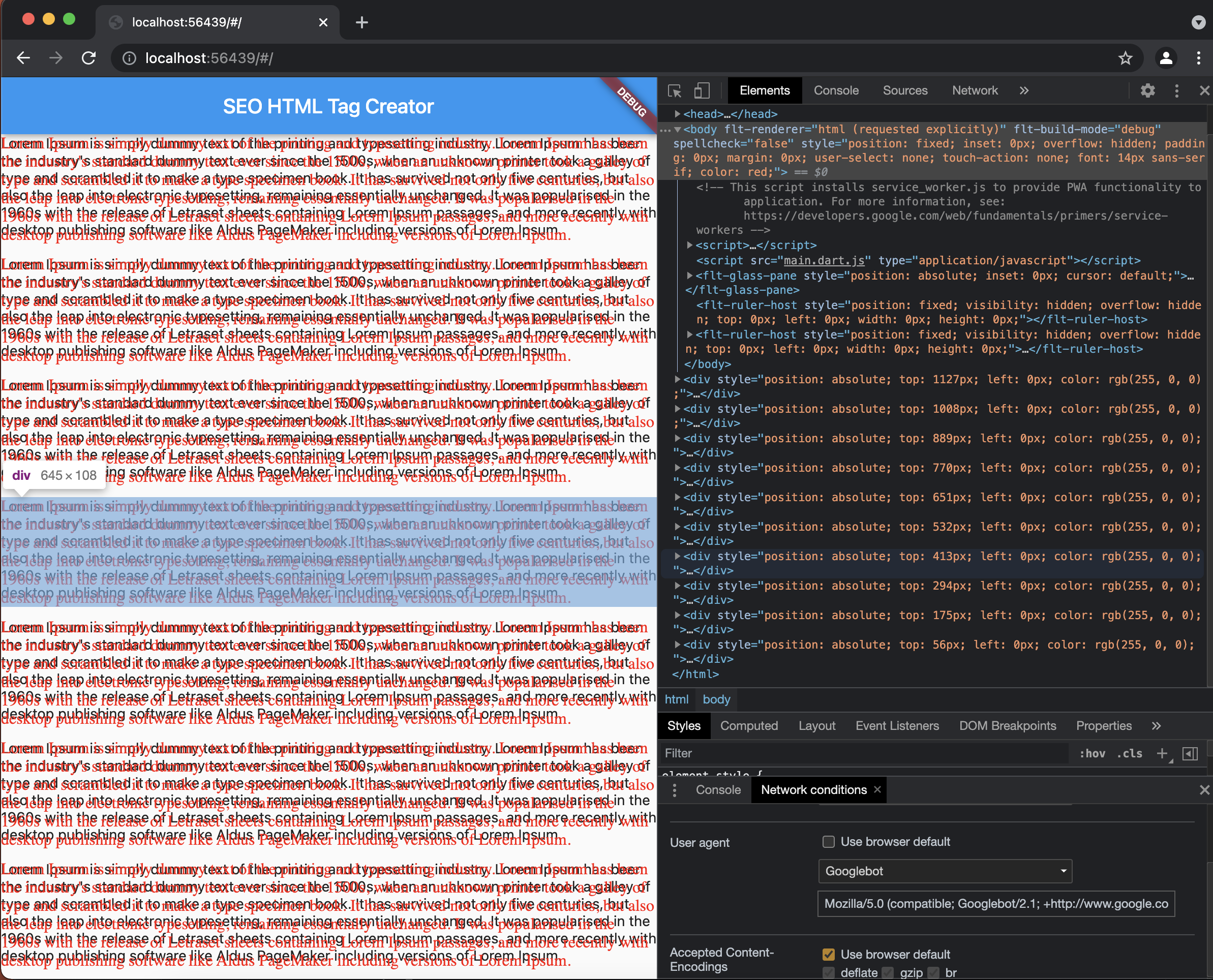
Select GoogleBot here's how as userAgent in Network Condition and refresh the page to see created Div Elements.
License
MIT License

Copyright (c) 2021 Sahdeep Singh

Permission is hereby granted, free of charge, to any person obtaining a copy
of this software and associated documentation files (the "Software"), to deal
in the Software without restriction, including without limitation the rights
to use, copy, modify, merge, publish, distribute, sublicense, and/or sell
copies of the Software, and to permit persons to whom the Software is
furnished to do so, subject to the following conditions:

The above copyright notice and this permission notice shall be included in all
copies or substantial portions of the Software.

THE SOFTWARE IS PROVIDED "AS IS", WITHOUT WARRANTY OF ANY KIND, EXPRESS OR
IMPLIED, INCLUDING BUT NOT LIMITED TO THE WARRANTIES OF MERCHANTABILITY,
FITNESS FOR A PARTICULAR PURPOSE AND NONINFRINGEMENT. IN NO EVENT SHALL THE
AUTHORS OR COPYRIGHT HOLDERS BE LIABLE FOR ANY CLAIM, DAMAGES OR OTHER
LIABILITY, WHETHER IN AN ACTION OF CONTRACT, TORT OR OTHERWISE, ARISING FROM,
OUT OF OR IN CONNECTION WITH THE SOFTWARE OR THE USE OR OTHER DEALINGS IN THE
SOFTWARE.