Pakete, Repositories und App-Kategorien suchen

Cover von shaky_animated_listview
Paketdetailsv0.0.5

shaky_animated_listview

Listen Sie Animationen, um Ihre Scrolländerungen auf dem Bildschirm zu verfolgen oder Ihre Liste erstmals anzufügen, um Ihre Listenitems mit verschiedenen Übergaberegeln zu animieren.

AndroidiOSWebmacOSWindowsLinux
30-Tage-Downloads
98
Likes
73
Pub-Punkte
140

Paket installieren

flutter pub add shaky_animated_listview

Paketübersicht

Aus öffentlichen Paketdaten erstellte Orientierung.

ShakyAnimatedListView ist ein Flutter-Paket, das dynamische Listenelementanimationen bereitstellt, um Scrolländerungen oder die anfängliche Sichtbarkeit von Elementen in einer Liste visuell zu verfolgen. Es verbessert die Benutzererfahrung durch anpassbare Übergangseffekte, wenn Elemente in den Sichtbereich gelangen oder während des Scrollens auftreten. Perfekt geeignet für ansprechende, reaktive Listen mit flüssigen Eintritts- und Bewegungsanimationen, unterstützt es mehrere Plattformen wie Android, iOS, Web, macOS, Windows und Linux. Das Paket ist leichtgewichtig und lässt sich nahtlos in bestehende Flutter-Projekte integrieren.

Anwendungsfälle

  • Verbesserung von Eintragsanimationen in Listen
  • Visuelle Rückmeldung während des Scrollens
  • Interaktive Benutzeroberflächen mit dynamischen Übergängen erstellen
  • Verbesserung der Benutzerengagement in scrollbaren Listen
  • Animationen von Listen in Multiplattform-Apps

Hauptmerkmale

  • Anpassbare Übergangsregeln
  • Glatte Eintragsanimationen für Listenitems
  • Scrollbewusste Animationsverfolgung
  • Unterstützt alle wichtigen Flutter-Plattformen
  • Leichtgewichtig und einfach zu integrieren

Geeignet für

  • Entwickler, die interaktive Listen erstellen
  • UI-Designer, die auf visuelle Perfektion abzielen
  • Apps mit animierten Listen-Einträgen
  • Plattformübergreifende Flutter-Anwendungen
  • Projekte, die sich auf die Verbesserung der Benutzererfahrung konzentrieren

Hinweise

  • Kann die Leistung bei sehr großen Listen beeinträchtigen
  • Erfordert sorgfältige Abstimmung der Animationsparameter
  • Beschränkte Dokumentation verfügbar
  • Am besten geeignet für moderate Listengrößen
  • Nicht ideal für statische oder einfache Listen

Original-README

Originaler README-Schnappschuss aus dem verknüpften Quell-Repository. Aktuelle Inhalte finden Sie im Repository.

Shaky_animated_list

pub

Shaky_animated_list can be used for three main things:

  1. Animate List view scroll.
  2. Animate grid view first view.
  3. Animate grid view scroll.

1. Library over view

All these animations track your scroll changes on screen or your list first attachment to animated your list items with different transition rules.

Shaking Grid Scroll list Scroll Grid
shaking_grid scroll_list scroll_grid

You can define these animation directions Axis by channing your list ScrollDirection.

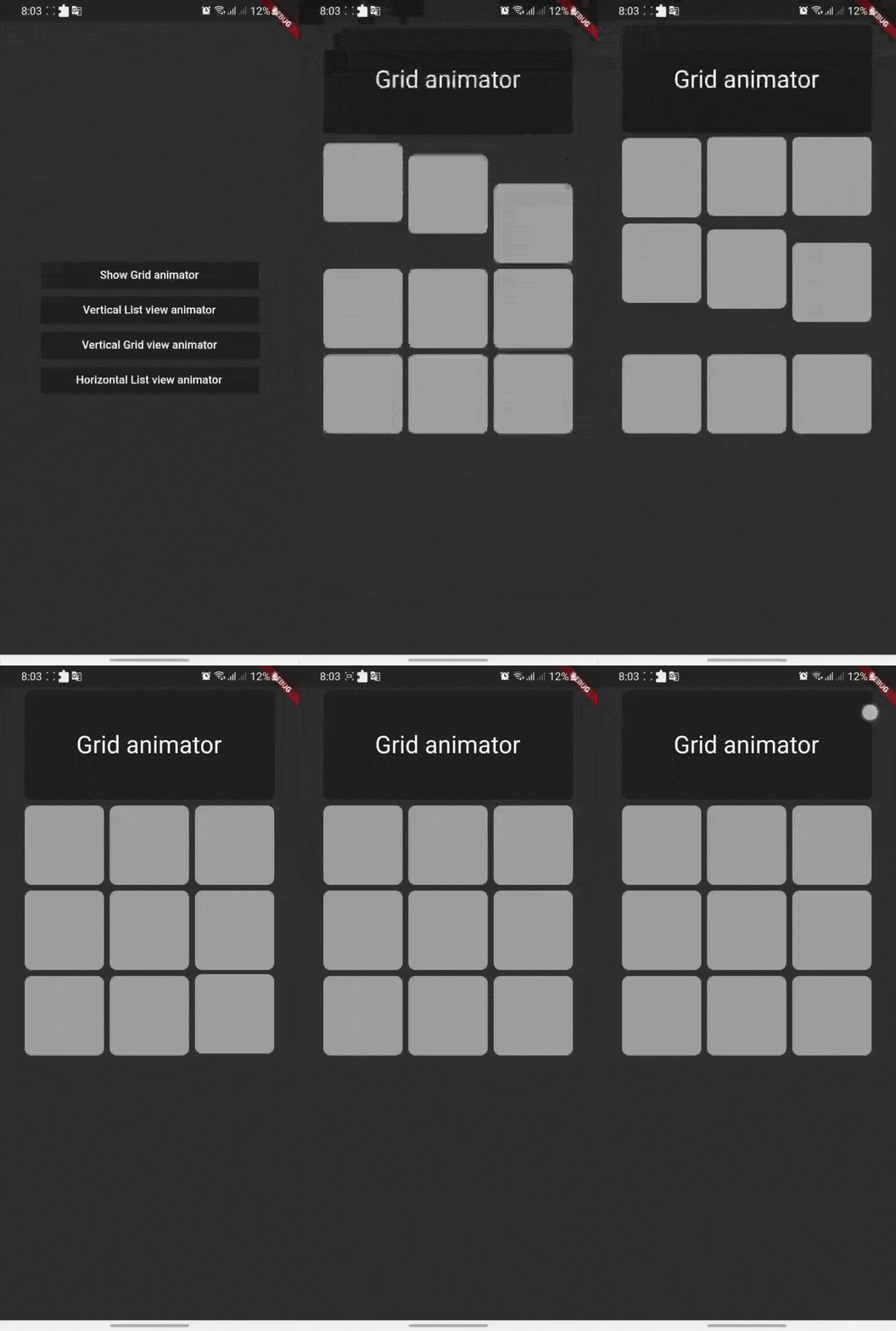
Shaking Grid

Shaking grid can be simply implemented by wrapping your grid child by GridAnimatorWidget and that's it we will take it from here ^^

for example you can simply do this to show shaking grey color cards

    GridView.count(
    crossAxisCount: 3,
    // shrinkWrap: true,
    children: List.generate(9, (i) => GridAnimatorWidget(
        child: Padding(
        padding: const EdgeInsets.all(4),
            child: ClipRRect(
            borderRadius: const BorderRadius.all(Radius.circular(10)),
                child: Container(
                color: Colors.grey,
                ),
        ),
    ),
    ),).toList()
    )

shaking_grid

ListView Scroll animations

ListView Scroll animations will enable your to implement the scroll animations with full control on animations space and duration please don't add vertical margins to your elements, you can use the spaceBetween to give a space between elements and extendedSpaceBetween to control the scroll animations space. Also you can use duration to control the reverse animations duration based on your needs

for example you can simply do this to show ListView vertical Scroll animations

    AnimatedListView(
    duration: 100,
    extendedSpaceBetween: 30,
    spaceBetween:10,
    children: List.generate(
    21,
    (index) => Card(
    elevation: 50,
    margin: const EdgeInsets.symmetric(horizontal: 20),
    shadowColor: Colors.black,
    color: Colors.grey,
        child: SizedBox(
        height: 300,
            child: Padding(
            padding: const EdgeInsets.all(20.0),
            child: Column(
                children: [
                    CircleAvatar(
                    backgroundColor: Colors.blue[500],
                    radius: 60,
                    child: const CircleAvatar(
                        backgroundImage: NetworkImage(
                        "https://avatars.githubusercontent.com/u/30810111?v=4"),
                        //NetworkImage
                        radius: 50,
                        ),
                    ),
                    const SizedBox(
                    height: 10,
                    ),
                    Text(
                    'Scroll to start',
                        style: TextStyle(
                        fontSize: 30,
                        color: Colors.blue[900],
                        fontWeight: FontWeight.w500,
                        ),
                    ),
                    const SizedBox(
                    height: 10,
                    ),
                    const Text(
                    'Animated list demo',
                        style: TextStyle(
                        fontSize: 15,
                        color: Colors.white,
                        ),
                    ),
                    const SizedBox(
                    height: 10,
                    ),
                ],
            ),
            ),
        ),
    )
))

scroll_list

Grid Scroll animations

Grid Scroll animations will enable your to implement the scroll animations on a grid view, one little change here is that we will implement the delegate, this is a design issue that we run into so you will have to to specify your crossAxisCount, crossAxisSpacing, mainAxisSpacing, and duration and we will take it from here,you can use any other default supported parameters in GridView.

for example you can simply do this to show Grid vertical Scroll animations

    AnimatedGridView(
          duration: 100,
          crossAxisCount: 2,
          mainAxisExtent: 256,
          crossAxisSpacing: 8,
          mainAxisSpacing: 8,
          children: List.generate(
              21,
              (index) => Card(
                    elevation: 50,
                    shadowColor: Colors.black,
                    color: Colors.grey[700],
                    child: SizedBox(
                      width: double.infinity,
                      child: Padding(
                        padding: const EdgeInsets.all(20.0),
                        child: Column(
                          children: const [
                            CircleAvatar(
                              backgroundColor: Colors.black,
                              radius: 60,
                              child: CircleAvatar(
                                backgroundImage: NetworkImage(
                                    "https://avatars.githubusercontent.com/u/30810111?v=4"),
                                //NetworkImage
                                radius: 50,
                              ),
                            ),
                          ],
                        ),
                      ),
                    ),
                  )
             )
       ),

scroll_grid

ListView horizontal Scroll animations

if you want to add a horizontal animations, all what you have to do is to add a scroll direction to the widget and that's it for example you can simply do this to show ListView horizontal Scroll animations

  AnimatedListView(
        duration: 100,
        scrollDirection: Axis.horizontal,
        children: List.generate(
        21,
            (index) => const Card(
            elevation: 50,
            margin: EdgeInsets.symmetric(horizontal: 10),
            shadowColor: Colors.black,
            color: Colors.grey,
                child: SizedBox(
                height: 300,
                width: 200,
                ),
            ),
        ),
  ),

horz_list

Sample source code

Example for all cases

Contribute

Let's develop with collaborations. We would love to have contributions by raising issues and opening PRs. Filing an issue before PR is must.

License

Project is published under the Apache 2.0 license. Feel free to clone and modify repo as you want, but don't forget to add reference to authors :)

Kategorien

Quell-Repository

Projekte, die dieses Paket verwenden

Noch keine Daten verfügbar.