Pakete, Repositories und App-Kategorien suchen

Cover von side_menu_animation
Paketdetailsv1.1.0

side_menu_animation

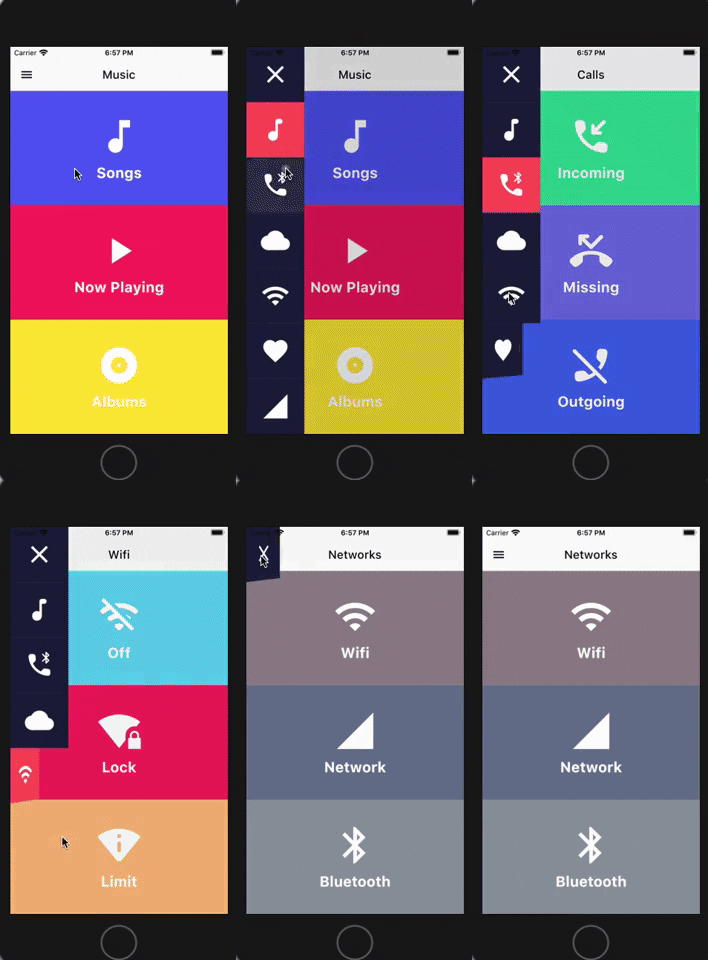
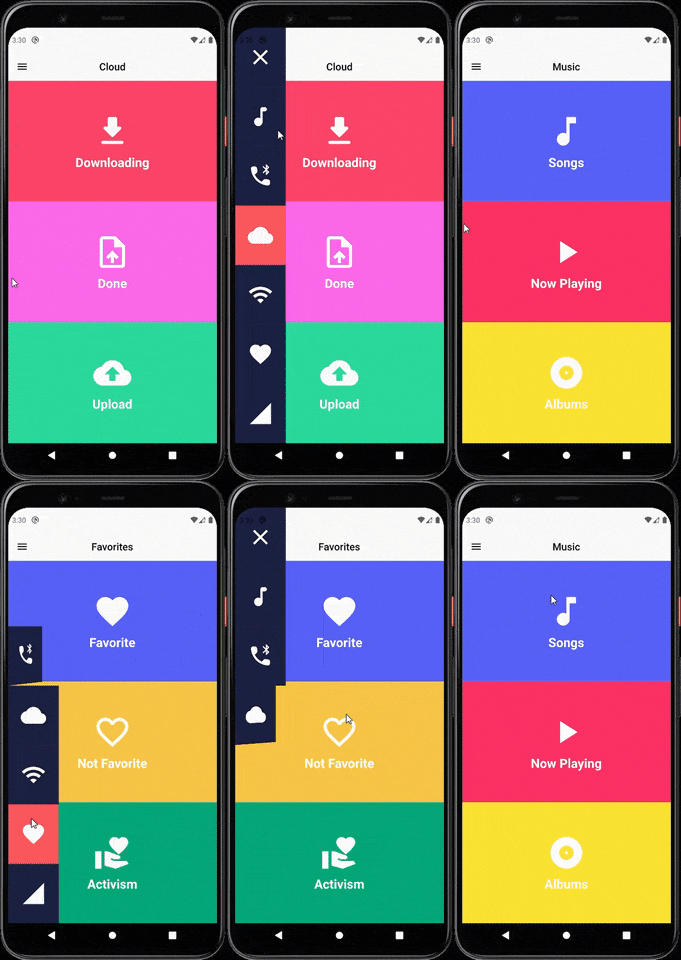
Animierter Seitenmenü mit anpassbarem UI. Inspiriert von der Yalantis-Bibliothek (Android/iOS).

AndroidiOSWebmacOSWindowsLinux
30-Tage-Downloads
21
Likes
97
Pub-Punkte
150

Paket installieren

flutter pub add side_menu_animation

Paketübersicht

Aus öffentlichen Paketdaten erstellte Orientierung.

Ein Flutter-Paket, das einen animierten Seitenmenü mit anpassbarem UI-Ansicht bietet, inspiriert von der Yalantis-Bibliothek für Android und iOS. Es bietet reibungslose Übergänge und visuelle Effekte, um die Navigationserfahrung auf mehreren Plattformen zu verbessern. Das Paket unterstützt eine vollständige Anpassung von Aussehen und Verhalten und ist daher ideal für Apps, die ein modernes, interaktives Drawer erfordern. Es ist mit Android, iOS, Web, macOS, Windows und Linux kompatibel und sorgt für konsistente Ergebnisse über Plattformen hinweg.

Anwendungsfälle

  • Mobile App-Navigation
  • Web-Dashboard-Schnittstellen
  • Plattformübergreifende Anwendungen
  • Anpassbare Schubladendesigns
  • Interaktive Benutzeroberflächenkomponenten

Hauptmerkmale

  • Glatte animierte Übergänge
  • Hochgradig anpassbare Benutzeroberfläche
  • Plattformübergreifende Unterstützung
  • Reaktives Design
  • Einfache Integration mit bestehendem Code
  • Unterstützung für Dunkelmodus

Geeignet für

  • Entwickler, die mobile oder Web-Apps erstellen
  • Designer, die moderne Navigationsmuster suchen
  • Projekte, die animierte Seitenmenüs erfordern
  • Apps für mehrere Plattformen
  • Teams, die Flutter für Full-Stack-Entwicklung verwenden

Hinweise

  • Kann eine Leistungsoptimierung auf älteren Geräten erfordern
  • Anpassungsoptionen können die Komplexität erhöhen
  • Beschränkte Dokumentation über die grundlegende Einrichtung hinaus
  • Mögliche Konflikte mit anderen Navigationspaketen
  • Nicht für sehr große Menüelemente optimiert
  • Erfahrung mit dem Animationssystem von Flutter erforderlich

Original-README

Originaler README-Schnappschuss aus dem verknüpften Quell-Repository. Aktuelle Inhalte finden Sie im Repository.

Side Menu Animation

pub package

Animated Side Menu with customizable UI. Inspired in Yalantis library (Android/iOS). Original Design: https://dribbble.com/shots/1689922-Side-Menu-Animation

Sample

SIDE MENU ANIMATION SIDE MENU ANIMATION - DRAG GESTURE

Learn how to build this package

  • Video 1: https://www.youtube.com/watch?v=vcdETKdI15E
  • Video 2: https://www.youtube.com/watch?v=W7mxTcwX5Wg

(Don't forget to subscribe and like)

Features

  • Optional parameter to tap outside to dismiss
  • Optional parameter to change the scrimColor
  • Custom color item for the side menu selected
  • Custom color item for the side menu unselected
  • Custom width for the side menu
  • Custom duration of the animation side menu
  • Display the menu from left or right

Getting Started

You should ensure that you add the router as a dependency in your flutter project.

dependencies:
 side_menu_animation: "^0.0.1"

You should then run flutter packages upgrade or update your packages in IntelliJ.

Example Project

There is a example project in the example folder. Check it out. Otherwise, keep reading to get up and running.

Usage

Need to include the import the package to the dart file where it will be used, use the below command,

import 'package:side_menu_animation/side_menu_animation.dart';

SideMenu

class SideMenuScreen extends StatelessWidget {
  final _index = ValueNotifier<int>(1);

  @override
  Widget build(BuildContext context) {
    return Scaffold(
      body: SideMenuAnimation(
        appBarBuilder: (showMenu) => AppBar(
          leading: IconButton(icon: Icon(Icons.menu, color: Colors.black), onPressed: showMenu),
          backgroundColor: Theme.of(context).scaffoldBackgroundColor,
          elevation: 0,
          brightness: Brightness.light,
          centerTitle: true,
          title: ValueListenableBuilder<int>(
            valueListenable: _index,
            builder: (_, value, __) => Text(value.toString(), style: TextStyle(color: Colors.black)),
          ),
        ),
        views: [YourCustomViews1Here(), YourCustomViews2Here()],
        items: [MyCustomItem1Here(), MyCustomItem2Here()],
        selectedColor: Color(0xFFFF595E),
        unselectedColor: Color(0xFF1F2041),
        tapOutsideToDismiss: true,
        scrimColor: Colors.black45,
        onItemSelected: (value) {
          if (value > 0 && value != _index.value) _index.value = value;
        },
      ),
    );
  }
}

SideMenuBuilder

class SideMenuBuilderScreen extends StatelessWidget {
  final _index = ValueNotifier<int>(1);

  @override
  Widget build(BuildContext context) {
    return Scaffold(
      body: SideMenuAnimation.builder(
        builder: (showMenu) {
          return Scaffold(
            appBar: AppBar(
              leading: IconButton(icon: Icon(Icons.menu, color: Colors.black), onPressed: showMenu),
              backgroundColor: Theme.of(context).scaffoldBackgroundColor,
              elevation: 0,
              brightness: Brightness.light,
              centerTitle: true,
              title: ValueListenableBuilder<int>(
                valueListenable: _index,
                builder: (_, value, __) => Text(_value.toString(), style: TextStyle(color: Colors.black)),
              ),
            ),
            body: ValueListenableBuilder<int>(
              valueListenable: _index,
              builder: (_, value, __) => IndexedStack(
                index: value - 1,
                children: [YourCustomViews1Here(), YourCustomViews2Here()],
              ),
            ),
          );
        },
       items: [MyCustomItem1Here(), MyCustomItem2Here()],
        selectedColor: Color(0xFFFF595E),
        unselectedColor: Color(0xFF1F2041),
        onItemSelected: (value) {
          if (value > 0 && value != _index.value) _index.value = value;
        },
      ),
    );
  }
}

For more info about the ussage, check the example project.

Contact

You can follow me on twitter @diegoveloper , Youtube channel

If you want to contribute with the project, just open a Pull request :), all contributions are welcome.

Contribution

If you want to contribute with this package, follow this steps:

  • Fork this repository.
  • Do your changes! You can add your name with link into the CONTRIBUTORS.md file.
  • Before push your changes run dartfmt . -w.
  • Create a Pull request on Github from your fork/branch to my repo(main branch).

Kategorien

Quell-Repository

Projekte, die dieses Paket verwenden

Noch keine Daten verfügbar.