Pakete, Repositories und App-Kategorien suchen

Paketdetailsv1.0.7

social_login_buttons

Ein neues Flutter-Paket, das Benutzern ermöglicht, Social-Media-Anmeldebutton einfach zu erstellen.

AndroidiOSLinuxmacOSWebWindows
30-Tage-Downloads
1210
Likes
56
Pub-Punkte
150

Paket installieren

flutter pub add social_login_buttons

Paketübersicht

Aus öffentlichen Paketdaten erstellte Orientierung.

Ein Flutter-Paket, das die Erstellung von Social-Media-Anmelde-Schaltflächen vereinfacht und Entwicklern ermöglicht, beliebte Social-Login-Optionen wie Google, Facebook und Apple schnell in ihre Apps zu integrieren. Es bietet vorgefertigte, anpassbare Schaltflächen mit konsistenter Gestaltung über Plattformen hinweg. Das Paket unterstützt mehrere Plattformen wie Android, iOS, Web und Desktop-Umgebungen und sorgt für eine nahtlose Benutzererfahrung. Mit minimalem Setup verbessert es die App-Onboarding-Erfahrung durch vertraute, visuell ansprechende Anmeldeoptionen.

Anwendungsfälle

  • Schnelle Integration sozialer Anmeldungen
  • Benutzer-Onboarding verbessern
  • Plattformübergreifende Authentifizierung
  • Einfachere Gestaltung der Login-Oberfläche
  • Unterstützung mehrerer sozialer Anbieter
  • Boilerplate-Code reduzieren

Hauptmerkmale

  • Vordefinierte soziale Anmeldebuttons
  • Anpassbare Button-Stile
  • Multiplattformunterstützung
  • Einfache Einrichtung mit minimalem Code
  • Konsistente Benutzeroberfläche über Geräte hinweg
  • Integrierte Anbieter-Symbole

Geeignet für

  • Mobile-App-Entwickler
  • Web-Anwendungsersteller
  • Desktop-App-Integrator
  • Startups, die eine schnelle Anmeldeimplementierung benötigen
  • Entwickler, die sich auf UX/UI-Effizienz konzentrieren

Hinweise

  • Für jeden sozialen Anbieter ist eine zusätzliche Konfiguration erforderlich
  • Kann eine benutzerdefinierte Behandlung für OAuth-Flüsse erfordern
  • Beschränkt auf vordefinierte Button-Designs
  • Abhängig von externen Anbieter-APIs
  • Nicht geeignet für komplexe Authentifizierungsworkflows
  • Internetverbindung während der Anmeldung erforderlich

Original-README

Originaler README-Schnappschuss aus dem verknüpften Quell-Repository. Aktuelle Inhalte finden Sie im Repository.

pub package pub points

Flutter Social Login Button

Social Login Button is a flutter package to create social media login buttons of all common used SSO.

Usage

Add the dependency in pubsec.yaml file.

  dependencies:
    flutter:
      sdk: flutter
    social_login_buttons: 1.0.7

How to Use

  SocialLoginButton(
    buttonType: SocialLoginButtonType.apple,
    onPressed: () {},
  )          

You can also specify some other arguments which are:

  • imageURL (if you're specifying the image link from your Github repo, don't forget to change blob with raw)
  • imagePath (you can also use local image, Local will be preferred incase cpecifed both)
  • imageWidth
  • text
  • backgroundColor
  • textColor
  • height
  • width
  • borderRadius
  • fontSize
  • mode

Below is the example with all arguments supplied:

   SocialLoginButton(
      backgroundColor: Colors.amber,
      height: 50,
      text: 'SignIn',
      borderRadius: 20,
      fontSize: 25,
      buttonType: SocialLoginButtonType.generalLogin,
      imageWidth: 20,
      imagepath: "assets/file.png",
      imageURL: "URL",
      onPressed: () {},
   ),

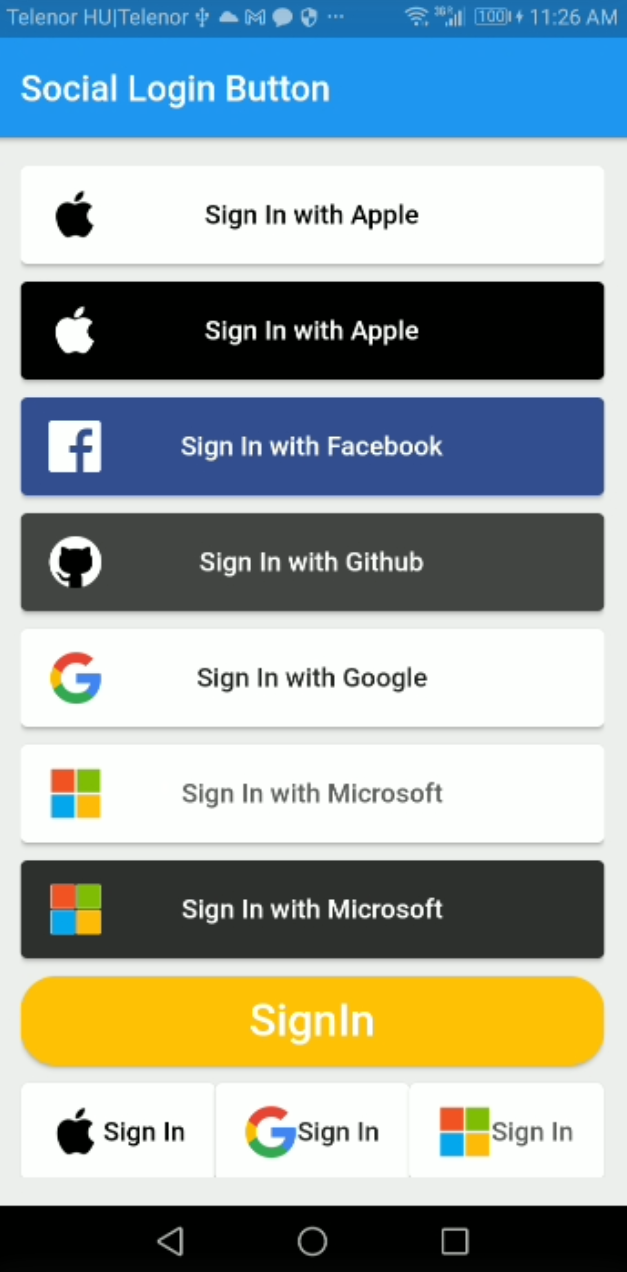
Button Types

  • Facebook
  • Google
  • Twitter
  • Apple
  • AppleBlack
  • Microsoft
  • MicrosoftBlack
  • Github
  • General Login

Mode

There are two modes available for the buttons, You can make shorter buttons with single mode.

  • single
  • multi

Example

import 'package:flutter/material.dart';
import 'package:social_login_buttons/social_login_buttons.dart';

void main() {
  runApp(const MyApp());
}

class MyApp extends StatelessWidget {
  const MyApp({Key? key}) : super(key: key);

  @override
  Widget build(BuildContext context) {
    return MaterialApp(
      title: 'Flutter Social Login Buttons',
      debugShowCheckedModeBanner: false,
      theme: ThemeData(
        primarySwatch: Colors.blue,
      ),
      home: const MyHomePage(tittle: 'Flutter Social Login Buttons'),
    );
  }
}

class MyHomePage extends StatelessWidget {
  const MyHomePage({Key? key, required this.tittle}) : super(key: key);
  final String tittle;

  @override
  Widget build(BuildContext context) {
    return Scaffold(
      appBar: AppBar(
        title: const Text('Social Login Button'),
        elevation: 2.0,
      ),
      body: _buildContainer(context),
      backgroundColor: Colors.grey[200],
    );
  }

  Widget _buildContainer(BuildContext context) {
    return Padding(
      padding: const EdgeInsets.all(16.0),
      child: Center(
        child: SingleChildScrollView(
          child: Column(
            crossAxisAlignment: CrossAxisAlignment.stretch,
            mainAxisAlignment: MainAxisAlignment.center,
            children: <Widget>[
              SocialLoginButton(
                buttonType: SocialLoginButtonType.apple,
                onPressed: () {},
              ),
              const SizedBox(height: 10),
              SocialLoginButton(
                buttonType: SocialLoginButtonType.appleBlack,
                onPressed: () {},
              ),
              const SizedBox(height: 10),
              SocialLoginButton(
                buttonType: SocialLoginButtonType.facebook,
                onPressed: () {},
              ),
              const SizedBox(height: 10),
              SocialLoginButton(
                buttonType: SocialLoginButtonType.github,
                onPressed: () {},
              ),
              const SizedBox(height: 10),
              SocialLoginButton(
                buttonType: SocialLoginButtonType.google,
                onPressed: () {},
              ),
              const SizedBox(height: 10),
              SocialLoginButton(
                buttonType: SocialLoginButtonType.microsoft,
                onPressed: () {},
              ),
              const SizedBox(height: 10),
              SocialLoginButton(
                buttonType: SocialLoginButtonType.microsoftBlack,
                onPressed: () {},
                imageWidth: 20,
              ),
              const SizedBox(height: 10),
              SocialLoginButton(
                backgroundColor: Colors.amber,
                height: 50,
                text: 'SignIn',
                borderRadius: 20,
                fontSize: 25,
                buttonType: SocialLoginButtonType.generalLogin,
                onPressed: () {},
              ),
              const SizedBox(height: 10),
              Row(
                mainAxisAlignment: MainAxisAlignment.spaceBetween,
                children: [
                  SocialLoginButton(
                    buttonType: SocialLoginButtonType.google,
                    onPressed: () {},
                    mode: SocialLoginButtonMode.single,
                  ),
                ],
              )
            ],
          ),
        ),
      ),
    );
  }
}

Contributing

Pull requests are welcome. For major changes, please open an issue first to discuss what you would like to change.

License

Apache-2.0

Screenshot

Image

Kategorien

Quell-Repository

Projekte, die dieses Paket verwenden

Noch keine Daten verfügbar.