Aus öffentlichen Paketdaten erstellte Orientierung.
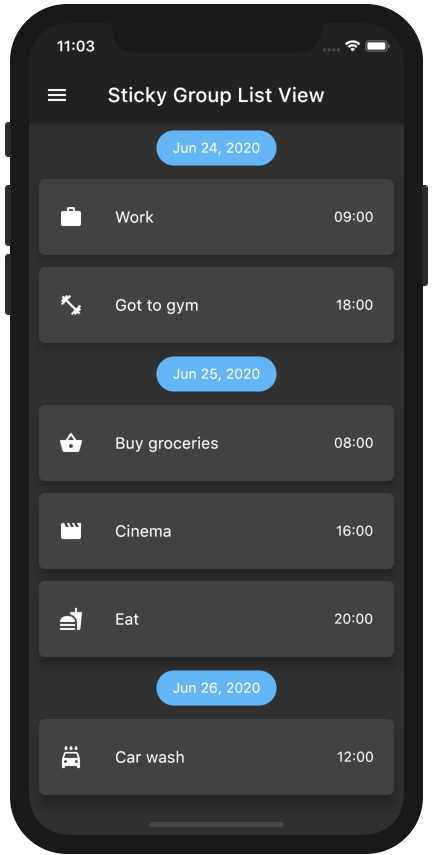
Ein Flutter-Paket, das ScrollablePositionedList erweitert, um gruppierte Listenabschnitte mit haftenden Überschriften zu ermöglichen. Es ermöglicht Benutzern, Elemente in logische Gruppen zu organisieren, wobei die Abschnittsüberschriften beim Scrollen am oberen Bildschirmrand festgehalten werden. Ideal für lange Listen mit klarer Kategorisierung, wie Kontakte, Nachrichten oder Produktkataloge. Das Paket unterstützt alle wichtigen Plattformen und lässt sich nahtlos in bestehende Flutter-Anwendungen integrieren.
Anwendungsfälle
Kontakte alphabetisch sortieren
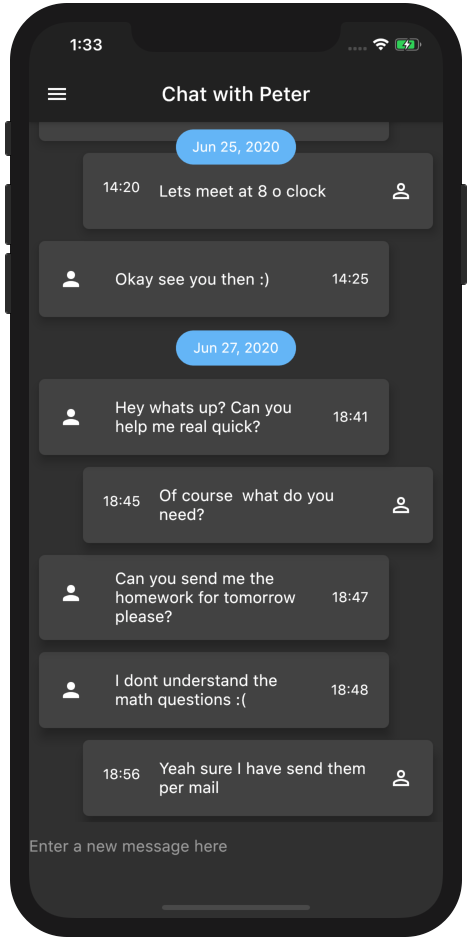
Chat-Nachrichten nach Datum anzeigen
Kategorisierte Produktlisten erstellen
Ein durchsuchbares Verzeichnis erstellen
Gruppierte Aufgabenlisten implementieren
Hauptmerkmale
Sticky Abschnittskopfzeilen
Unterstützung für scrollbare gruppierte Elemente
Plattformübergreifende Kompatibilität
Einfache Integration mit ScrollablePositionedList
Anpassbare Kopfzeilen-Stilierung
Geeignet für
Apps mit kategorisierten Daten
Lange scrollbare Listen
Benutzeroberflächen, die eine Abschnittsnavigation erfordern
Entwickler, die ScrollablePositionedList verwenden
Projekte, die responsive Gruppenüberschriften benötigen
Hinweise
Erfordert sorgfältige Behandlung von Elementschlüsseln
Kann die Leistung bei sehr großen Datensätzen beeinträchtigen
Das Verhalten des Headers hängt von der Scrollposition ab
eingebaute Animationen begrenzt
Nicht geeignet für nicht scrollbare Layouts
Original-README
Originaler README-Schnappschuss aus dem verknüpften Quell-Repository. Aktuelle Inhalte finden Sie im Repository.
A ListView in which list items can be grouped to sections. Based on scrollable_positioned_list, which enables programatically scrolling of the list.
Features
Easy creation of chat-like interfaces.
List items can be separated in groups.
For the groups an individual header can be set.
Sticky headers with floating option.
All fields from ScrollablePositionedList available.
By using a pre defined element identifier. The identifier is defined by a Function which takes one element and returns a unique identifier of any type.
The methods scrollToElement and jumpToElement can be used to jump to an element by providing the elements identifier instead of the index:
A list of the data you want to display in the list
required
-
itemBuilder / indexedItemBuilder
Function which returns an Widget which defines the item. indexedItemBuilder provides the current index as well. If both are defined indexedItemBuilder is preferred
yes, either of them
-
groupBy
Function which maps an element to its grouped value
required
-
groupSeparatorBuilder
Function which gets a element and returns an Widget which defines the group header separator
required
-
separator
A Widget which defines a separator between items inside a group
no
no separator
floatingHeader
When set to true the sticky header will float over the list
no
false
stickyHeaderBackgroundColor
Defines the background color of the sticky header
no
Color(0xffF7F7F7)
itemScrollController
Instead of an ItemScrollController a GroupedItemScrollController needs to be provided.
no
-
elementIdentifier
Used by itemScrollController and defines the unique identifier for each element.
no
-
order
Change to StickyGroupedListOrder.DESC to reverse the group sorting
no
StickyGroupedListOrder.ASC
groupComparator
Can be used to define a custom sorting for the groups. Otherwise the natural sorting order is used
no
-
itemComparator
Can be used to define a custom sorting for the elements inside each group. Otherwise the natural sorting order is used
no
-
reverse
Scrolls in opposite from reading direction (Starting at bottom and scrolling up). Same as in scrollable_positioned_list.
no
false
GroupedItemScrollController.srollTo() and GroupedItemScrollController.jumpTo() automatic set the alignment so that the item is fully visible aligned under the group header. Both methods take automaticAlignment as a additional optional paramenter which needs to be set to true if alignment is specified.
Also the fields from ScrollablePositionedList.builder can be used.
Highlight - Chat Dialog
Easy creation of chat-like dialogs.
Just set the option reverse to true and the option order to StickyGroupedListOrder.DESC. A full example can be found in the examples.
The list will be scrolled to the end in the initial state and therefore scrolling will be against redeaing direction.
Difference between grouped_list and sticky_grouped_list:
TThe list views in the GroupedList package are based on the default flutter listview and the silver list. This package is based on the scrollable_positioned_list which enables the possibility to programatically scroll to certain positions in the list. So if you need the ability to programatically scroll the list use the this package otherwise I would recommend to use the GroupedList package.