Pakete, Repositories und App-Kategorien suchen

Paketdetailsv1.0.1

stopper

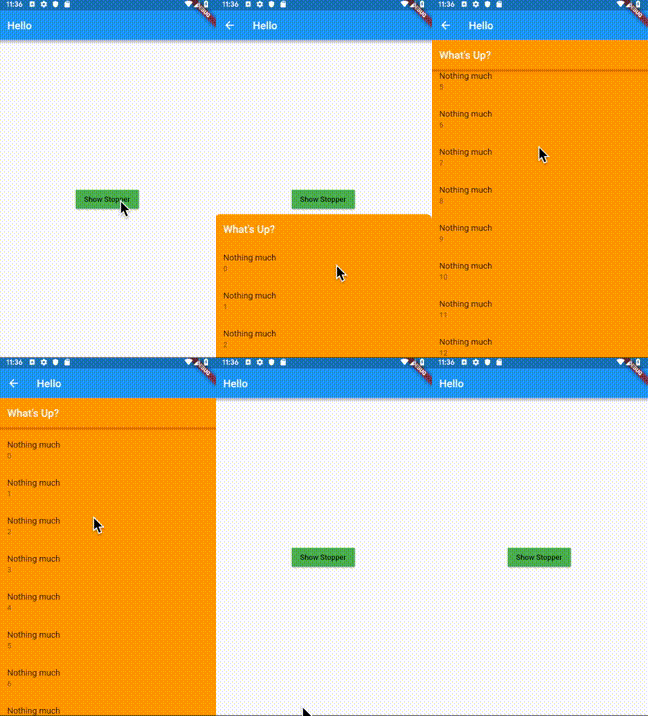
Ein Bottom-Sheet, das durch Ziehen auf eine der vordefinierten Stopphöhen ausgedehnt werden kann.

30-Tage-Downloads
18
Likes
21
Pub-Punkte
40

Paket installieren

flutter pub add stopper

Paketübersicht

Aus öffentlichen Paketdaten erstellte Orientierung.

Stopper ist ein Flutter-Paket, das eine Bottom-Sheet mit vordefinierten Stopp-Höhen bereitstellt, sodass Benutzer die Sheet durch Ziehen erweitern und an bestimmte Positionen bringen können. Es verbessert die Benutzerinteraktion durch glatte, kontrollierte Erweiterung innerhalb festgelegter Grenzen und ist ideal für Modals oder ergänzende Inhaltsbereiche. Das Paket ist leichtgewichtig und lässt sich nahtlos in bestehende Flutter-Apps integrieren. Es unterstützt benutzerdefinierte Stopppunkte und Animationen und eignet sich somit für intuitive UI-Designs. Der Quellcode ist öffentlich auf GitHub verfügbar, um Transparenz zu gewährleisten und Beiträge zu ermöglichen.

Anwendungsfälle

  • Interaktive Bottom Sheets mit festen Ausdehnungsebenen
  • Anpassbare Modalfenster
  • Erweiterte Benutzersteuerung über die Panelhöhe
  • Dynamische Inhaltsoverlays
  • Glatte Drag-to-Expand-Oberflächen

Hauptmerkmale

  • Vorgegebene Stopphöhen
  • Drag-basierte Erweiterung
  • Anpassbare Stop-Punkte
  • Glatte Animationen
  • Leichtgewichtig und einfach zu integrieren

Geeignet für

  • Entwickler, die interaktive Bottom Sheets erstellen
  • Apps, die eine kontrollierte Panelerweiterung benötigen
  • UIs, die ein präzises Verhalten des unteren Blatts erfordern
  • Flutter-Projekte, die sich auf Benutzererfahrung konzentrieren
  • Design-Systeme mit konsistenten Panel-Interaktionen

Hinweise

  • Keine plattformspezifischen Einschränkungen erwähnt
  • Benötigt manuelle Konfiguration der Stopphöhen
  • Beschränkt auf Bottom-Sheet-Anwendungsfälle
  • Kein integrierter Zustandsmanagement
  • Abhängig von externen Abhängigkeiten für erweiterte Funktionen
Original-README

Originaler README-Schnappschuss aus dem verknüpften Quell-Repository. Aktuelle Inhalte finden Sie im Repository.

Stopper

A bottom sheet that can be expanded to one of the pre-defined stop heights by dragging.

animated image

Introduction

Some iOS applications have a bottom sheet that has two states: half-expanded and fully expanded. The standard showBottomSheet method lacks such a capability. The complexity in implementing this behavior arises when the the bottom sheet needs to be scrollable, making scroll and drag event handling difficult as these gestures can be used for scrolling the list as well as for dragging the bottom sheet up/down, depending on the position of the bottom sheet and the current scroll position. The Stopper plugin addresses this problem by:

  • Letting the developer define discreet height values (stops) to which the bottom sheet can be expanded;
  • Using the builder pattern to build the bottom sheet depending on the current stop value;
  • Instantiating ScrollController and ScrollPhysics objects and passing them to the bottom sheet builder;
  • Using animations to make transitions of the bottom sheet between the stops look natural;
  • Providing a convenient showStopper function to be used instead of showBottomSheet in order to handle dismissal of the bottom sheet by the user.

This plugin utilizes bottom sheet functionality from the Scaffold widget and avoids copy/paste from the standard library, making the implementation clear and easy to maintain.

Example

import 'package:stopper/stopper.dart';
//...
final height = MediaQuery.of(context).size.height;
//...
MaterialButton(
  child: Text("Show Stopper"),
  onPressed: () {
    showStopper(
      context: context,
      stops: [0.5 * height, height],
      builder: (context, scrollController, scrollPhysics, stop) {
        return ListView(
          controller: scrollController,
          physics: scrollPhysics,
          children: [
            //...
          ]
        );
      }
    );
  },
  ...
)

Note: The build context passed to showStopper must have a Scaffold widget as an ancestor. Therefore it's recommended to use Builder to build the body of the Scaffold. See the complete example app provided in this package for details on this approach.

Kategorien

Quell-Repository

Projekte, die dieses Paket verwenden

Noch keine Daten verfügbar.