Pakete, Repositories und App-Kategorien suchen

Cover von sweetsheet
Paketdetailsv0.4.0

sweetsheet

Zeigen Sie schnell und einfach eine schöne Bottom-Sheet als Bestätigungsdialog an.

AndroidiOSWebmacOSWindowsLinux
30-Tage-Downloads
50
Likes
231
Pub-Punkte
140

Paket installieren

flutter pub add sweetsheet

Paketübersicht

Aus öffentlichen Paketdaten erstellte Orientierung.

Sweetsheet ist ein Flutter-Paket, das Entwicklern ermöglicht, attraktive Bottom Sheets als Bestätigungsdialoge schnell und einfach anzuzeigen. Es vereinfacht den Prozess der Erstellung modaler Bottom Sheets mit minimalem Code und bietet standardmäßig eine saubere und moderne Benutzeroberfläche. Für nahtlose Integration über mehrere Plattformen entwickelt, unterstützt es Android, iOS, Web, macOS, Windows und Linux. Das Paket verbessert die Benutzererfahrung durch reibungslose Animationen und anpassbare Layouts, während es gleichzeitig Einfachheit und Konsistenz im Design beibehält.

Anwendungsfälle

  • Schnelle Bestätigungsdialoge
  • Benutzeraktionen-Aufforderungen
  • Bestätigungen zur Formularübermittlung
  • Modale Navigation
  • Einfache Pop-up-Oberflächen

Hauptmerkmale

  • Einfach zu verwendende API
  • Schönes Standard-Styling
  • Plattformübergreifende Unterstützung
  • Anpassbarer Inhalt
  • Glatte Animationen
  • Minimales Boilerplate

Geeignet für

  • Entwickler, die eine schnelle Bottom-Sheet-Implementierung suchen
  • Projekte, die leichtgewichtige Bestätigungsdialoge benötigen
  • Apps mit konsistenten Benutzeroberflächenmustern
  • Teams, die Entwicklungsbeschleunigung priorisieren
  • Flutter-Anfänger erkunden Bottom Sheets

Hinweise

  • Eingeschränkte Anpassung über die grundlegende Gestaltung hinaus
  • Nicht ideal für komplexe interaktive Blätter
  • Benötigt externe Abhängigkeiten für volle Funktionalität
  • Am besten geeignet für einfache Anwendungsfälle statt fortgeschrittener Modals

Original-README

Originaler README-Schnappschuss aus dem verknüpften Quell-Repository. Aktuelle Inhalte finden Sie im Repository.

sweetsheet

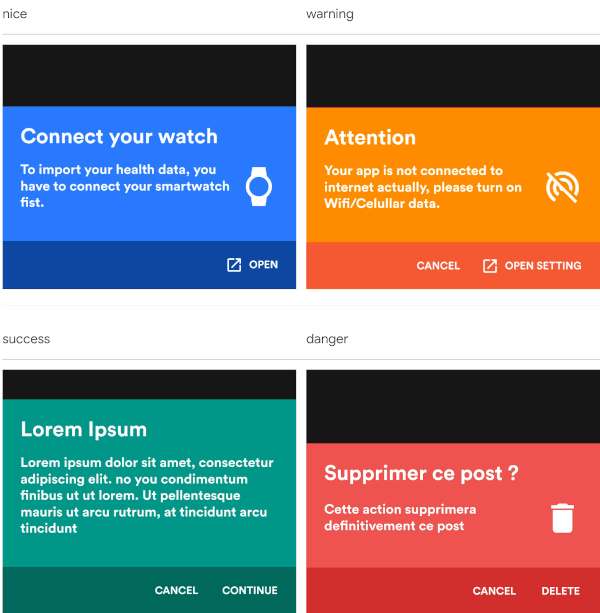
Show beautiful bottom sheet as confirmation dialog quickly and easily.

nice warning
nice warning
success danger
success danger

and since version 0.2.0 , it is fully customizable.

custom dark custom light
success danger

Getting Started

With increasingly large smartphones, it has become almost impossible to have good ergonomics in an application using confirmation dialogs. The SweetSheet package allows you to show beautiful bottoms sheets to replace your confirmation dialogs and maintain a good user experience.

How to use?

Add this to your package's pubspec.yaml file:

dependencies:
  sweetsheet: ^0.4.0

And import it:

import 'package:sweetsheet/sweetsheet.dart';

to start using the sheets, you have to create the instance of the SweetSheet class first.

final SweetSheet _sweetSheet = SweetSheet();

Now you can show the bottom sheet by calling the method show() on the instance. This is the signature of the show method

  show({
    required BuildContext context,
    Text? title,
    required Text description,
    required CustomSheetColor color,
    required SweetSheetAction positive,
    EdgeInsets? contentPadding = const EdgeInsets.symmetric(horizontal: 24.0, vertical: 24.0),
    EdgeInsets? actionPadding = const EdgeInsets.all(8.0),
    SweetSheetAction? negative,
    IconData? icon,
    bool useRootNavigator = false,
    bool isDismissible = true,
  }) {}

This is the signature of the SweetSheetAction widget.

class SweetSheetAction extends StatelessWidget {
  final String title;
  final VoidCallback onPressed;
  final IconData icon;
  final Color color;

  SweetSheetAction({
    @required this.title,
    @required this.onPressed,
    this.icon,
    this.color = Colors.white,
  });  
}

Attention : At least one action is required and the icons are IconData for uniformity purpose.

The SweetSheetColor is a class which have four static values and it determine the color of the sheet by creating a CustomSheetColor:

  • SweetSheetColor.SUCCESS (green)
  • SweetSheetColor.DANGER (red)
  • SweetSheetColor.WARNING (orange)
  • SweetSheetColor.NICE (blue)

Customisation

To customise, create a new instance of CustomSheetColor and pass it to the argument color when calling the method show. signature of CustomSheetColor:

class CustomSheetColor {
  Color main;
  Color accent;
  Color icon;

  CustomSheetColor({@required this.main, @required this.accent, this.icon});
}

To customise the action, pass a new color to color argument of SweetSheetAction.

Example:

Warning
_sweetSheet.show(
    context: context,
    title: Text("Attention"),
    description: Text(
        'Your app is not connected to internet actually, please turn on Wifi/Celullar data.'),
    color: SweetSheetColor.WARNING,
    icon: Icons.portable_wifi_off,
    positive: SweetSheetAction(
      onPressed: () {
        Navigator.of(context).pop();
      },
      title: 'OPEN SETTING',
      icon: Icons.open_in_new,
    ),
    negative: SweetSheetAction(
      onPressed: () {
        Navigator.of(context).pop();
      },
      title: 'CANCEL',
    ),
);
Custom Light
_sweetSheet.show(
    context: context,
    description: Text(
      'Place your order. Please confirm the placement of your order : Iphone X 128GB',
      style: TextStyle(color: Color(0xff2D3748)),
    ),
    color: CustomSheetColor(
      main: Colors.white,
      accent: Color(0xff5A67D8),
      icon: Color(0xff5A67D8),
    ),
    icon: Icons.local_shipping,
    positive: SweetSheetAction(
      onPressed: () {
        Navigator.of(context).pop();
      },
      title: 'CONTINUE',
    ),
    negative: SweetSheetAction(
      onPressed: () {
        Navigator.of(context).pop();
      },
      title: 'CANCEL',
  ),
);
That is all. Have fun!

Kategorien

Quell-Repository

Projekte, die dieses Paket verwenden

Noch keine Daten verfügbar.