Aus öffentlichen Paketdaten erstellte Orientierung.
Ein Flutter-Plugin, das die Anzeige eines dauerhaften, systemweiten Überlagerungsfensters unter Android und iOS ermöglicht, ähnlich der Benutzeroberfläche von Truecaller. Es funktioniert über allen anderen Apps und unterstützt Rückrufereignisse für Benutzerinteraktionen. Speziell für hochsichtbare Benachrichtigungen oder dringende Warnungen konzipiert, integriert sich nahtlos in native Systemberechtigungen. Das Plugin ist nützlich für Anwendungen, die sofortige Benutzeraufmerksamkeit erfordern, ohne sich auf Standard-Push-Benachrichtigungen zu verlassen.
Anwendungsfälle
Dringende Warnungen anzeigen
Erstellen von immer sichtbaren Benachrichtigungsfenstern
Implementierung von Anrufblockierungs-Schnittstellen
Echtzeit-Status-Overlay aktivieren
Systemnahe Interaktionsprompts bereitstellen
Hauptmerkmale
System-Overlay-Unterstützung
Plattformübergreifend (Android & iOS)
Callback-Ereignisbehandlung
Dauerhafte Anzeige über anderen Apps
Integration mit Systemberechtigungseinstellungen
Geeignet für
Sicherheits- und Datenschutz-Apps
Anruftools
Echtzeit-Monitoring-Tools
Notfallwarnsysteme
Apps, die eine hohe Priorität der Benutzerinteraktion erfordern
Hinweise
Benötigt Systemberechtigung unter Android
Eingeschränkte iOS-Funktionalität aufgrund von Plattformbeschränkungen
Kann von Sicherheits-Apps markiert werden
Der Benutzer muss Overlay-Berechtigungen manuell aktivieren
Möglicher Einfluss auf Batterie und Leistung
Original-README
Originaler README-Schnappschuss aus dem verknüpften Quell-Repository. Aktuelle Inhalte finden Sie im Repository.
system_alert_window
A flutter plugin to show Truecaller like overlay window, over all other apps along with callback events. Android Go or Android 11 & above, this plugin shows notification bubble, in other android versions, it shows an overlay window.
Android
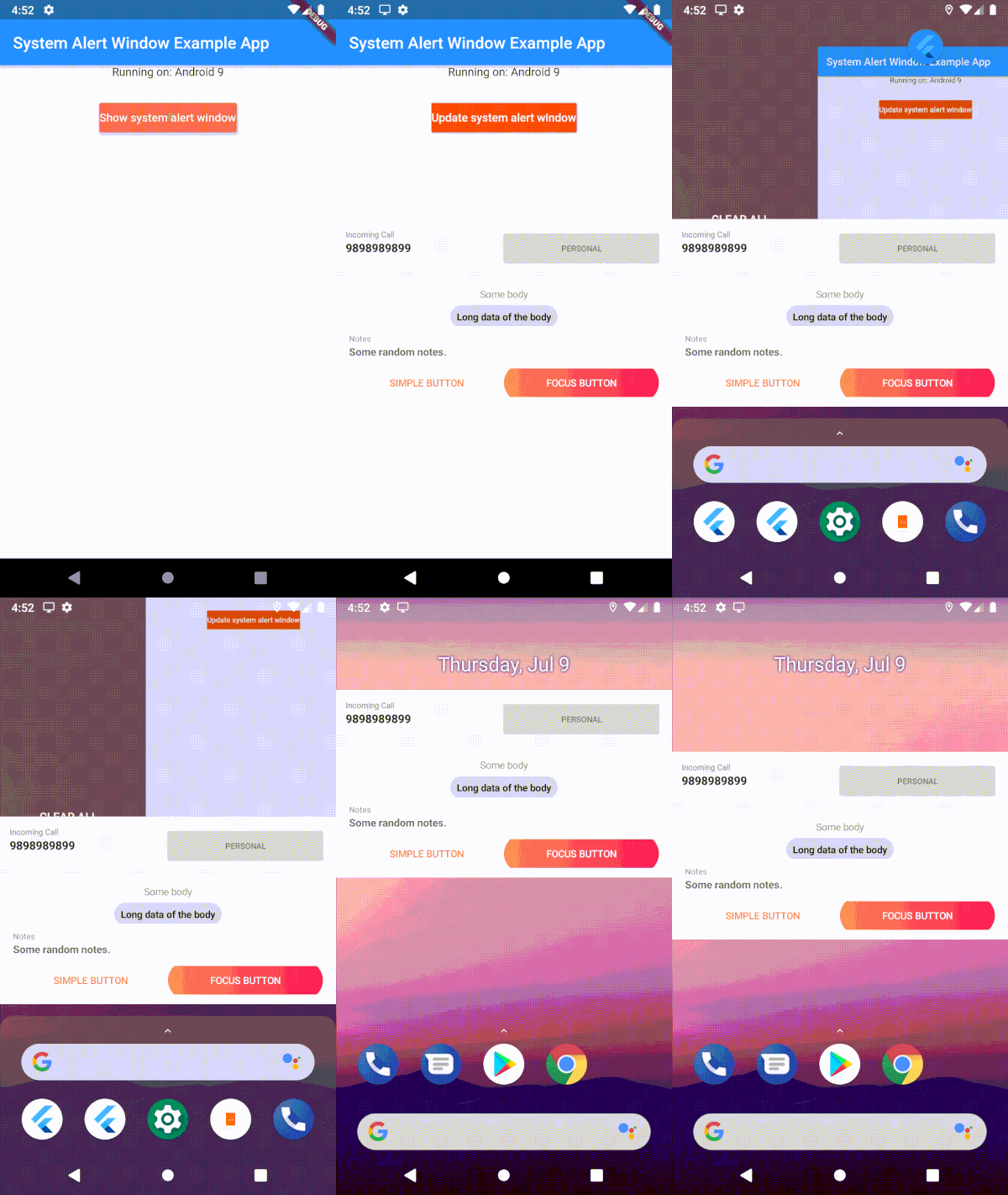
Demo
1. Clip of example app and 2. Working of button click in the background
Uses 'draw on top' permission and displays it as a overlay window
Android 11 & above
With SystemWindowPrefMode.OVERLAY, system alert windows uses 'overlay functionality' wherever it's supported. In that mode, it will show as bubbles if the 'display over other apps' is not supported.
With SystemWindowPrefMode.DEFAULT/SystemWindowPrefMode.BUBBLE, User has to allow 'All conversations can bubble' in the notification settings of the app. Uses Android Bubble APIs to show the overlay window inside a notification bubble.
Edge-to-edge content and window insets are handled automatically inside the bubble container — wrap your overlay widget with SafeArea to avoid content being obscured by system bars.
Android GO (API 29)
User has to manually enable bubbles from the developer options. Uses Android Bubble APIs to show the overlay window inside a notification bubble.
IOS
Displays as a notification in the notification center [Help Needed]
Example
Show Overlay
Request overlay permission
await SystemAlertWindow.requestPermissions;
Inside main.dart create an entry point for your Overlay widget;
// overlay entry point@pragma("vm:entry-point")
voidoverlayMain() {
runApp(constMaterialApp(
debugShowCheckedModeBanner: false,
home: Material(child: Text("My overlay"))
));
}
//Open overLay content// - Optional arguments:/// `gravity` Position of the window and default is [SystemWindowGravity.CENTER]/// `width` Width of the window and default is [Constants.MATCH_PARENT]/// `height` Height of the window and default is [Constants.WRAP_CONTENT]/// `notificationTitle` Notification title, applicable in case of bubble/// `notificationBody` Notification body, applicable in case of bubble/// `prefMode` Preference for the system window. Default is [SystemWindowPrefMode.DEFAULT]/// `layoutParamFlags` List of List of WindowManager.LayoutParams. This is not applicable for bubbles.awaitSystemAlertWindow.showSystemWindow();
/// update the overlay flag while the overlay in action/// - Optional arguments:/// `gravity` Position of the window and default is [SystemWindowGravity.CENTER]/// `width` Width of the window and default is [Constants.MATCH_PARENT]/// `height` Height of the window and default is [Constants.WRAP_CONTENT]/// `notificationTitle` Notification title, applicable in case of bubble/// `notificationBody` Notification body, applicable in case of bubble/// `prefMode` Preference for the system window. Default is [SystemWindowPrefMode.DEFAULT]/// `layoutParamFlags` List of List of WindowManager.LayoutParams. This is not applicable for bubbles.awaitFlutterOverlayWindow.updateSystemWindow();
// closes overlay if openawaitSystemAlertWindow.closeSystemWindow();
// broadcast data to overlay app from main appawaitSystemAlertWindow.sendMessageToOverlay("Hello from the other side");
//streams message from main app to overlay.SystemAlertWindow.overlayListener.listen((event) {
log("Current Event: $event");
});
Isolate communication
Use this snippet, if you want the callbacks on your main thread
While initializing system alert window in your code
awaitSystemAlertWindow.checkPermissions;
ReceivePort _port = ReceivePort();
IsolateManager.registerPortWithName(_port.sendPort);
_port.listen((message) {
log("message from OVERLAY: $message");
print("Do what ever you want here. This is inside your application scope");
});
Use this to send data to isolate mentioned above
voidcallBackFunction(String tag) {
print("Got tag " + tag);
SendPort port = IsolateManager.lookupPortByName();
port.send(tag);
}