Pakete, Repositories und App-Kategorien suchen

Cover von transformable_list_view
Paketdetailsv0.8.0

transformable_list_view

Widget, das die Standard-ListView-Klasse erweitert und die Fähigkeit bietet, Element-Transformationsanimationen je nach Scrollposition hinzuzufügen

AndroidiOSWebmacOSWindowsLinux
30-Tage-Downloads
212
Likes
133
Pub-Punkte
150

Paket installieren

flutter pub add transformable_list_view

Paketübersicht

Aus öffentlichen Paketdaten erstellte Orientierung.

Ein Flutter-Widget, das ListView erweitert, um reibungslose Transformationsanimationen für Listenitems basierend auf ihrer Scrollposition zu ermöglichen. Es ermöglicht Entwicklern, dynamische, interaktive Listen mit visuellen Effekten wie Skalierung, Drehung oder Ausblenden zu erstellen, wenn Elemente in oder aus dem Sichtfeld gelangen. Ideal zur Verbesserung der Benutzererfahrung in scrollintensiven Oberflächen. Das Paket unterstützt alle wichtigen Plattformen einschließlich Android, iOS, Web, macOS, Windows und Linux.

Anwendungsfälle

  • Animierte Scroll-Listen erstellen
  • Verbesserung der Benutzeroberfläche durch scrollausgelöste Transformationen
  • Engagierende Produkt-Carousels erstellen
  • Immersive Content-Feeds gestalten
  • Implementierung von Parallax-artigen Effekten
  • Visuelle Rückmeldung während des Scrollens hinzufügen

Hauptmerkmale

  • Auf Scrollposition basierte Elementtransformationen
  • Glatte Animationsübergänge
  • Plattformübergreifende Kompatibilität
  • Einfache Integration mit bestehendem ListView-Code
  • Unterstützung für Skalierung, Drehung und Deckkraftänderungen
  • Anpassbare Animationskurven und Timing

Geeignet für

  • UI-Designer, die interaktive Elemente suchen
  • Entwickler, die scrollgesteuerte Animationen erstellen
  • Apps, die ansprechende Listeninteraktionen erfordern
  • Projekte für mehrere Plattformen
  • Teams, die sich auf anspruchsvolle Benutzererfahrungen konzentrieren

Hinweise

  • Kann die Leistung bei großen Datensätzen beeinträchtigen
  • Erfordert sorgfältige Abstimmung der Animationsparameter
  • Am besten geeignet für moderate Listengrößen
  • Nicht ideal für sehr komplexe Animationen
  • Benötigt Tests auf verschiedenen Geräten und Plattformen

Original-README

Originaler README-Schnappschuss aus dem verknüpften Quell-Repository. Aktuelle Inhalte finden Sie im Repository.

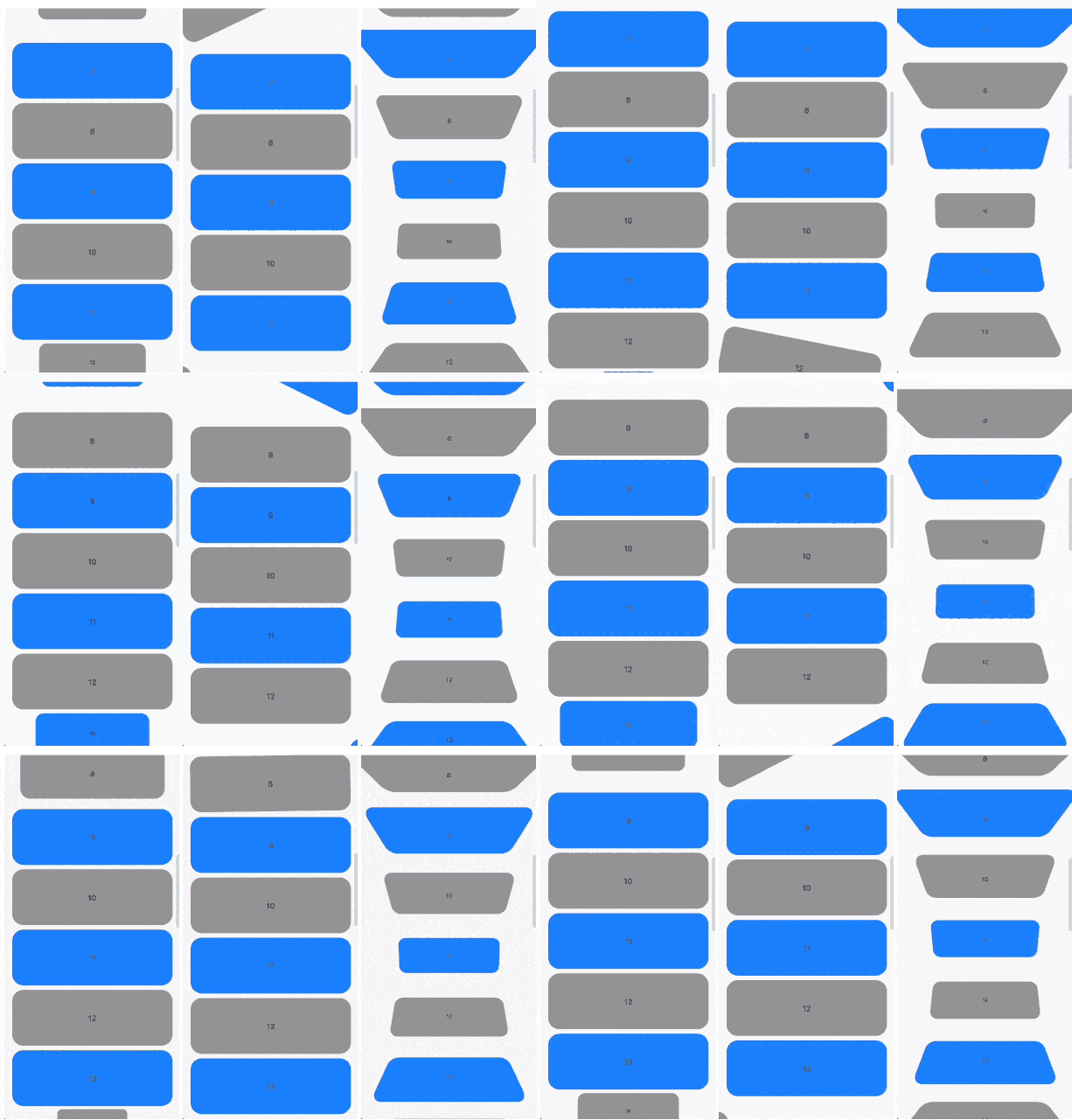
Scrollable widgets with easily customizable transform animations.

Features

The package contains 3 widgets:

  • TransformableListView that extends ListView
  • TransformableSliverList that extends SliverList
  • TransformableSliver that extends SliverToBoxAdapter

Each of then has getTransformMatrix callback. In the callback you need to return Matrix4 that represetns transormation of the child at the current moment. If you don't need any transformations you can simply return Matrix4.identity().

In getTransformMatrix callback you receive TransformableListItem with the data about list item:

  • Offset offset is main axis offset of the child. By default (with vertical, non reversed scroll view) offset.dx is always 0 while offset.dy is the distance between top edge of the child and top edge of the viewport.
  • Size size is the child size received from its RenderBox.
  • SliverConstraints constraints describes the current scroll state of the viewport from the point of view of the sliver receiving the constraints.
  • int? index is the index of the child. Will be null when using TransformableSliver.
  • TransformableListItemPosition position is child position on the main axis viewport. Can be .topEdge, .middle or .bottomEdge.
  • double visibleExtent is currently visible portion of item. For example, if item is hidden it will be 0 while it's completely displayed will equal to size.height or size.width depending on axis.

Usage

First you need to add TransformableListView where you need transformations

TransformableListView.builder(
  getTransformMatrix: getTransformMatrix,
  itemBuilder: (context, index) {
    return Container(
      height: 100,
      margin: const EdgeInsets.symmetric(
        horizontal: 16,
        vertical: 4,
      ),
      decoration: BoxDecoration(
        color: index.isEven ? Colors.grey : Colors.blueAccent,
        borderRadius: BorderRadius.circular(20),
      ),
      alignment: Alignment.center,
      child: Text(index.toString()),
    );
  },
  itemCount: 30,
),

Second you need to implement getTransformMatrix callback

Matrix4 getTransformMatrix(TransformableListItem item) {
  /// final scale of child when the animation is completed
  const endScaleBound = 0.3;

  /// 0 when animation completed and [scale] == [endScaleBound]
  /// 1 when animation starts and [scale] == 1
  final animationProgress = item.visibleExtent / item.size.height;

  /// result matrix
  final paintTransform = Matrix4.identity();

  /// animate only if item is on edge
  if (item.position != TransformableListItemPosition.middle) {
    final scale = endScaleBound + ((1 - endScaleBound) * animationProgress);

    paintTransform
      ..translate(item.size.width / 2)
      ..scale(scale)
      ..translate(-item.size.width / 2);
  }

  return paintTransform;
}

You can implement your own callback or check more at /example folder.

Additional information

You can read more about matrix transfomations in Flutter here. Any feedback and PRs are welcome.

Developed by TBR Group.

Kategorien

Quell-Repository

Projekte, die dieses Paket verwenden

Noch keine Daten verfügbar.