Aus öffentlichen Paketdaten erstellte Orientierung.
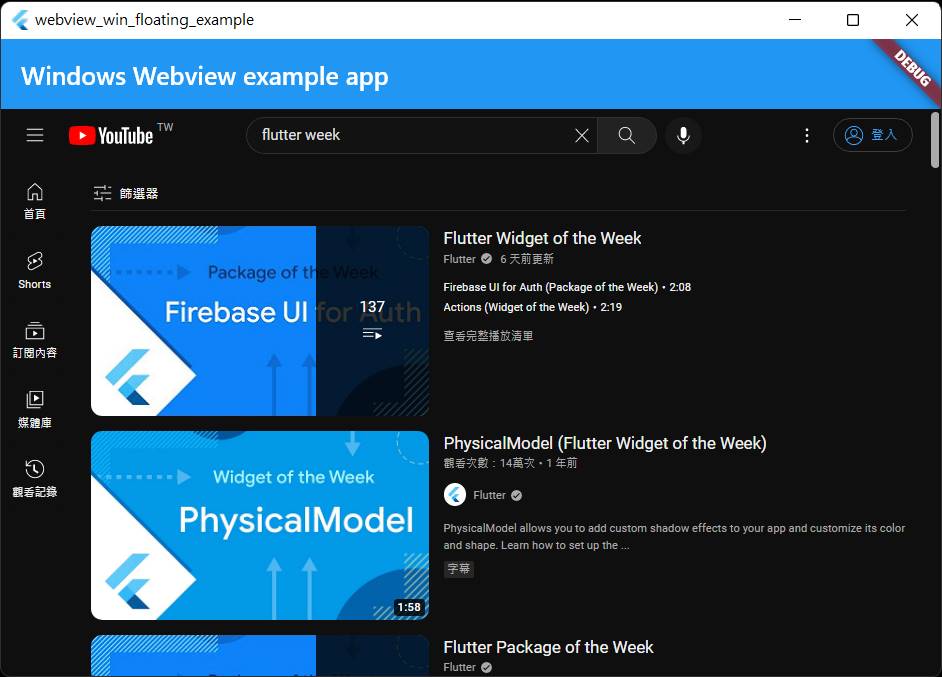
Ein Flutter-Plugin, das WebView-Unterstützung für Windows und Linux bereitstellt und die Schnittstelle von webview_flutter implementiert. Es ermöglicht die Einbettung von Webinhalten in Desktop-Anwendungen auf diesen Plattformen und bietet Entwicklern eine konsistente API. Das Paket ist nahtlos mit den bestehenden WebView-Funktionen von Flutter kompatibel und erleichtert so die Erstellung plattformübergreifender Desktop-Anwendungen mit Web-Integration. Es unterstützt sowohl Windows als auch Linux, macOS ist jedoch nicht enthalten.
You can write your app against the webview_flutter API and use this package as the desktop implementation.
Highlights
Native WebView rendering on Windows and Linux.
High-performance video playback and scrolling.
Compatible with the webview_flutter API on supported platforms.
Limitations
This package places a native WebView directly on top of the Flutter window instead of rendering it as a texture.
That design has a tradeoff:
You get native WebView performance and smooth video playback.
Flutter widgets CANNOT render above the WebView on Windows and Linux.
You cannot push a new route above the WebView.
Tab-key focus switching between Flutter and WebView has some limitations.
Flutter cannot clip the WebView, so it may remain visible even when scrolled outside its parent area.
If the WebView is placed inside a scrollable widget, you may need a ScrollController so it can be repositioned while scrolling.
Hmm... there are so many limitations.
Workaround
If your application targets only Windows or Linux, refer to the [Standalone mode] section below and use controller.setVisibility(bool) to toggle the WebView visibility.
When to Use It
Use this package if:
You need smooth video playback.
You care about scroll performance.
You do not need Flutter overlays above the WebView.
For Linux platform
Linux has a few build-time considerations. See README_Linux.md for details.
You can configure custom storage paths for browser data, including cache, cookies, and session information.
If your app is installed in a read-only location such as C:\Program Files\, set a custom user data folder.
Profiles:
You can specify a Profile Name, similar to the "User Profile" mechanism in Google Chrome.
Data for each profile is stored in: <UserDataFolder>/EBWebView/WV2Profile_<ProfileName>/
Isolation: Cookies, cache, and other browser data are stored separately.
String cacheDir = "c:\\test";
String profileName = "UserA";
var params = WindowsWebViewControllerCreationParams(userDataFolder: cacheDir, profileName: profileName);
var controller = WebViewController.fromPlatformCreationParams(params);
Build with InnoSetup
Or if application installed in "C:/Program Files/" or other read-only dir
If your application build with InnoSetup, or can be installed in "C:/Program Files/" or other read-only system directory, the webview cannot create data folder in read-only directory, so it won't work.
In this case, you should specify user data folder as mentioned above.
Standalone Mode
If your app only targets Windows and you want fewer dependencies, you can remove the webview_flutter dependency:
dependencies:webview_win_floating:^3.0.0# webview_flutter: ^4.13.0 # mark this line for Windows only app
With the information above, you can manually trigger WebView visibility by hooking into navigator.push / pop events or widget visibility changes.
TroubleShooting
Build Fails with MSB3073
If your build fails with an error containing MSB3073, run the build command from an Administrator terminal.
javascript 'history.back()' issue
If you use history.back() in JavaScript, remove your NavigationDelegate.onNavigationRequest() implementation. That callback can interfere with back navigation.