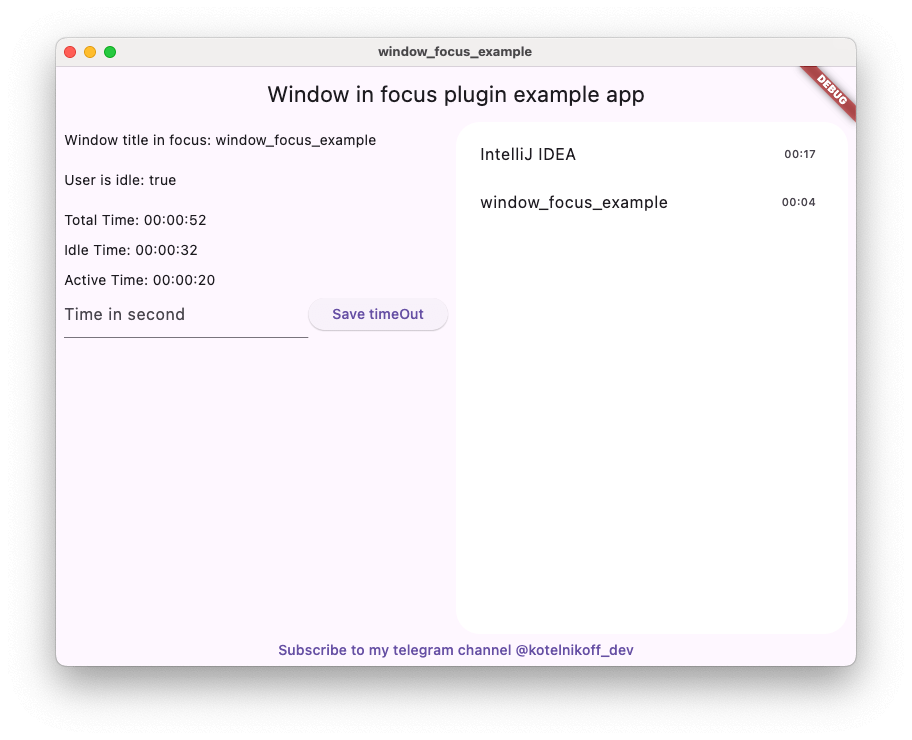
Window Focus ist ein praktisches Plugin für Flutter, mit dem Sie Benutzerinaktivität verfolgen und Informationen über den Titel des aktiven Fensters unter Mac OS und Windows erhalten können.
Aus öffentlichen Paketdaten erstellte Orientierung.
Window Focus ist ein Flutter-Plugin, das die Verfolgung von Benutzerinaktivität und die Abrufung des Titels des aktiven Fensters unter macOS und Windows ermöglicht. Es liefert Entwicklern Einblicke in das Benutzerverhalten, indem es überwacht, welche Anwendung oder welches Fenster derzeit im Fokus liegt. Das Plugin ist besonders nützlich für Produktivitäts-Tools, Zeitverfolgungs-Apps und Anwendungen, die Kenntnis über den Benutzerkontext auf Desktop-Plattformen benötigen. Es unterstützt macOS, Windows und Linux und ist somit für die plattformübergreifende Desktop-Entwicklung geeignet. Das Paket integriert sich nahtlos in die Flutter-Ecosystem über pub.
Anwendungsfälle
Zeitverfolgungsanwendungen
Produktivitäts- und Fokus-Tools
Benutzeraktivitätsüberwachung
Plattformübergreifende Desktop-Anwendungen
kontextbewusste Anwendungen
Hauptmerkmale
Aktiven Fenstertitel verfolgen
Überwacht die Benutzerinaktivität
Unterstützt macOS, Windows und Linux
Leichtgewichtig und einfach zu integrieren
Bietet Echtzeit-Window-Zustands-Updates
Geeignet für
Desktop-App-Entwickler
Ersteller von Produktivitäts-Tools
Zeitmanagement-Software
Anwendungen, die Benutzerkontextbewusstsein erfordern
Plattformübergreifende Desktop-Projekte
Hinweise
Erfordert plattformspezifische Berechtigungen auf einigen Systemen
Beschränkt auf macOS, Windows und Linux
Kann zusätzliche Konfiguration unter Linux erfordern
Nicht für mobile Plattformen verfügbar
Abhängig von nativen System-APIs für Funktionen
Original-README
Originaler README-Schnappschuss aus dem verknüpften Quell-Repository. Aktuelle Inhalte finden Sie im Repository.
Window Focus is a Flutter plugin that allows you to track user activity and focus on the active window for Windows and macOS platforms. The plugin provides features such as detecting user inactivity, identifying the active application, and enabling debug mode for enhanced logging.
Key Features:
User Inactivity Tracking:
The plugin enables you to detect periods of user inactivity within your Flutter application. You can customize the inactivity threshold and handle inactivity events according to your needs.
Active Window Title Retrieval:
Provides the ability to retrieve the title of the active window of the operating system.
Windows: Full window title support.
macOS: Improved detection using CGWindowList. Supports capturing titles for the active process. Requires Screen Recording permission for accurate window titles.
Debug Mode
Enable detailed logs for troubleshooting during development.
Set Custom Idle Threshold
Define the timeout period after which the user is considered inactive.
Screenshot Capture
Capture the entire screen or just the active window. This is useful for time tracking applications.
Plugin Installation
Windows
No action required.
Mac OS
Setup for window focus tracking
You need to add the following code to the Info.plist file for MacOS:
To use the screenshot functionality on macOS 10.15+, you must request screen recording permission. You can check the permission status using checkScreenRecordingPermission() and request it using requestScreenRecordingPermission().
The user must manually enable this in:
System Preferences > Security & Privacy > Privacy > Screen Recording
Setup for Global Keyboard Tracking (macOS)
To track keyboard activity globally (outside the app) on macOS, the application requires Accessibility permissions.
Crucial: Without these permissions, the plugin will only detect mouse movements and clicks outside the app, but keyboard events will be ignored for security reasons.
The user must manually enable this in:
System Preferences > Security & Privacy > Privacy > Accessibility
(Or System Settings > Privacy & Security > Accessibility on macOS Ventura and newer).
Plugin Usage
Import the plugin:
import'package:window_focus/window_focus.dart';
Example
voidmain() {
final windowFocus = WindowFocus(debug: true, duration: Duration(seconds: 10));
// Add focus change listener
windowFocus.addFocusChangeListener((appWindow) {
print('Active window: ${appWindow.appName}, Title: ${appWindow.windowTitle}');
});
// Add user activity listener
windowFocus.addUserActiveListener((isActive) {
  if (isActive) {
    print('User is active');
  } else {
    print('User is inactive');
  }
});
}