सार्वजनिक जानकारी से बना चयन मार्गदर्शन। केवल संदर्भ हेतु।
एडाप्टिव चैमेलियन थीम एक फ्लटर पैकेज है जो हल्के, गहरे और सिस्टम थीम मोड का समर्थन करके थीम प्रबंधन को सरल बनाता है। यह उपयोगकर्ता के पसंदीदा या सिस्टम सेटिंग्स के आधार पर डायनामिक रंग परिवर्तन की अनुमति देता है, जिससे उपकरणों के माध्यम से एक सुसंगत और अनुकूल यूआई सुनिश्चित होता है। पैकेज फ्लटर के थीमडेटा के साथ निरंतर रूप से एकीकृत है और थीम मोड के निर्धारण और रंग कस्टमाइज़ेशन के लिए आसान उपकरण प्रदान करता है। जिन ऐप्स को रिस्पॉन्सिव डिज़ाइन और एक्सेसिबिलिटी की आवश्यकता होती है, उनके लिए उपयुक्त है, जो स्वचालित थीम अनुकूलन के माध्यम से उपयोगकर्ता अनुभव को बढ़ाता है।
उपयोग
मोबाइल ऐप में डायनामिक थीम स्विचिंग
डार्क मोड और सिस्टम थीम का समर्थन करता है
थीम के अनुसार ऐप रंग कस्टमाइज़ करें
एक्सेसिबल यूआई का निर्माण
प्लेटफॉर्म के बीच विषय सुसंगतता
मुख्य विशेषताएँ
हल्के, गहरे और प्रणाली थीम मोड समर्थन
आसान रंग थीम स्विचिंग
स्वचालित प्रणाली थीम डिटेक्शन
प्लेटफॉर्म के अनुकूलता
ThemeData के साथ सरल एकीकरण
निर्धारित थीम चर
इनके लिए उपयुक्त
प्रतिक्रियाशील Flutter एप्लिकेशन बनाने वाले डेवलपर्स
कई प्लेटफॉर्म के लिए लक्षित ऐप्स
प्रविष्टि आवश्यकताओं के लिए परियोजनाएँ
उपयोगकर्ता अनुभव पर केंद्रित टीमें
बहुत सारे थीम वाले डिज़ाइन सिस्टम
विचार योग्य बातें
थीम रंगों के हस्ताक्षर कॉन्फ़िगरेशन की आवश्यकता है
मूल थीम मोड हैंडलिंग तक सीमित
उपयोगकर्ता पसंदीदा के लिए कोई निर्मित स्थायित्व नहीं है
ThemeData के सही कार्यान्वयन पर निर्भर करता है
उन्नत थीमिंग के लिए अतिरिक्त पैकेज की आवश्यकता हो सकती है
मूल README
संबंधित सोर्स रिपॉज़िटरी के मूल README का स्नैपशॉट। नवीनतम सामग्री के लिए रिपॉज़िटरी देखें।
Adaptive Chameleon Theme
A Flutter package that will automatically retrieve your OS defined Theme (Dynamic), force your
prefered one (Light / Dark), allow you to present the user with a set of color themes to choose
from and of course, persist this choice in your device.
Features
Set default theme
Override system theme mode and set yours (light/dark)
Change theme colors
Customize color palettes for different theme modes
This package allows for an arbitrary number of themes to be defined. Each theme has a unique ID
of type int. To create the themes and map them to IDs, first you have to create an instance of
ThemeCollection, like so:
final themeCollection = ThemeCollection(
    themes: {
        0: ThemeData(primarySwatch: Colors.blue),
        1: ThemeData(primarySwatch: Colors.red),
    },
    fallbackTheme: ThemeData.light(), // optional fallback theme, default value is ThemeData.light()
);
I would however recommend you introduce a class with static const int values to
associate a name to each ID value for easier reference:
You can utilise the changeThemeMode function from anywhere in your app. It provides a simple
and
straight forward way of altering the theme modes: light to dark, dark to light or to system
default.
This function has two optional parameters: dynamic and dark.
If the value of dynamic is true, it takes precedence over dark.
// sets theme mode to darkAdaptiveChameleonTheme.of(context).changeThemeMode(dark: true);
// sets theme mode to lightAdaptiveChameleonTheme.of(context).changeThemeMode(dark: false);
// sets theme mode to system defaultAdaptiveChameleonTheme.of(context).changeThemeMode(dynamic: true);
Changing Theme Color
The theme can be set anywhere in the app, provided you have a BuildContext, e.g.:
By setting the theme, its ID is automatically saved via the shared_preferences package, so the next time the
app starts, the theme can be restored automatically.
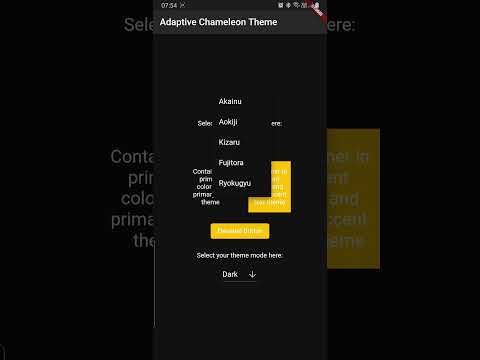
The example app can be found in the example folder. It implements a dropdown menu to select
between 5 themes. The app is the source for the video demo above.
Showcase
Using this package in a live app? Let me know and I will add it here.