सार्वजनिक जानकारी से बना चयन मार्गदर्शन। केवल संदर्भ हेतु।
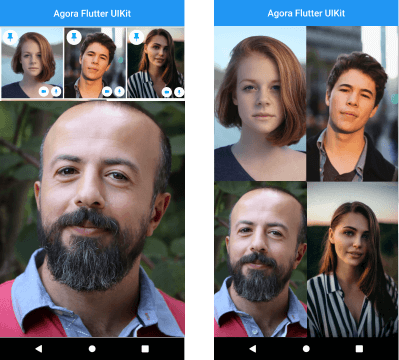
Agora UIKit एक Flutter प्लगइन है जो विकासकर्ताओं को अपने एप्लिकेशन में निरंतर वीडियो कॉलिंग और लाइव वीडियो स्ट्रीमिंग को न्यूनतम कोड के साथ तेजी से एकीकृत करने में सक्षम बनाता है। Agora.io द्वारा बनाया गया, यह वीडियो कॉन्फ्रेंसिंग के लिए पूर्व-निर्मित UI घटक प्रदान करता है, जिससे ऑडियो/वीडियो कॉल, स्क्रीन शेयरिंग और लाइव प्रसारण जैसी सुविधाओं को आसानी से लागू करना संभव होता है। इस पैकेज के माध्यम से जटिल रियल-टाइम संचार कार्यप्रवाह को सरल बनाया गया है, जिससे विकास समय में काफी कमी आती है। यह प्लेटफॉर्म के बीच स्केलेबल, कम लेटेंसी इंटरैक्शन का समर्थन करता है, जो निरंतर वीडियो कनेक्टिविटी की आवश्यकता वाले एप्लिकेशन के लिए आदर्श है।
उपयोग
वीडियो कॉन्फ्रेंसिंग ऐप्स
लाइव स्ट्रीमिंग प्लेटफॉर्म
वर्चुअल क्लासरूम
दूरस्थ स्वास्थ्य परामर्श
टीम सहयोग उपकरण
मुख्य विशेषताएँ
पूर्व-निर्मित वीडियो कॉल UI
केवल कुछ पंक्तियों के कोड के साथ आसान एकीकरण
लाइव स्ट्रीमिंग और ग्रुप कॉल का समर्थन
कम लेटेंसी रियल-टाइम संचार
कस्टमाइज़ेबल यूआई कंपोनेंट्स
इनके लिए उपयुक्त
त्वरित वीडियो एकीकरण की तलाश में विकासकर्ता
रियल-टाइम वीडियो फीचर्स की आवश्यकता वाले ऐप्स
संचार-भारी एप्लिकेशन बना रहे स्टार्टअप
शैक्षिक और टेलीहेल्थ प्लेटफॉर्म
विचार योग्य बातें
Agora खाता और API कुंजी की आवश्यकता होती है
अतिरिक्त कोडिंग के बिना सीमित कस्टमाइज़ेशन
एगोरा के बैकएंड इंफ्रास्ट्रक्चर पर निर्भर
पूर्ण कार्यक्षमता के लिए प्लेटफॉर्म-विशिष्ट सेटिंग्स की आवश्यकता हो सकती है
मूल README
संबंधित सोर्स रिपॉज़िटरी के मूल README का स्नैपशॉट। नवीनतम सामग्री के लिए रिपॉज़िटरी देखें।
[ARCHIVED] Agora VideoUIKit for Flutter
⚠️ This project is no longer maintained and has been archived.
Please note that this repository is now in a read-only state and will not receive any further updates or support.
We recommend migrating to the following alternatives:
Agora SDK: For developers seeking a customizable solution with full control over the user experience. Learn more
Agora App Builder: For those preferring a no-code approach to integrate real-time engagement features. Get started
Instantly integrate Agora video calling or video streaming into your Flutter application.
NOTE: The Flutter VideoUIKit( >version 1.1.0) uses the latest version of the Agora 4.x SDK. To know more about the changes and the new features in the 4.x SDK, kindly take a look at the docs.
Getting started
Roadmap
[ ] Add Usernames
[x] More Event Callbacks
[x] Add RTM SDK
[x] Screen Sharing (Currently in Beta)
[x] Layout for One to One Video Call
[ ] Layout for Voice Calls
[ ] Re-orderable list view (Floating Layout)
[ ] Cloud recording
[ ] Promoting an audience member to a broadcaster role.
Agora Video SDK requires camera and microphone permission to start video call.
Android
Open the AndroidManifest.xml file and add the required device permissions to the file.
<manifest>
...
<uses-permissionandroid:name="android.permission.READ_PHONE_STATE"/><uses-permissionandroid:name="android.permission.INTERNET" /><uses-permissionandroid:name="android.permission.RECORD_AUDIO" /><uses-permissionandroid:name="android.permission.CAMERA" /><uses-permissionandroid:name="android.permission.MODIFY_AUDIO_SETTINGS" /><uses-permissionandroid:name="android.permission.ACCESS_NETWORK_STATE" /><!-- The Agora SDK requires Bluetooth permissions in case users are using Bluetooth devices.--><uses-permissionandroid:name="android.permission.BLUETOOTH" />
...
</manifest>
iOS
Open info.plist and add:
Privacy - Microphone Usage Description, and add a note in the Value column.
Privacy - Camera Usage Description, and add a note in the Value column.
Your application can still run the voice call when it is switched to the background if the background mode is enabled. Select the app target in Xcode, click the Capabilities tab, enable Background Modes, and check Audio, AirPlay, and Picture in Picture.
The plan is to grow this library and have similar offerings across all supported platforms. There are already similar libraries for Android, iOS, React Native, and Web React, so be sure to check them out.