पैकेज, रिपॉज़िटरी और ऐप श्रेणियाँ खोजें

animated_theme_switcher कवर
पैकेज विवरणv2.0.10

animated_theme_switcher

Flutter एनिमेटेड थीम स्विचर, जो थीम स्विच के दौरान सुंदर लेनदेन बनाने में मदद करता है।

AndroidiOSWebmacOSWindowsLinux
30-दिन डाउनलोड
2.7 हज़ार
लाइक
533
Pub अंक
140

पैकेज इंस्टॉल करें

flutter pub add animated_theme_switcher

पैकेज अवलोकन

सार्वजनिक जानकारी से बना चयन मार्गदर्शन। केवल संदर्भ हेतु।

एक फ्लटर पैकेज जो हल्के और डार्क थीम के बीच स्विच करते समय चिकने, एनिमेटेड ट्रांज़िशन की अनुमति देता है। यह अचानक दृश्य शिफ्ट के बिना दृश्य रूप से आकर्षक थीम बदलाव प्रदान करके उपयोगकर्ता अनुभव को बढ़ाता है। न्यूनतम कोड के साथ शानदार थीम स्विचिंग के लिए डेवलपर्स के लिए डिज़ाइन किया गया है। पैकेज सभी मुख्य प्लेटफॉर्म के लिए समर्थन करता है, जिसमें एंड्रॉइड, आईओएस, वेब, मैकओएस, विंडोज और लिनक्स शामिल हैं। यह फ्लटर के थीम सिस्टम के साथ बिना किसी दिक्कत के एकीकृत होता है और एनिमेशन अवधि, कर्व और ट्रांज़िशन प्रभाव के कस्टमाइज़ेशन की अनुमति देता है।

उपयोग

  • मोबाइल ऐप्स में स्मूथ थीम ट्रांजिशन
  • एनिमेटेड थीम बदलाव के साथ UI/UX में सुधार
  • दृश्य शैली के साथ डार्क मोड का अनुकूलन
  • गतिशील थीम के साथ प्रतिक्रियाशील डिज़ाइन बनाना
  • धीरे-धीरे थीम शिफ्ट के माध्यम से पहुँच का समर्थन

मुख्य विशेषताएँ

  • एनिमेटेड थीम ट्रांज़िशन
  • कस्टमाइज़ किए गए एनीमेशन अवधि और वक्र
  • प्लेटफॉर्म के अनुकूलता
  • ThemeData के साथ आसान एकीकरण
  • हल्के और अंधेरे मोड दोनों का समर्थन करता है
  • आवश्यक न्यूनतम बॉयलरप्लेट कोड

इनके लिए उपयुक्त

  • चिकनी UI संक्रमण खोज रहे ऐप विकासकर्ता
  • डिज़ाइन-केंद्रित फ्लटर प्रोजेक्ट्स
  • अक्सर थीम बदलने वाले ऐप्स
  • उपयोगकर्ता अनुभव को प्राथमिकता देने वाले विकासकर्ता
  • प्लेटफॉर्म-वाइड थीम सुसंगतता की आवश्यकता वाले प्रोजेक्ट

विचार योग्य बातें

  • कम क्षमता वाले उपकरणों पर प्रदर्शन प्रभावित हो सकता है
  • एनिमेशन पैरामीटर्स को ध्यान से समायोजित करने की आवश्यकता है
  • केवल थीम-संबंधित एनिमेशन तक सीमित
  • थीम के अनुरूप राज्य परिवर्तन के लिए उपयुक्त नहीं
  • पूर्ण कार्यक्षमता के लिए फ्लटर के थीम सिस्टम पर निर्भर करता है

मूल README

संबंधित सोर्स रिपॉज़िटरी के मूल README का स्नैपशॉट। नवीनतम सामग्री के लिए रिपॉज़िटरी देखें।

animated_theme_switcher

Pub

Animated theme switcher.

This library starts from Peyman's stackoverflow question how-to-add-animation-for-theme-switching-in-flutter

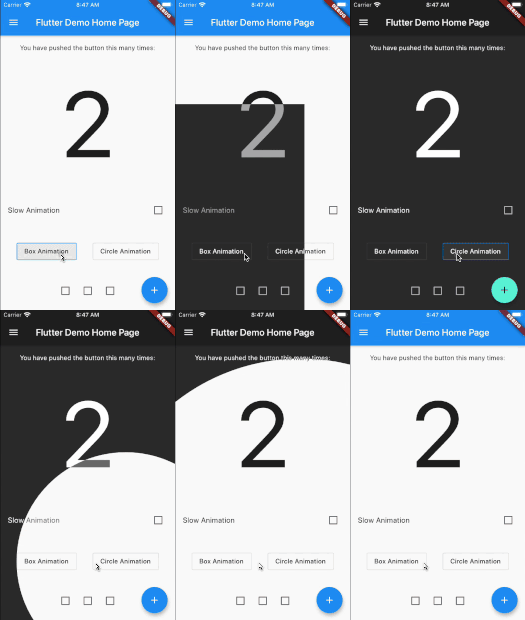
demo

Getting started

Add animated_theme_switcher: "^2.0.8" in your pubspec.yaml dependencies.

dependencies:
 animated_theme_switcher: "^2.0.8"
How To Use

Import the following package in your dart file

import 'package:animated_theme_switcher/animated_theme_switcher.dart';

Wrap MaterialApp with ThemeProvider widget, as it has shown in the following example:

  ThemeProvider(
      initTheme: initTheme,
      builder: (context, myTheme) {
        return MaterialApp(
          title: 'Flutter Demo',
          theme: myTheme,
          home: MyHomePage(),
        );
      }),
    ),

But if all you want is to provide a theme, use as follows:

  ThemeProvider(
      initTheme: initTheme,
      child: SomeCoolPage(),
    ),

Wrap the screen where you whant to make them switch with ThemeSwitchingArea widget, as it has shown in the following example:

    ThemeSwitchingArea(
      child: Builder(builder: (context) {
        return ...,
      },
    );

Wrap every switcher with ThemeSwitcher builder, and use ThemeSwitcher.of(context).changeTheme function to switch themes;


    ThemeData newTheme = ThemeData(
      primaryColor: Colors.amber
    );
    ...
    ThemeSwitcher(
      builder: (context) {
        ...
        onTap: () => ThemeSwitcher.of(context).changeTheme(
          theme: newTheme,
          isReversed: false // default: false 
        );
        ...
      },
    );

Alternatively you could use ThemeSwitcher.switcher() or ThemeSwitcher.withTheme().
Builders of this constructors already provide you ThemeSwitcher.
ThemeSwitcher.withTheme() also provides current theme:

    ThemeSwitcher.switcher(
      builder: (context, switcher) {
        ...
        onTap: () => switcher.changeTheme(
          theme: newTheme,
        );
        ...
      },
    );
    
    ThemeSwitcher.withTheme(
      builder: (context, switcher, theme) {
        ...
        onTap: () => switcher.changeTheme(
          theme: theme.brightness == Brightness.light
              ? darkTheme
              : lightTheme,
        );
        ...
      },
    );

Use optional named parameter clipper to pass the custom clippers.

    ...
    ThemeSwitcher(
      clipper: ThemeSwitcherBoxClipper(),
      builder: (context) {
        ...
      },
    );

Notes:

  1. This package is not intended to persist selected theme on the local device. But we added special example to show how to do it using shared_preferences package.

  2. Use the CanvasKit rendering engine to use it on web, more about it..

श्रेणियाँ

सोर्स रिपॉज़िटरी

इस पैकेज का उपयोग करने वाले प्रोजेक्ट