पैकेज, रिपॉज़िटरी और ऐप श्रेणियाँ खोजें

art_sweetalert कवर
पैकेज विवरणv0.0.5

art_sweetalert

एक सुंदर, अनुकूल, कस्टमाइज़ेबल, सुगम उपयोग वाला फ्लटर पॉपअप बॉक्स का एक उपयुक्त विकल्प। दोनों iOS और Android के लिए समर्थित।

AndroidiOSWebmacOSWindowsLinux
30-दिन डाउनलोड
361
लाइक
54
Pub अंक
140

पैकेज इंस्टॉल करें

flutter pub add art_sweetalert

पैकेज अवलोकन

सार्वजनिक जानकारी से बना चयन मार्गदर्शन। केवल संदर्भ हेतु।

ArtSweetAlert एक दृश्य रूप से आकर्षक, प्रतिक्रियाशील और उच्च रूप से कस्टमाइज़ करने योग्य डायलॉग पैकेज है, जो Flutter के लिए मानक पॉपअप डायलॉग के बजाय एक उपलब्ध और आसान उपयोग वाला विकल्प प्रदान करता है। यह Android, iOS, Web, macOS, Windows और Linux सहित सभी प्रमुख प्लेटफ़ॉर्म को समर्थन देता है, जिससे उपकरणों के बीच सुसंगत उपयोगकर्ता अनुभव सुनिश्चित होता है। चिकनी एनीमेशन और आधुनिक डिज़ाइन के साथ, यह ऐप की अंतरक्रिया को बढ़ाता है जबकि एक्सेसिबिलिटी मानकों को बनाए रखता है। शैली के साथ चेतावनियाँ, पुष्टिकरण और सूचनाएँ दिखाने के लिए आदर्श है।

उपयोग

  • चेतावनी संदेश प्रदर्शित करना
  • उपयोगकर्ता पुष्टि डायलॉग
  • लोडिंग सूचकांक
  • सफलता या त्रुटि अधिसूचनाएँ
  • कस्टमाइज़ किए गए पॉपअप

मुख्य विशेषताएँ

  • सुंदर एनीमेशन
  • क्रॉस-प्लेटफ़ॉर्म समर्थन
  • एक्सेसिबिलिटी संगत
  • उच्चतम अनुकूलन योग्य
  • आसान एकीकरण
  • प्रतिक्रियाशील डिज़ाइन

इनके लिए उपयुक्त

  • आधुनिक UI डायलॉग की आवश्यकता वाले ऐप्स
  • यूएक्स पर ध्यान केंद्रित विकासकर्मी
  • समांतर प्लेटफॉर्म व्यवहार के साथ आवश्यक प्रोजेक्ट
  • त्वरित कार्यान्वयन चाहने वाली टीमें
  • कई ऑपरेटिंग सिस्टम के लिए लक्षित ऐप्स

विचार योग्य बातें

  • जटिल उपयोग के मामलों के लिए अतिरिक्त स्टाइलिंग की आवश्यकता हो सकती है
  • डायलॉग-प्रकार के इंटरैक्शन तक सीमित
  • अत्यधिक उपयोग के साथ प्रदर्शन प्रभाव
  • बाहरी निर्भरताओं पर निर्भर करता है
  • गैर-डायलॉग UI घटकों के लिए अनुपयुक्त

मूल README

संबंधित सोर्स रिपॉज़िटरी के मूल README का स्नैपशॉट। नवीनतम सामग्री के लिए रिपॉज़िटरी देखें।

art_sweetalert

A beautiful, responsive, customizable, accessible replacement, easy use for flutter popup boxes. Both supported ios and android.

A success message

ArtSweetAlert.show(
  context: context,
  artDialogArgs: ArtDialogArgs(
    type: ArtSweetAlertType.success,
    title: "A success message!",
    text: "Show a success message with an icon"
  )
);

A message with title and text

ArtSweetAlert.show(
    context: context,
    artDialogArgs: ArtDialogArgs(
        type: ArtSweetAlertType.question,
        title: "A question?",
        text: "Show a question message with an icon"
    )
);

An error message

ArtSweetAlert.show(
    context: context,
    artDialogArgs: ArtDialogArgs(
        type: ArtSweetAlertType.danger,
        title: "Oops...",
        text: "There is a problem :("
    )
);

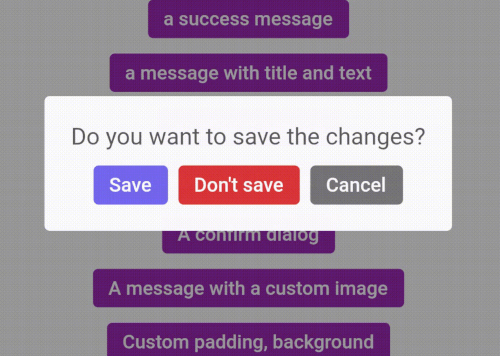
A dialog with three buttons

ArtDialogResponse response = await ArtSweetAlert.show(
  barrierDismissible: false,
  context: context,
  artDialogArgs: ArtDialogArgs(
    showCancelBtn: true,
    denyButtonText: "Don't save",
    title: "Do you want to save the changes?",
    confirmButtonText: "Save",
  )
);

if(response==null) {
  return;
}

if(response.isTapConfirmButton) {
  ArtSweetAlert.show(
    context: context,
    artDialogArgs: ArtDialogArgs(
      type: ArtSweetAlertType.success,
      title: "Saved!"
    )
  );
  return;
}

if(response.isTapDenyButton) {
  ArtSweetAlert.show(
    context: context,
    artDialogArgs: ArtDialogArgs(
      type: ArtSweetAlertType.info,
      title: "Changes are not saved!"
    )
  );
  return;
}

A confirm dialog

ArtDialogResponse response = await ArtSweetAlert.show(
  barrierDismissible: false,
  context: context,
  artDialogArgs: ArtDialogArgs(
    denyButtonText: "Cancel",
    title: "Are you sure?",
    text: "You won't be able to revert this!",
    confirmButtonText: "Yes, delete it",
    type: ArtSweetAlertType.warning
  )
);

if(response==null) {
  return;
}

if(response.isTapConfirmButton) {
  ArtSweetAlert.show(
      context: context,
      artDialogArgs: ArtDialogArgs(
          type: ArtSweetAlertType.success,
          title: "Deleted!"
      )
  );
  return;
}


A message with a custom image


ArtSweetAlert.show(
    context: context,
    artDialogArgs: ArtDialogArgs(
        title: "Sweet!",
        text: "Modal with a custom image.",
        customColumns: [
          Container(
            margin: EdgeInsets.only(
                bottom: 12.0
            ),
            child: Image.network(
              "https://unsplash.it/400/200",
            ),

          )
        ]
    )
);


Submit your Github username!

ArtDialogResponse response = await ArtSweetAlert.show(
    artDialogKey: _artDialogKey,
    context: context,
    artDialogArgs: ArtDialogArgs(
        title: "Submit your Github username!",
        customColumns: [
            Container(
                margin: EdgeInsets.only( bottom: 20.0 ),
                child: CupertinoTextField(
                    controller: _textController,
                ),
            )
        ],
        onConfirm: () async  {
            _artDialogKey.currentState.showLoader();
            var response = await http.get(Uri.parse('https://api.github.com/users/'+_textController.text));
            if(response.statusCode!=200) {
                _artDialogKey.currentState.hideLoader();
                _artDialogKey.currentState.showErrors(["Request failed: Error"]);
                return;
            }
            var body = response.body;
            var bodyJson = json.decode(body);
            _artDialogKey.currentState.hideLoader();
            _artDialogKey.currentState.closeDialog( data: { "image": bodyJson["avatar_url"] } );
        },
        onDispose: () {
            _artDialogKey = GlobalKey<ArtDialogState>();
        },
    )
);

if (response == null) { return; }

if (response.isTapConfirmButton) {
    ArtSweetAlert.show(
        context: context,
        artDialogArgs: ArtDialogArgs(
            customColumns: [
                Container(
                    margin: EdgeInsets.only(bottom: 12.0),
                    child: Image.network( response.data["image"]),
                )
            ]
        )
    );
    return;
}


श्रेणियाँ

सोर्स रिपॉज़िटरी

इस पैकेज का उपयोग करने वाले प्रोजेक्ट

अभी कोई डेटा उपलब्ध नहीं है।