सार्वजनिक जानकारी से बना चयन मार्गदर्शन। केवल संदर्भ हेतु।
Auto Store Translate एक Flutter/Dart पैकेज है जो Apple App Store और Google Play Store के लिए ऐप मेटाडेटा (जैसे शीर्षक, विवरण और कीवर्ड) के अनुवाद और पंजीकरण को स्वचालित करता है। यह अनुवाद सेवाओं के साथ एकीकरण करके बहुभाषी भाषाओं में मेटाडेटा अपडेट के प्रबंधन के माध्यम से स्थानीयकरण कार्यप्रवाह को सरल बनाता है। वैश्विक बाजारों में ऐप को प्रकाशित करने के लिए विकासकर्ताओं के लिए डिज़ाइन किया गया, यह हस्तक्षेप को कम करता है और बहुभाषी ऐप सूचियों में त्रुटियों को कम करता है। इस पैकेज का समर्थन Android, iOS, macOS, Windows और Linux प्लेटफॉर्म के लिए है।
उपयोग
एप्प स्टोर मेटाडेटा स्थानीयकरण को स्वचालित करना
अंतर्राष्ट्रीय ऐप लॉन्च को सुगम बनाना
हस्तकलित अनुवाद कार्य को कम करना
बहुभाषी मेटाडेटा अद्यतन करना
CI/CD पाइपलाइन्स के साथ एकीकरण
मुख्य विशेषताएँ
स्वचालित मेटाडेटा अनुवाद
App Store और Play Store के लिए समर्थन
बहुप्लेटफॉर्म संगतता
अनुवाद एपीआई के साथ एकीकरण
CI/CD-ready workflow
इनके लिए उपयुक्त
ग्लोबल ऐप प्रकाशक
बहुभाषी ऐप्स का प्रबंधन करने वाली डेव टीमें
CI/CD स्वचालन शौकीनों
स्थानीयकरण विशेषज्ञ
विचार योग्य बातें
अनुवाद सेवाओं के लिए API की की आवश्यक है
बाहरी अनुवाद प्रदाता की गुणवत्ता पर निर्भर
अनुवादित सामग्री के लिए हस्तलेखित समीक्षा की आवश्यकता हो सकती है
मेटाडेटा तक सीमित, एपी यूआई या सामग्री नहीं
प्लेटफॉर्म-विशिष्ट मेटाडेटा सीमाएँ
मूल README
संबंधित सोर्स रिपॉज़िटरी के मूल README का स्नैपशॉट। नवीनतम सामग्री के लिए रिपॉज़िटरी देखें।
Auto Store Translate
A library that automates translation/registration of metadata (title, description, etc.) in the App Store/Play Store.
playstore & appstore translated screenshot
How to Use?
1. Setup the config file
dependencies:auto_store_translate:
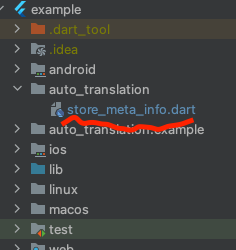
2. Create a dart file in your project and paste the code below.
create dart file in your project
project path > auto_translation > store_meta_info.dart please fill in all the information below.
import'package:auto_store_translate/auto_store_translate.dart';
/// write your store info here.MyStoreInfo myStoreInfo = MyStoreInfo(
// Play Store Title 30 characters or less
playStoreTitle: "",
// Play Store Short Description 80 characters or less
playStoreShortDescription: "",
// Play Store Long Description 4000 characters or less
playStoreFullDescription: '''
''',
// Play Store Translation Start Language
playStoreStartLanguage: "en",
// Play Store Title Translation
translatePlayStoreName: true,
// App Store Title 30 characters or less
appStoreTitle: "",
// App Store Subtitle 30 characters or less
appStoreSubTitle: "",
// App Store Description 4000 characters or less
appStringDescription: '''
''',
// App Store Keywords 100 characters or less , separated by commas, SEO
appStoreKeywords: "",
// App Store Translation Start Language
appStoreStartLanguage: "en",
// App Store Title Translation
translateAppStoreName: true,
// Whether to display the first letter of the App Store title in uppercase
onlyFirstCharacterUpperAppName: true,
// App Store Update Notes
releaseNote: "fix small bug :)",
// Home Page URL
homepageLink: "",
// Privacy Policy URL
policyPageLink: "",
);
main() {
AutoStoreTranslate.translateStoreInfo(
myStoreInfo: myStoreInfo,
// google translate api key
googleTranslateApiKey: "INPUT_YOUR_GOOGLE_TRANSLATE_API_KEY",
// true: translate only title, false: translate title + all
onlyAppNameTranslate: false);
}
It works even if you don't put the Google Translate api key, but you will soon reach the free limit.
For a guide to getting the Google Translate api key, please refer to this document.
3. Run the code above and wait for the translation to complete.
4. you will see the translated folder in the project.
5. Set up fastlane for each android/ios and register the information in the play store/app store.


 playstore & appstore translated screenshot