सार्वजनिक जानकारी से बना चयन मार्गदर्शन। केवल संदर्भ हेतु।
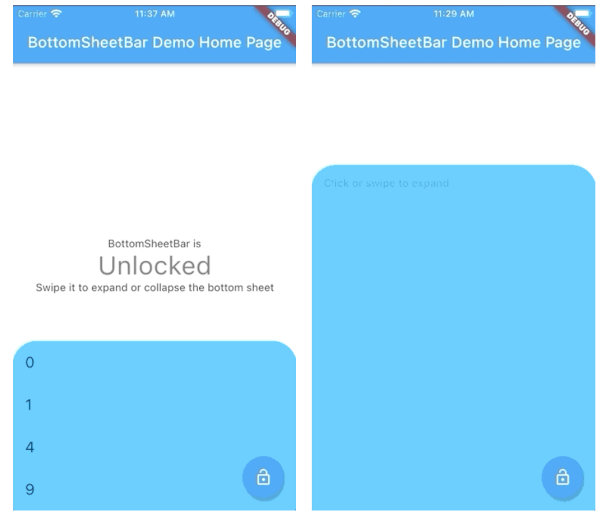
BottomSheetBar एक Flutter पैकेज है जो स्क्रीन के नीचे लगी एक टूलबार प्रदान करता है, जो पूर्ण बॉटम शीट में विस्तारित हो सकता है। यह संक्षिप्त और विस्तारित अवस्थाओं के बीच चिकनी संक्रमण प्रदान करता है, जो नेविगेशन, नियंत्रण या अतिरिक्त सामग्री तक पहुँच के लिए आदर्श है। विजेट कस्टमाइज़ेबल है और Android, iOS, Web, macOS, Windows और Linux जैसे सभी प्रमुख प्लेटफॉर्मों पर काम करता है। इंट्यूइटिव उपयोगकर्ता इंटरैक्शन के लिए डिज़ाइन किया गया है, यह UI फ्लो को बेहतर बनाता है बिना मुख्य इंटरफेस को भारी बनाए।
उपयोग
नियंत्रणों तक त्वरित पहुँच
संक्षिप्त मेनू के साथ नेविगेशन
एक्सपैंडेबल पैनल के साथ फॉर्म इनपुट
मीडिया प्लेबैक नियंत्रण
डायनामिक कंटेंट फ़िल्टरिंग
मुख्य विशेषताएँ
नीचे स्थित टूलबार
नीचे की शीट में स्मूथ विस्तार
क्रॉस-प्लेटफ़ॉर्म संगतता
कस्टमाइज़ेबल दिखावट
हस्तक्षेप द्वारा खोलना/बंद करना
प्रतिक्रियाशील डिज़ाइन
इनके लिए उपयुक्त
मोबाइल-प्रथम एप्लिकेशन
इंटरैक्टिव डैशबोर्ड
सामग्री-भारित इंटरफेस
उपयोगकर्ता-केंद्रित नेविगेशन
संकुचित टूलबार वाले ऐप्स
विचार योग्य बातें
अन्य बॉटम ओवरले इसके साथ टकराने की संभावना है
ध्यान से लेआउट योजना की आवश्यकता होती है
भारी सामग्री के साथ प्रदर्शन प्रभाव
डिफ़ॉल्ट स्थिति में सीमित कस्टमाइज़ेशन
पूर्ण-स्क्रीन मॉडल उपयोग के लिए अनुपयुक्त
मूल README
संबंधित सोर्स रिपॉज़िटरी के मूल README का स्नैपशॉट। नवीनतम सामग्री के लिए रिपॉज़िटरी देखें।
bottom_sheet_bar
A toolbar that aligns to the bottom of a widget and expands into a bottom sheet.
Widget body - The toolbar will be aligned to the bottom of the body Widget. Padding equal to height is added to the bottom of this widget.
Function(ScrollController) expandedBuilder - A function to build the widget displayed when the bottom sheet is expanded. If the expanded content is scrollable, pass the provided ScrollController to the scrollable widget.
Optional
Widget collapsed - A Widget to be displayed on the toolbar in its collapsed state
BottomSheetBarController controller - A controller can be used to listen to events, and expand and collapse the bottom sheet.
Color color - The background color of the toolbar and bottom sheet. Defaults to Colors.white
Color backdropColor - The backdrop color that overlays the [body] widget when the bottom sheet is expanded. Defaults to Colors.transparent (no backdrop)
BorderRadius borderRadius - Provide a border-radius to adjust the shape of the toolbar
BorderRadius borderRadiusExpanded - Provide a border-radius to adjust the shape of the bottom-sheet when expanded
List<BoxShadow> boxShadows - Provide shadow decoration to the bottom sheet
double height - The height of the collapsed toolbar. Default to kToolbarHeight (56.0)
bool isDismissable - If true, the bottom sheet can be dismissed by tapping elsewhere. Defaults to true
bool locked - If true, the bottom sheet cannot be opened or closed with a swipe gesture. Defaults to true
bool willPopScope - If true, the bottom sheet widget will be wrapped in a WillPopScope widget to handle back-gestures. Defaults to false
bool backButtonListener - If true, the bottom sheet widget will be wrapped in a BackButtonListener widget to handle back-gestures. Defaults to false
BottomSheetBarController
A controller used to expand or collapse the bottom sheet of a BottomSheetBar. Listeners can be added to respond to expand and collapse events. The expanded or collapsed state can also be determined through this controller.
bool get isCollapsed - Only returns [true] if the bottom sheet if fully collapsed
bool get isExpanded - Only returns [true] if the bottom sheet if fully expanded
TickerFuture collapse() - Collapse the bottom sheet built by BottomSheetBar.expandedBuilder
TickerFuture expand() - Expand the bottom sheet built by BottomSheetBar.expandedBuilder
void addListener(Function listener) - Adds a function to be called on every animation frame
void removeListener(Function listener) - Removes a previously added listener
void dispose() - Removes all previously added listeners
void attach(AnimationController animationController) - Used internally to assign the AnimationController created by BottomSheetBar to the controller. Unless you're using advanced animation techniques, you probably won't ever need to use this method.
Example
A quick demonstration can be found in the example directory. To run the example: