सार्वजनिक जानकारी से बना चयन मार्गदर्शन। केवल संदर्भ हेतु।
एक सरल और कस्टमाइज़ करने योग्य Flutter पैकेज जिसका उपयोग देश या उनके डायलिंग कोड का चयन करने के लिए किया जा सकता है, जिसमें आंतरिक खोज कार्यक्षमता शामिल है। देश चयन की आवश्यकता वाले फॉर्म में उपयोगकर्ता अनुभव को बढ़ाने के लिए डिज़ाइन किया गया, यह Android, iOS, Web, macOS, Windows और Linux जैसे बहुत सारे प्लेटफॉर्म को सपोर्ट करता है। चयनकर्ता हल्का है, आसानी से एकीकृत किया जा सकता है, और विकासकर्ताओं को अपने ऐप की आवश्यकताओं के अनुसार दिखावट और व्यवहार को कस्टमाइज़ करने की अनुमति देता है।
उपयोग
देश चयन के साथ उपयोगकर्ता पंजीकरण
देश कोड के साथ फ़ोन नंबर इनपुट
अंतर्राष्ट्रीय फॉर्म फ़ील्ड
यात्रा या शिपिंग पता संग्रह
देश के नाम में बहुभाषी समर्थन
मुख्य विशेषताएँ
खोज योग्य देश सूची
कस्टमाइज़ किए गए UI
डायलिंग कोड का समर्थन करता है
क्रॉस-प्लेटफॉर्म संगतता
हल्का और तेज़
Flutter फॉर्म के साथ आसान एकीकरण
इनके लिए उपयुक्त
देश चयन की आवश्यकता वाले मोबाइल और वेब ऐप्स
अंतरराष्ट्रीय उपयोगकर्ताओं के लक्ष्य वाले ऐप्स
फ़ोन नंबर इनपुट की आवश्यकता वाले फॉर्म
एक सरल देश चयनकर्ता खोज रहे विकासकर्ता
न्यूनतम निर्भरता वाले प्रोजेक्ट्स
विचार योग्य बातें
पूर्वनिर्धारित देश डेटा तक सीमित
कोई वास्तविक समय के देश अपडेट नहीं
कस्टमाइज़ेशन में अतिरिक्त स्टाइलिंग ज्ञान की आवश्यकता हो सकती है
ज्यामितीय स्थान विशेषताओं को शामिल नहीं करता है
नए देश जोड़ने के लिए हस्तचालित अद्यतन की आवश्यकता हो सकती है
मूल README
संबंधित सोर्स रिपॉज़िटरी के मूल README का स्नैपशॉट। नवीनतम सामग्री के लिए रिपॉज़िटरी देखें।
A Simple, Customizable Flutter Country picker for picking a Country or Dialing code with Search functionality.
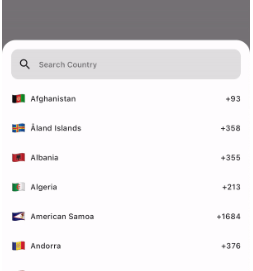
Preview
How to use
If you want to show the country picker bottom sheet, use:
If you want to show the country list as a UI component, use the CountryCodeSelector widget:
CountryCodeSelector(
   onCountryCodeTap: (CountryCode code) {
      /// Specify country code tap event
   },
    //Note: Cannot provide both onCountryCodeTap and codeBuilder, as onCountryCodeTap will not work if you have provided codeBuilder.
)
How to get a country code from the country alpha-2:,
CountryCode code = CountryCode.getCountryCodeByAlpha2(
    countryAlpha2Code:"IN", // its case-insensitive you can use both IN or in
);
You can use await Alpha2CountryCode,getCurrentCountryCode() to obtain the current alpha-2 code:
Note: Using await Alpha2CountryCode.getCurrentCountryCode() will return the current country alpha-2 code based on the IP location from the 'http://ip-api.com/json/' API.
You can also get the current country alpha-2 code based on the user's device region, using PlatformDispatcher locale.
CountryCode code = CountryCode.getCountryCodeByAlpha2(
    countryAlpha2Code: WidgetsBinding.instance.platformDispatcher.locale.countryCode,
    /// if you have context, use View.of(context).platformDispatcher.locale.countryCode
);
Note: WidgetsBinding and View.of(context) are provided by the Flutter SDK.
How to get a country code from the country dial code,
For customizations, we are providing the CustomizationBuilders class to customize each section.
customizationBuilders: CustomizationBuilders(
codeBuilder: (CountryCode code) {
// Return something to change the country list item UI.// Note: onCountryCodeTap will be overridden by codeBuilder in customizationBuilders.// If want to do some customization in default country code view, you can usereturnDefaultCountryCodeListItemView(
onCountryCodeTap: () {},
code: code,
locale: 'US', // To show a localized country name,
);
},
codeSeparatorBuilder: (BuildContext context, int index) {
// Return something to add a separator between country codes.returnconstSizedBox(); // Default
},
countryListBuilder: (List<CountryCode> codes, ScrollController? controller) {
// Return something to customize the country list
},
textFieldBuilder: (voidFunction(String)? filter) {
// Return the search text field widget//// If you want to do some customization in the default text field, you can usereturnDefaultCountryCodeFilterTextField(
filter: filter,
);
// Use filter(searchText); to update the country code list.
},
),
Bugs and Feedback
For bugs, feedback, questions and discussions please use the Github Issues.
Credits
Canopas Country Picker is owned and maintained by the Canopas team.
You can follow us on Twitter at @canopassoftware for project updates and releases.
We regularly upload blogs on new topics, which you can read here.