पैकेज, रिपॉज़िटरी और ऐप श्रेणियाँ खोजें

checkout_screen_ui कवर
पैकेज विवरणv1.1.0

checkout_screen_ui

एक पूर्व-निर्मित UI जो खरीदारी के स्क्रीन का प्रतिनिधित्व करता है जिसे अपनी अपनी तर्क के साथ जोड़ा जाना चाहिए।

AndroidiOSWebmacOSWindowsLinux
30-दिन डाउनलोड
118
लाइक
45
Pub अंक
160

पैकेज इंस्टॉल करें

flutter pub add checkout_screen_ui

पैकेज अवलोकन

सार्वजनिक जानकारी से बना चयन मार्गदर्शन। केवल संदर्भ हेतु।

एक पूर्व-निर्मित चेकआउट स्क्रीन UI कंपोनेंट जो कस्टम बिज़नेस लॉजिक के साथ निरंतर रूप से एकीकृत होने के लिए डिज़ाइन किया गया है। यह एक चमकदार, प्रतिक्रियाशील इंटरफ़ेस प्रदान करता है जो भुगतान विवरण जैसे कार्ड इनपुट, मुद्रा तिथि और CVV को एकत्र करने के लिए उपयोगी है, जो ई-कॉमर्स और सब्सक्रिप्शन ऐप्स के लिए उपयुक्त है। UI विभिन्न प्लेटफ़ॉर्मों पर अनुकूलित है, जिससे Android, iOS, Web, macOS, Windows और Linux पर स्थिर उपयोगकर्ता अनुभव सुनिश्चित होता है। Flutter की लचीलापन के ध्यान में रखते हुए बनाया गया, यह विकासकर्मियों को बैकएंड प्रोसेसिंग पर ध्यान केंद्रित करने की अनुमति देता है जबकि प्रोफेशनल चेकआउट फ्लो प्रदान करता है।

उपयोग

  • ई-कॉमर्स चेकआउट प्रवाह
  • सब्सक्रिप्शन भुगतान संग्रह
  • मोबाइल और वेब भुगतान इंटरफ़ेस
  • डिजिटल उत्पाद खरीदारी
  • बहुपлатफॉर्म भुगतान ऐप्स
  • मौजूदा Flutter परियोजनाओं में त्वरित एकीकरण

मुख्य विशेषताएँ

  • पूर्व-डिज़ाइन किया गया, प्रतिक्रियाशील चेकआउट लेआउट
  • क्रॉस-प्लेटफॉर्म संगतता
  • कस्टम लॉजिक के साथ आसान एकीकरण
  • कार्ड इनपुट सत्यापन सुझाव
  • स्पष्ट, आधुनिक डिज़ाइन भाषा
  • सभी प्रमुख प्लेटफॉर्म के लिए समर्थन

इनके लिए उपयुक्त

  • Flutter विकासकर्ता भुगतान विशेषताएं बना रहे हैं
  • त्वरित चेकआउट कार्यान्वयन की आवश्यकता वाली स्टार्टअप
  • स्थिर क्रॉस-प्लेटफॉर्म यूएक्स वाले ऐप्स
  • डिज़ाइन सुसंगतता को प्राथमिकता देने वाले विकासकर्ता
  • टीम यूआई डिज़ाइन के बजाय बैकएंड लॉजिक पर ध्यान केंद्रित कर रही है

विचार योग्य बातें

  • भुगतान प्रसंस्करण तर्क शामिल नहीं है
  • बैकएंड या भुगतान गेटवे के साथ एकीकरण की आवश्यकता होती है
  • ब्रांड-विशिष्ट स्टाइलिंग के लिए कस्टमाइज़ेशन की आवश्यकता हो सकती है
  • उत्पादन उपयोग के लिए अतिरिक्त सुरक्षा उपायों के बिना उद्देश्य नहीं है
  • UI तक सीमित; कोई निर्मित टोकनीकरण या PCI सुसंगतता नहीं

मूल README

संबंधित सोर्स रिपॉज़िटरी के मूल README का स्नैपशॉट। नवीनतम सामग्री के लिए रिपॉज़िटरी देखें।

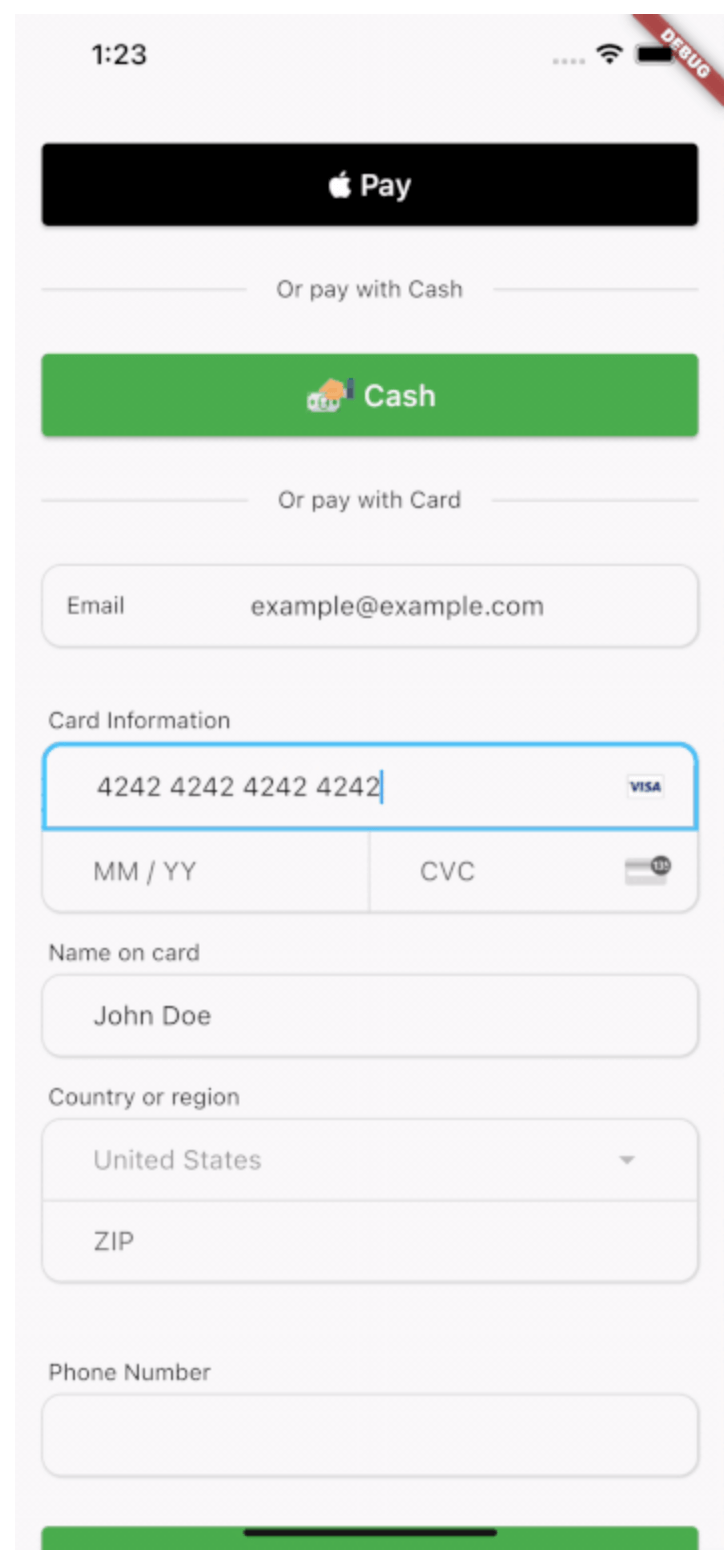
A Widget representing a checkout screen that accepts native and credit card payments along with a button for cash payments if your system has 'in person' payments. This is a UI only widget and is meant to compliment whatever third party transaction api system you are using.

Includes a CreditCardForm widget that allows you to utilize only the credit card form without the rest of the checkout screen if desired.

Security and PCI scope

This package is UI only. Card data exists in memory inside Flutter text controllers while the user types. Never log CardFormResults or raw PAN/CVC in production. In release and profile builds, CardFormResults.toString() is redacted; in debug builds it includes full values for developer convenience—still do not persist it or ship debug logs that contain card data. Send card data only to your PCI-compliant processor (for example Stripe) over TLS, following their integration guidance.

Installation

In the pubspec.yaml of your Flutter project, add:

dependencies:
  checkout_screen_ui: ^1.1.0

Import the barrel (recommended) or specific libraries:

import 'package:checkout_screen_ui/checkout_screen_ui.dart';
// or
import 'package:checkout_screen_ui/checkout_ui.dart';

Usage

The main entry point is CheckoutPage with a CheckoutData object:

final List<PriceItem> priceItems = [
  PriceItem(name: 'Product A', quantity: 1, itemCostCents: 5200),
  PriceItem(name: 'Product B', quantity: 2, itemCostCents: 8599),
];

CheckoutPage(
  data: CheckoutData(
    priceItems: priceItems,
    payToName: 'Vendor Name',
    taxRate: 0.07,
    displayNativePay: true,
    isApple: Platform.isIOS,
    onNativePay: (result) { /* ... */ },
    onCashPay: (result) { /* ... */ },
    onCardPay: (card, result) {
      // card: CardFormResults — never log in production
      // result: CheckOutResult — items, subtotal, tax, total in cents
    },
    onBack: () => Navigator.of(context).pop(),
  ),
  footer: CheckoutPageFooter(
    termsLink: 'https://example.com/terms',
    privacyLink: 'https://example.com/privacy',
  ),
);

Optional theming:

MaterialApp(
  theme: ThemeData(
    extensions: const [
      CheckoutTheme(
        chargeAmountColor: Colors.teal,
        nativePayBackgroundColor: Colors.black,
        nativePayForegroundColor: Colors.white,
      ),
    ],
  ),
  // ...
);

Additional information

If a feature is missing (the Dart language is always evolving) or you'd like an easier or better way to do something, consider opening a pull request. You can always file an issue, but generally speaking feature requests will be on a best-effort basis.

श्रेणियाँ

निर्भरताएँ

निर्भरता सूची 3 आइटम

  • text_form_field_wrapper^1.0.0
  • url_launcher^6.3.2
  • url_launcher_web^2.4.2

सोर्स रिपॉज़िटरी

इस पैकेज का उपयोग करने वाले प्रोजेक्ट

अभी कोई डेटा उपलब्ध नहीं है।