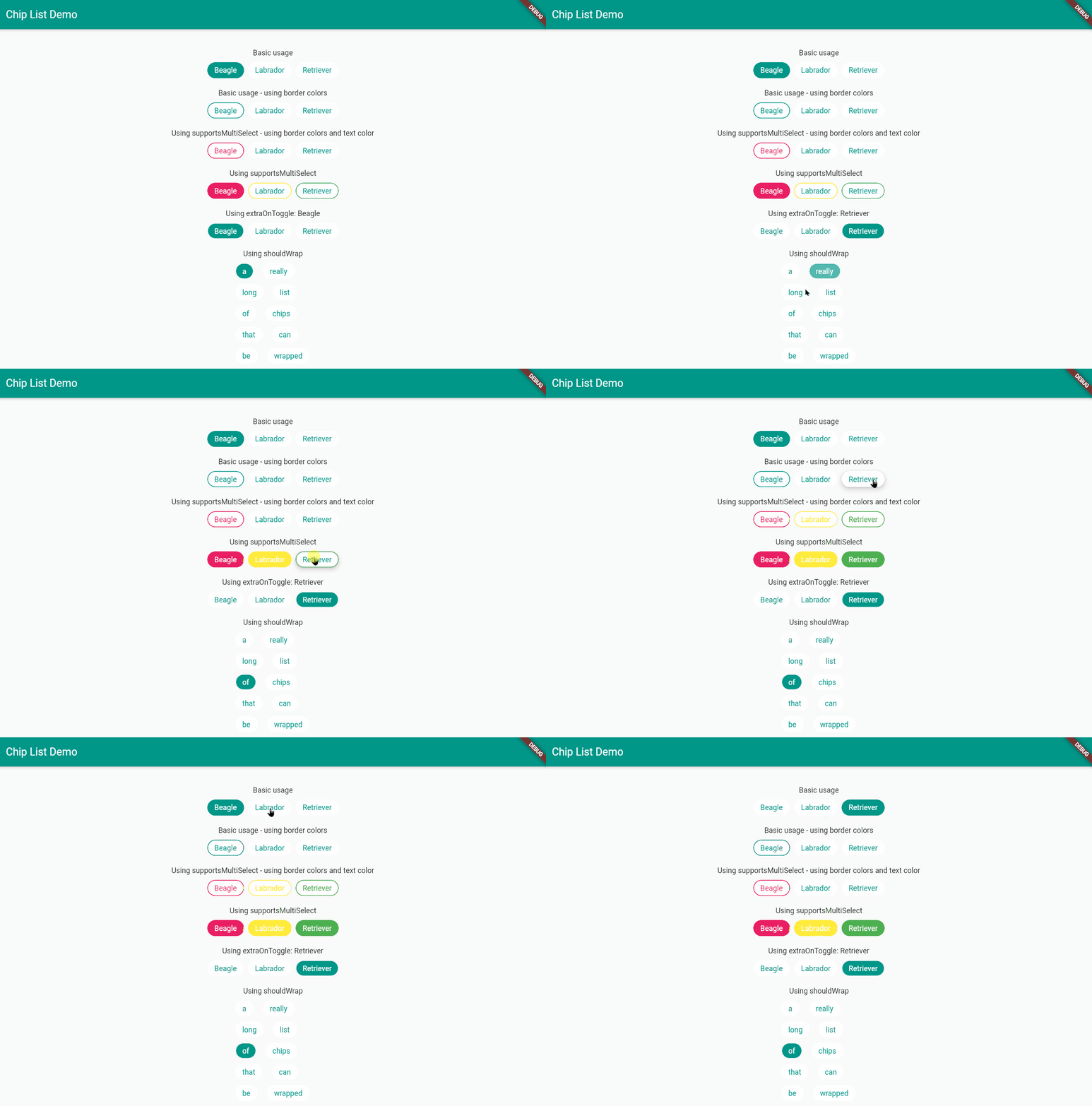
सार्वजनिक जानकारी से बना चयन मार्गदर्शन। केवल संदर्भ हेतु।
chip_list पैकेज फ्लटर में कस्टमाइज़ेबल ChoiceChip विजेट्स की सूचियों के निर्माण को सरल बनाता है। यह अंतरक्रियाशील, चयनयोग्य चिप समूह बनाने के लिए एक सुविधाजनक API प्रदान करता है, जिसमें न्यूनतम बॉइलरप्लेट कोड की आवश्यकता होती है। डेवलपर्स आसानी से चिप व्यवहार को स्टाइल और प्रबंधित कर सकते हैं, जिससे यह फ़िल्टरिंग, टैगिंग या चयन इंटरफ़ेस के लिए आदर्श बन जाता है। यह पैकेज सभी प्रमुख प्लेटफॉर्मों को समर्थन देता है, जिसमें Android, iOS, Web, macOS, Windows और Linux शामिल हैं, जिससे क्रॉस-प्लेटफॉर्म अनुभव सुनिश्चित होता है। इसकी लचीलापन और उपयोग में आसानी पर ध्यान केंद्रित करने के कारण, chip_list कस्टमाइज़ेशन विकल्पों को नष्ट किए बिना UI विकास को बढ़ावा देता है।
उपयोग
फॉर्म में फ़िल्टरिंग विकल्प
टैगिंग प्रणाली
उपयोगकर्ता प्राथमिकता चयन
इंटरैक्टिव श्रेणी नेविगेशन
गतिशील चयन इनपुट
बहुचयन इंटरफ़ेस
मुख्य विशेषताएँ
ChoiceChip के साथ आसान एकीकरण
उच्च रूप से कस्टमाइज़ किया गया दिखावट
क्रॉस-प्लेटफ़ॉर्म समर्थन
आवश्यक सेटअप न्यूनतम
बिल्ट-इन चयन प्रबंधन
प्रतिक्रियाशील डिज़ाइन संगतता
इनके लिए उपयुक्त
फ्लटर विकासकर्ता फॉर्म इंटरफेस बना रहे हैं
गतिशील चिप-आधारित चयन की आवश्यकता वाले ऐप
पुनर्उपयोगी चिप घटकों की तलाश कर रहे डिज़ाइनर
बहु-चयन क्षमता की आवश्यकता वाले प्रोजेक्ट
त्वरित UI विकास पर ध्यान केंद्रित टीमें
विचार योग्य बातें
ChoiceChip विजेट के बारे में समझने की आवश्यकता है
जटिल लेआउट के लिए अतिरिक्त स्टाइलिंग की आवश्यकता हो सकती है
चिप-आधारित इंटरैक्शन तक सीमित
अन्योपयोगी अनिर्देशित सामग्री के लिए
लंबी सूचियों के लिए स्क्रॉल करने योग्य कंटेनर के भीतर सबसे अच्छा है
मूल README
संबंधित सोर्स रिपॉज़िटरी के मूल README का स्नैपशॉट। नवीनतम सामग्री के लिए रिपॉज़िटरी देखें।
Features
Creates a list of ChoiceChips. Also allows for selecting multiple chips at once and allows use in sync with other widgets. This package is intended to solve all your woes with regards to Chips.
Well, maybe not all, but if you would like to request a feature, fire away !
See /example/main.dart for an example on how to use the state of the list for updating the state of other widgets, and other fancy properties.
If you want to wrap the ChipList, then set shouldWrap to true.
You can then use all the properties of a typical Wrap widget to further customize appearance.
Setting individual colors for active/inactive background and border color and text color
If you want to have full control of the parameters specified above over each and every single chip, you can do so by setting the color within the activeBgColorList, inactiveBgColorList,
activeTextColorList and inactiveTextColorList respectively, wherever appropriate.
Use a single color if you want it to be used for all chips. Otherwise, the length of the list must be equal to the length of listOfChipNames.
Note that if you don't, then the package has defaults as specified in the documentation. (You can hover over the property in your IDE to see more 🙂).
Spacing in between each Chip
Whether you choose to let the axis to Axis.vertical or Axis.horizontal, you can set the spacing by tweaking widgetSpacing.
New attributes added to improve customisation if you set useMaterial3 = true
showCheckmark lets you enable or disable checkmarks in chips
checkmarkColor lets you set the color of the checkmark if it's enabled
⚠ Warning !!!!!!!!!
The flutter_lints package might suggest that you make listOfChipIndicesCurrentlySeclected a constant.
PLEASE DO NOT DO SO.
The widget will not respond to user interaction, seemingly without any reason.
The whole point of the API being designed like this is so that you have direct access to the currently selected indices, without the need for any state management and such.
That list will be updated as the user interacts with the widget. It is intended to be used in case you would like to incorporate the contents for any logic.
For an example, look at the section title "using extraOnToggle" in the provided example. The index is used to display the currently selected indice's label elsewhere in the UI.