पैकेज, रिपॉज़िटरी और ऐप श्रेणियाँ खोजें

circular_bottom_navigation कवर
पैकेज विवरणv2.4.0

circular_bottom_navigation

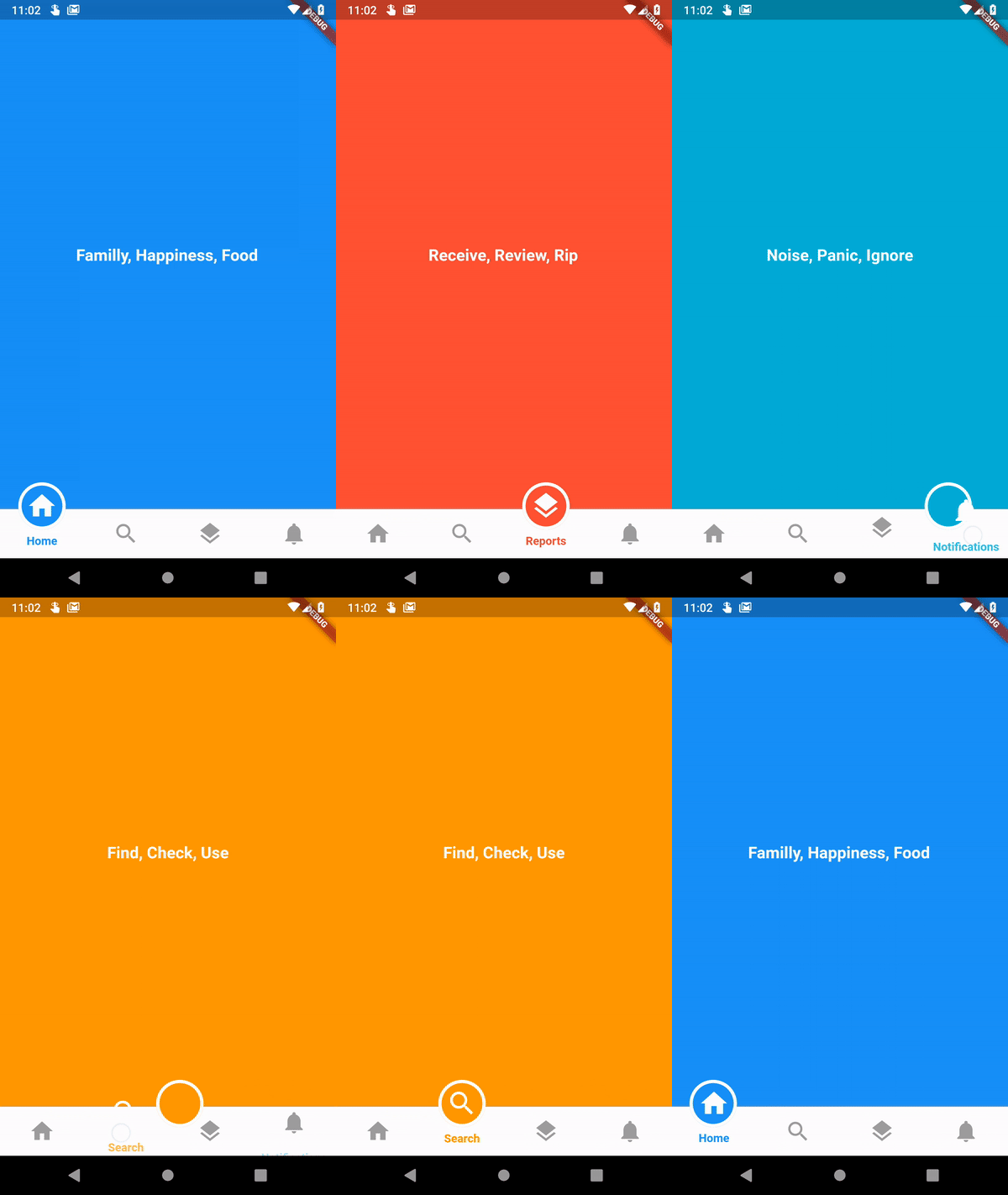
सर्कुलर बॉटम नेविगेशन (या शायद टैब बार)

AndroidiOSWebmacOSWindowsLinux
30-दिन डाउनलोड
592
लाइक
223
Pub अंक
130

पैकेज इंस्टॉल करें

flutter pub add circular_bottom_navigation

पैकेज अवलोकन

सार्वजनिक जानकारी से बना चयन मार्गदर्शन। केवल संदर्भ हेतु।

Flutter के लिए एक गोल बॉटम नेविगेशन विजेट जो पारंपरिक टैब बार के आधुनिक, दृश्य रूप से आकर्षक विकल्प प्रदान करता है। इसमें चिकनी एनीमेशन और कस्टमाइज़ किए गए आइकॉन, लेबल और रंगों का समर्थन है। Android, iOS, Web, macOS, Windows और Linux जैसे विभिन्न प्लेटफॉर्मों पर उपयोग के लिए डिज़ाइन किया गया है, जिससे एक सुस्पष्ट उपयोगकर्ता अनुभव मिलता है। पैकेज हल्का है और आसानी से एकीकृत किया जा सकता है, जिससे यह कार्यक्षमता के बिना एक अद्वितीय नेविगेशन लेआउट की खोज करने वाले ऐप्स के लिए आदर्श है।

उपयोग

  • मोबाइल ऐप नेविगेशन
  • वेब एप्लिकेशन इंटरफ़ेस
  • क्रॉस-प्लेटफॉर्म UI डिज़ाइन
  • आधुनिक ऐप सौंदर्यशास्त्र
  • कस्टम टैब बार कार्यान्वयन

मुख्य विशेषताएँ

  • सर्कुलर लेआउट डिज़ाइन
  • स्मूथ एनिमेशन संक्रमण
  • कस्टमाइज़ेबल आइकॉन और लेबल
  • बहु-प्लेटफॉर्म समर्थन
  • Flutter के साथ आसान एकीकरण
  • कॉन्फ़िगरेबल रंग योजनाएं

इनके लिए उपयुक्त

  • अद्वितीय नेविगेशन पैटर्न खोज रहे डेवलपर्स
  • सीमित स्क्रीन स्थान वाले ऐप्स
  • डिज़ाइन-केंद्रित एप्लिकेशन
  • क्रॉस-प्लेटफॉर्म प्रोजेक्ट्स
  • UI/UX प्रयोग

विचार योग्य बातें

  • प्रवेश के लिए अतिरिक्त स्टाइलिंग की आवश्यकता हो सकती है
  • सीमित वृत्ताकार लेआउट (रैखिक नहीं)
  • कस्टमाइजेशन के लिए संभावित सीखने का ढलान
  • जटिल नेविगेशन हायरार्की के लिए उपयुक्त नहीं
  • अपडेट्स के लिए बाहरी GitHub भंडार पर निर्भर करता है

मूल README

संबंधित सोर्स रिपॉज़िटरी के मूल README का स्नैपशॉट। नवीनतम सामग्री के लिए रिपॉज़िटरी देखें।

Circular Bottom Navigation (or maybe a tab bar).

Awesome Flutter

pub package APK

This is implementation of an artwork in Uplabs

Let's get started

1 - Install and import

In your Dart code, you can use:
import 'package:circular_bottom_navigation/circular_bottom_navigation.dart';
import 'package:circular_bottom_navigation/tab_item.dart';

2 - CheatSheet

3 - Use it like a charm

Make your TabItems
List<TabItem> tabItems = List.of([
    TabItem(Icons.home, "Home", Colors.blue, labelStyle: TextStyle(fontWeight: FontWeight.normal)),
    TabItem(Icons.search, "Search", Colors.orange, labelStyle: TextStyle(color: Colors.red, fontWeight: FontWeight.bold)),
    TabItem(Icons.layers, "Reports", Colors.red, circleStrokeColor: Colors.black),
    TabItem(Icons.notifications, "Notifications", Colors.cyan),
  ]);
Use this widget everywhere you want
CircularBottomNavigation(
      tabItems,
      selectedCallback: (int selectedPos) {
        print("clicked on $selectedPos");
      },
    )

CircularBottomNavigation supports RTL designs, If you wrap your widget in a Directionality widget and set the textDirection property you can customize the direction:

MaterialApp(
  title: 'Circular Bottom Navigation Demo',
  theme: ThemeData(
    primarySwatch: Colors.blue,
  ),
  home: Directionality(
    // use this property to change direction in whole app
    // CircularBottomNavigation will act accordingly
    textDirection: TextDirection.rtl,
    child: MyHomePage(title: 'circular_bottom_navigation'),
  ),
);
How to use CircularBottomNavigationController

With this controller you can read the current tab position, and set a tab position on widget (without needing to rebuild the tree) with the widget built in animation.

Just create a new instance of controller

CircularBottomNavigationController _navigationController =
new CircularBottomNavigationController(selectedPos);

Then pass it in your widget

CircularBottomNavigation(
      tabItems,
      controller: _navigationController,
    );

Now you can write (set new position with animation) and read value from it everywhere you want

// Write a new value
_navigationController.value = 0;

// Read the latest value
int latest = _navigationController.value;

श्रेणियाँ

सोर्स रिपॉज़िटरी

इस पैकेज का उपयोग करने वाले प्रोजेक्ट

अभी कोई डेटा उपलब्ध नहीं है।