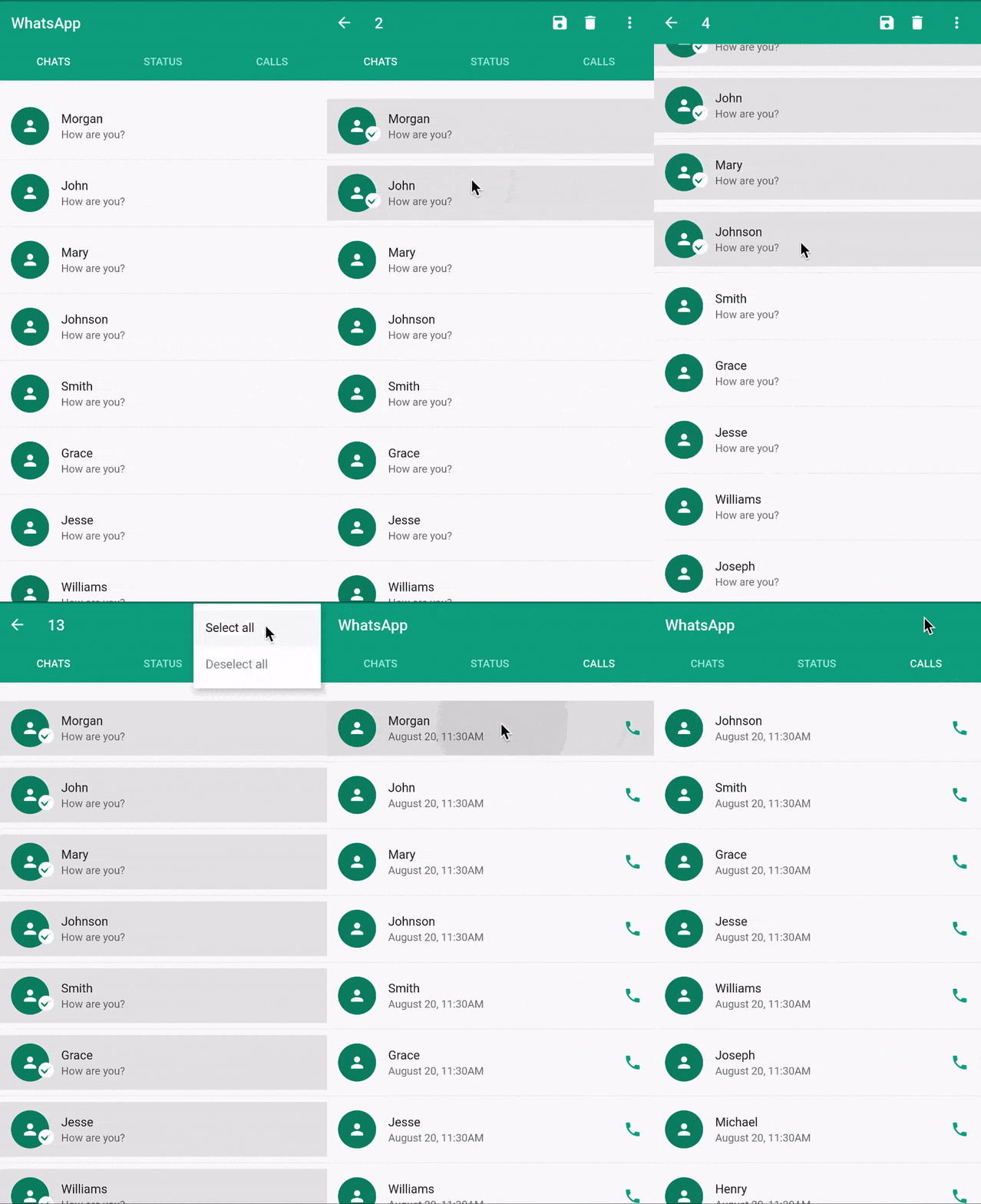
सार्वजनिक जानकारी से बना चयन मार्गदर्शन। केवल संदर्भ हेतु।
contextualactionbar पैकेज फ्लटर में संदर्भ क्रिया बार (CAB) को लागू करने के लिए एक विकल्प प्रदान करता है, जो चयनित आइटम के समय संदर्भ-विशिष्ट क्रियाओं को प्रदर्शित करने के लिए मानक ऐप बार को बदलता है। यह एंड्रॉइड, आईओएस, वेब, मैकओएस, विंडोज और लिनक्स जैसे कई प्लेटफॉर्मों के लिए डिज़ाइन किया गया है, और चयन मोड में लक्षित नियंत्रण प्रदान करके उपयोगकर्ता अंतरक्रिया को बढ़ाता है। यह पैकेज मौजूदा फ्लटर ऐप्स के साथ बिना किसी दिक्कत के एकीकृत होता है और कस्टम स्टाइलिंग और व्यवहार का समर्थन करता है। यह विशेष रूप से ऐसे सूची या ग्रिड इंटरफेस में उपयोगी है जहां उपयोगकर्ताओं को बैच ऑपरेशन करने की आवश्यकता होती है।
उपयोग
सूचियों में बैच आइटम चयन
ग्रिड में संदर्भ-संवेदनशील कार्रवाईएं
मोबाइल ऐप में सुधारित उपयोगकर्ता अंतरक्रिया
कस्टमाइज़ करने योग्य क्रिया ओवरले
क्रॉस-प्लेटफॉर्म कार्यान्वयन
चयन मोड यूआई सुधार
मुख्य विशेषताएँ
ऐप बार का डायनामिक प्रतिस्थापन
बहुत अधिक प्लेटफॉर्म के लिए समर्थन
कस्टमाइज़ करने योग्य क्रिया बटन
चयन मोड के साथ एकीकरण
हल्का और आसानी से कार्यान्वित करने योग्य
सभी उपकरणों के लिए प्रतिक्रियाशील डिज़ाइन
इनके लिए उपयुक्त
इंटरैक्टिव सूची इंटरफेस बना रहे डेवलपर्स
बैच ऑपरेशन की आवश्यकता वाले ऐप्स
क्रॉस-प्लेटफॉर्म मोबाइल एप्लिकेशन
चयन-आधारित कार्यप्रवाह वाले UI
प्लेटफॉर्म-अनुकूल CAB समाधान खोज रहे टीमें
संदर्भ क्रिया समर्थन की आवश्यकता वाले फ्लटर प्रोजेक्ट्स
विचार योग्य बातें
चयन अवस्था के हस्तक्षेप से प्रबंधित करने की आवश्यकता है
सीमित आंतरिक एनीमेशन
सुसंगतता के लिए अतिरिक्त स्टाइलिंग की आवश्यकता हो सकती है
स्क्रॉलेबल के साथ सही एकीकरण पर निर्भर करता है
सरल स्थिर UI के लिए उपयुक्त नहीं
राज्य प्रबंधन पैटर्न के साथ सबसे अच्छा उपयोग किया जाता है
मूल README
संबंधित सोर्स रिपॉज़िटरी के मूल README का स्नैपशॉट। नवीनतम सामग्री के लिए रिपॉज़िटरी देखें।
Flutter contextual action bar(CAB)
CAB & Flutter
CAB is a top app bar that replace the application app bar to provide contextual actions to selected items. Check the material implementation and requirement here
Flutter does not natively support CAB yet. see issue
Until CAB is natively supported, this package should provide you with an elegant way to implement the contextual action bar in flutter.
How it works
ContextualScaffold
ContextualAppBar
ContextualAction
ContextualActionWidget
ContextualScaffold<?>
The ContextualScaffold<?> is similar to the normal material Scaffold except that it also takes
a required contextualAppBar.
You can provide multiple ContextualScaffold as needed
ContextualAppBar<?>
The ContextualAppBar<?> is similar to the normal material Appbar but takes a counterBuilder instead of title and also a contextualActions instead of actions.
You can use the ContextualActionWidget anywhere in the ContextualActionScaffold body to notify ContextualActionScaffold that an item have been selected in order to show the ContextualAppBar.
Note: It is important that the child widget does not handle onLongPress.
A closer look at ContextualActionWidget<?>
The ContextualActionWidget<?> takes other optional parameters like
selectedColor
selectedWidget
unselectedWidget
The selectedColor is the color of the background for the selected item, it defaults to the splash color, if not provided. The selectedColor works well with ListTile.
selectedWidget and unselectedWidget are stacked on top of the provided child widget. By default, they are positioned at the center of the provided child widget.
Since They are stacked, you can use Row, Align, Positioned Widget or any other combination of widgets to position them where desired.
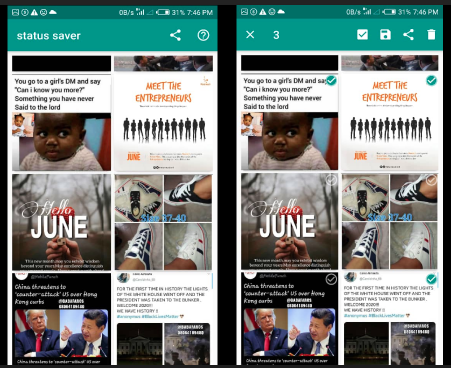
The selectedWidget is shown when the ActionMode is enabled and the item is selected, while the unselectedWidget is shown when ActionMode is enabled and the item is not selected. See example(status_saver) image below with both the selectedWidget and unselectedWidget aligned to the top-right corner.
ActionMode
This contextual action bar workaround does not support zero item in the ActionMode.
Use the ActionMode.addItem<?> to add an item to the selected items. If this is the first selection, the ActionMode is will be enabled.
Use the ActionMode.addItems<?> to add a list of items.
Use the ActionMode.disable<?> to disable and deselect all selected items.
Use the ActionMode.enabledStream<?> to emit true or false depending on if the Action mode is enabled or disabled respectively.
Note: In most cases, you won't need to use ActionMode.disable<?> because the package already do that for you where needed.
Study complete examples at example page.
If you like the project, don't forget to star ⭐️